
TL;DR
Smart home devices connect household equipment to apps, networks, or voice assistants so you can control it remotely or automate everyday tasks. Start with one clear need, check device and platform compatibility, and review privacy, connectivity, and subscription costs before you buy. Simple automations can improve comfort and awareness, but energy savings and reliability depend on your home and setup.
A hallway light that switches on before you reach the stairs sounds like a small luxury—until your hands are full of groceries. Smart home devices connect lights, thermostats, locks, cameras, plugs, and other household equipment to apps, networks, or voice assistants. They let you control some tasks from your phone and automate others around schedules or conditions.

Get everyday essentials delivered free with Prime
- Fast, free delivery on millions of items
- Prime Video, Amazon Music and more included
- Member-only deals all year
The useful question is not how many devices you can connect. It is which daily annoyance you want to fix. A smart plug might turn off a lamp at bedtime, while a leak sensor could send an alert before a slow drip ruins a cabinet. This guide explains what these devices do, how compatibility and connectivity shape the experience, and what to check before bringing one home.
You will also see where the tradeoffs sit: a camera may need a paid plan for saved video, a routine may rely on internet access, and an energy display cannot promise lower bills by itself. Think of a smart home as a set of helpful switches and reminders. You get better results when each one has a job you can describe in a sentence.
Choose a first device that fixes one specific routine or household problem.
Check the exact model, platform, wireless connection, and subscription requirements before buying.
Treat Matter as a compatibility aid, not a promise that every feature will work in every app.
Start with simple automations and test them in the room and schedule where you will use them.
Secure accounts, review recording settings, and check how devices behave when internet access fails.
What smart home devices do for you every day
Smart home devices connect household products to an app, network, or voice assistant so you can monitor, control, or automate them. The connection changes what you can do with a product: a regular bulb needs someone at its switch, while a connected bulb can respond to a phone command or a schedule. That convenience depends on the device being powered, reachable on the network, and supported by the app or platform you use.
Think of the system like a small household relay team: a sensor spots a change, a rule passes the message along, and another device acts. At 7 a.m., a motion sensor might notice you entering the kitchen and turn on a soft light. Each handoff is a point where setup matters: the sensor needs a useful position, the bulb must be compatible with the rule, and the platform must be available to carry it out. If one part is unreliable, the whole automation can feel less dependable than an ordinary switch.
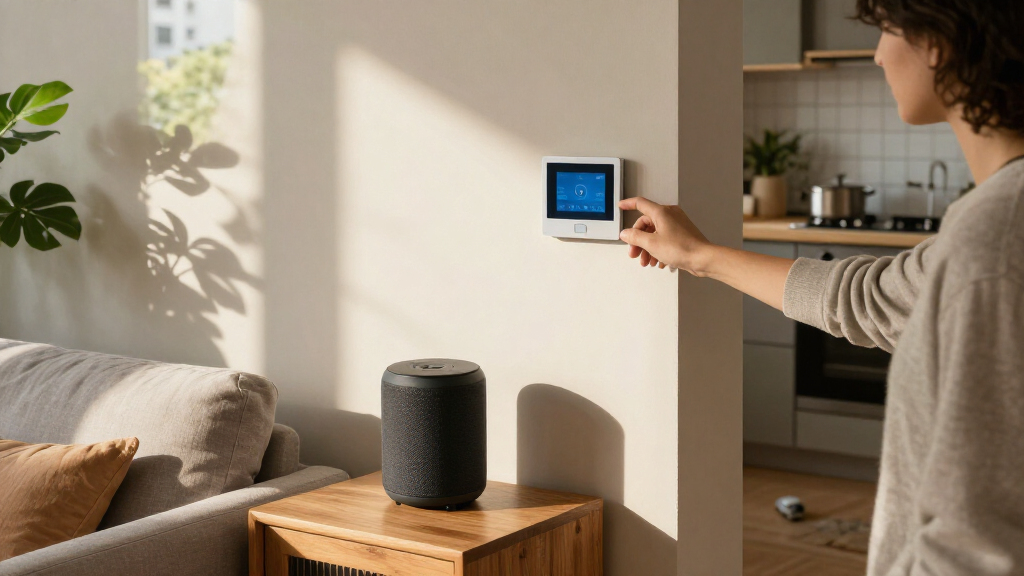
Devices fall into familiar groups, but their practical value differs. Lights and plugs offer simple control; thermostats can follow schedules; locks and cameras provide remote access or awareness; and sensors report events such as motion or water. Connected appliances may add status checks or remote controls. A smart speaker or display can make shared control easier, while an app may be simpler for one person or a small setup. More devices can add convenience, but they also mean more accounts, settings, and connections to maintain.
Imagine leaving home in a hurry. A routine could turn off selected lights and lower the thermostat when you tap an “away” control. This works best when the actions are limited to things you want changed every time. If someone stays home, or a device is not responding, a broad routine may be inconvenient. Treat automation as a shortcut for repeatable tasks, and keep a way to adjust or override it. Start by naming the task you want to make easier, then choose a device that can perform it reliably in your home.
Popular right now

Dyson V8 Cyclone Cordless Vacuum
Apple AirPods Pro

Shark Rocket Pet Plus Corded Stick Vacuum, Bordeaux/Silver, HV322
As an affiliate, we earn on qualifying purchases.
Choose your first device by starting with one daily annoyance
The best first smart home device solves a small, repeated problem you already notice. A smart plug suits a lamp you often forget to switch off, a smart bulb helps when you want hands-free lighting, and a leak sensor can watch an out-of-sight spot beneath a sink. Picking the problem first keeps the purchase tied to a real benefit; otherwise, it is easy to pay for features that add setup and upkeep without changing your routine.
Try this simple buying sequence before you add anything to your cart:
- Name the task. Write down what you want to control or learn, such as “turn the entry light on at sunset” or “alert me if water reaches the basement floor.” A specific task makes it easier to judge whether a product’s features solve the problem.
- Check the product’s requirements. Look for the needed app, wireless connection, hub, voice assistant, and any subscription for the feature you want. These requirements affect both the initial cost and the number of services you will need to keep using it.
- Test one device. Install it, try manual control, and see whether the schedule or alert works reliably in the actual room. A product that works near the router but fails in its intended location may need a different connection or may not suit your home.
- Add a second device only when it solves a related task. A motion sensor may pair naturally with an entry light; another gadget with no clear job may just add another app.
Say your bedside lamp stays on after you fall asleep. A smart plug could turn it off at 11 p.m., but first check that the lamp has a physical switch that remains on; the plug cannot help if you switch the lamp itself off. Also check that the plug is rated for the appliance you plan to control. If you rent, plug-in and battery-powered options often avoid wiring changes, while a wired thermostat or lock may need permission or professional installation. The easiest device to install is not automatically the right one if it cannot safely or consistently do the intended job.
A small start makes troubleshooting easier because you can see which connection or setting is responsible if something fails. It also reveals the real cost of ownership: whether the app is convenient, whether the device stays online, and whether a paid feature is necessary. Once it behaves as expected for a week, you can decide whether another device would make the routine more useful.
Check compatibility before you mix brands and platforms
Smart home devices work together only when their connection method, platform, and required features line up. Compatibility is more than whether a product appears in an app: a voice assistant might turn a bulb on and off but not expose its color controls or include it in a particular routine. That difference matters because the feature you expect to use every day may be the one that is missing. Check the exact model’s compatibility details before you buy, especially if you already use a smart speaker or home platform.
Matter is an industry standard designed to help compatible devices from different manufacturers work across supported platforms. It can reduce the risk of being tied to one brand and make it easier to choose a device that household members can control through their preferred platform. But Matter is a foundation for communication, not a guarantee of identical features: apps and devices may support different functions, and some features may require a manufacturer’s own app. Read the product’s current support list and confirm the particular action you need.
Connections also differ. Some products use Wi-Fi and connect straight to your router; others use Bluetooth, Thread, or a hub. Wi-Fi devices can be straightforward to install, but many connected devices add traffic to the home network. Thread can support low-power devices, but it may require a compatible border router. A hub can coordinate devices or provide a connection to your platform, adding an extra piece of equipment that may improve coverage or enable features but also needs power and updates. Confirm what your chosen setup requires before buying, rather than assuming every device connects directly to your phone.
Consider a household with one person using an iPhone and another asking a voice assistant to control the kitchen lights. Before buying bulbs, check whether both people can access the chosen platform and whether the intended voice commands work. If they cannot, one person may end up managing the lights through a separate app, weakening the convenience for everyone else. A short compatibility check can prevent the irritating scene of holding a phone in one hand while asking a speaker that cannot find the new lamp.
Make automations useful without letting them surprise you
A smart home automation links a trigger to an action, such as “when the front door opens after sunset, turn on the hall light.” It saves a step when it fits a routine you already have. Start with a rule that is easy to understand and easy to undo; a complicated chain can leave you wondering why the lights switched on at noon. The more conditions a rule has, the harder it can be to spot which setting caused an unexpected result.
Think of an automation like a kitchen timer: it handles one clear cue and one clear response. A motion sensor in a dark hallway can trigger a low light level at night, while the same sensor might be annoying in a living room where you sit still and the lights keep switching off. Location and timing matter because sensors observe only what they can detect; they do not know whether a person wants the light on. A manual control gives you a way to correct that mismatch.
For a practical first routine, try an evening lighting schedule:
- Choose a light you use at roughly the same time each evening.
- Set it to turn on at sunset or at a time that suits your household.
- Choose a comfortable brightness rather than full glare.
- Test the schedule for several nights, then adjust the time or brightness if it feels wrong.
Suppose your porch light turns on at sunset but stays bright until morning. Add a reasonable off time or use a compatible motion sensor, then check what happens when a guest arrives late. An off time can save energy, while motion activation can make the light useful on arrival; each depends on the household’s schedule and sensor placement. Keep a manual switch or app control available so you can override a rule when plans change. Simple routines earn trust because their effects are predictable, and predictability makes you more likely to keep using them.
Protect your privacy and keep important devices dependable
Smart home devices can collect account details, usage patterns, audio, video, or location data, depending on their features. That data can make useful functions possible, such as remote alerts, but it can also reveal when people are home or what they do. You can lower avoidable risks by securing the account and checking what each product stores. Use a unique password, turn on multifactor authentication when available, install updates, and review app permissions before granting access to a microphone or camera.
Ask practical questions before you set up a camera or voice assistant: Does it process data locally or in the cloud? When does recording start? Can you pause the microphone or camera? How long does saved footage remain, and does viewing its history require a subscription? Cloud storage can make footage available when you are away, but it depends on the company’s service and may incur an ongoing fee. Local storage may reduce that dependency, though access and backup options vary. Product behavior differs, so check the settings and current service terms rather than assuming every device handles recordings the same way.
Reliability depends on power, network coverage, and cloud services. If your internet connection drops, remote access may stop, and some cloud-dependent automations may fail; other local controls may continue. This means a smart device is often best used to add convenience or awareness, while essential functions should still have a dependable fallback. A thermostat that can still be adjusted on its own is different from a camera whose video history lives online. Check the product’s offline behavior before you rely on it for an important task.
For example, put a leak sensor under the kitchen sink and test its alert on your phone. Then ask what happens if the router loses power while you are away: the sensor may still detect water but be unable to send a remote alert. A connected detector can add useful awareness, but it does not replace physical safety measures, regular checks, or emergency services. Treat alerts as an extra set of eyes, not a guarantee that every problem will be caught.
Use smart controls to manage energy with realistic expectations
Smart thermostats, lighting, plugs, and energy monitors can help you see or control household energy use, but they do not guarantee a lower bill. Results depend on the home, heating and cooling system, local energy prices, settings, and your habits. A schedule that reduces heating in an empty home may help; one that makes your system work harder later may not deliver the result you expect. The useful measure is whether a change reduces consumption or cost while keeping the home comfortable, not simply whether an app reports more data.
A smart plug with energy monitoring can show how much electricity a compatible appliance uses over a period. That information is most useful when you act on it: compare a desk setup during work hours with its overnight use, then switch off equipment you do not need. The result can help you identify a worthwhile change, but small loads may offer little saving and some appliances should not be switched off abruptly. A monitor can reveal a pattern, but it cannot decide whether convenience, comfort, or cost matters most to you.
Homes adding heat pumps, solar panels, batteries, or smart meters may find energy coordination increasingly relevant. In the mid-2020s, manufacturers have been adding features tied to electrification and energy monitoring, but the available controls vary across products. Coordinating equipment could help shift usage to a time that suits local rates or available solar power, but only if the devices share compatible data and controls. Check whether a device supports your equipment and region before expecting it to coordinate with a heat pump or battery.
Picture a family that leaves the house weekdays at 8 a.m. A thermostat schedule might lower the temperature while they are out and restore comfort before they return. If someone works from home on Fridays or a pet needs a steady temperature, the same schedule may be a poor fit. Review usage and comfort after a few weeks, then adjust based on what your household actually does. A modest setting that works consistently can be more useful than an aggressive schedule that saves energy on paper but makes the home uncomfortable.
Frequently Asked Questions
Do I need a smart home hub?
Not always. Some devices connect directly to Wi-Fi or a phone, while others need a hub or border router for particular standards and features. Check the device’s requirements and the platform you plan to use before buying.
Will smart home devices from different brands work together?
Sometimes. Check compatibility for the exact model, platform, and feature you want. Matter can help compatible products work across supported platforms, but it does not guarantee every function will appear in every app.
Will smart home devices work without internet?
It depends on the device and feature. Some local controls or automations may keep working, while remote access and cloud-dependent services may stop. Check the product’s offline behavior before relying on it for an important routine.
Do smart home devices save energy or money?
They can help you manage energy use, but savings are not guaranteed. Results depend on your equipment, settings, habits, home, and energy prices. Use schedules or monitoring to spot opportunities, then check whether your comfort and bill actually improve.
What should I buy first?
Start with a clear need, such as easier lighting control, temperature scheduling, or a leak alert. Choose a device that works with your current platform and network, and confirm whether the feature requires a hub or subscription.
Conclusion
Start with one small task you want to make easier, then choose a device that fits your platform, network, and budget. Test it before adding more, and keep the privacy settings and offline behavior in view.
A good smart home should feel less like a control room and more like a helpful light appearing as you step into a dark hallway.