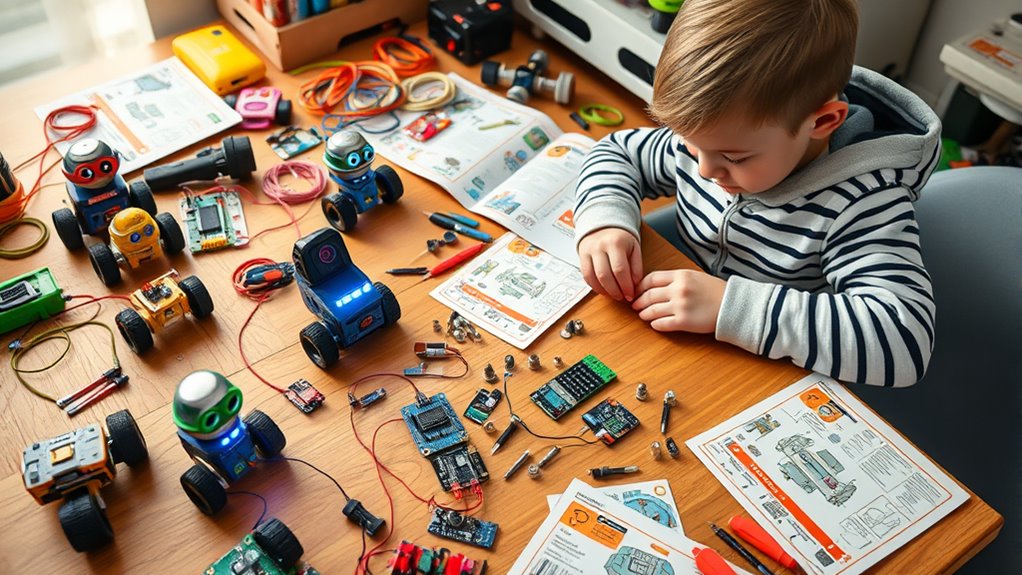

Choosing the right coding for kids kits can be challenging with so many options available, each offering different levels of complexity and engagement. The BeAndge Robotics STEM Kit stands out as the best overall, thanks to its comprehensive robotics projects suitable for ages 8-12. For younger children, the Learning Resources Botley the Coding Robot offers a straightforward, screen-free coding experience. Meanwhile, the Snap Circuits Arcade appeals to those interested in electronics and gaming. The main tradeoffs you’ll face involve balancing complexity, price, and the type of coding experience — whether hands-on building, screen-based programming, or a mix of both. Continue reading for a detailed breakdown to help you choose the perfect kit for your child’s interests and skill level.

Get everyday essentials delivered free with Prime
- Fast, free delivery on millions of items
- Prime Video, Amazon Music and more included
- Member-only deals all year
Key Takeaways
- The top kits balance ease of use with educational depth, catering to different age groups and skill levels.
- Robotics-focused kits like BeAndge and Makeblock mBot excel in engaging kids with hands-on, build-and-code projects.
- Electronics kits such as Snap Circuits offer a more tangible approach to foundational STEM concepts, appealing to project-oriented learners.
- Screen-free options like Botley are best for introducing younger children to coding without the distraction of screens.
- Price varies significantly, with more advanced kits costing more, but they often provide more comprehensive learning experiences.
| BeAndge Robotics STEM Kits for Kids Science Robot Building Crafts Age 8-12 |  | Best Creative STEM Kit for Family Bonding | Number of Projects: 6 | Recommended Age: 8-12 | Includes: Reptile robot, balance car, bubble machine, fiber lamp, buzzer wire game kit | VIEW ON AMAZON | See Our Full Breakdown |
| Playz Coding Learning Kit for Kids Age 8-12 |  | Best Comprehensive Coding Science Set | Age Range: 8-12 | Tools and Parts: 30+ | Includes: Instruction guide, science tools | VIEW ON AMAZON | See Our Full Breakdown |
| Thames & Kosmos My Robotic Pet: Coding Chameleon STEM Building & Experiment Kit |  | Best Screen-Free Coding Robot for Physical Play | Model Length: 15 inches | Sensors: Color sensor, infrared sensor, RGB LEDs | Play Modes: Coding Mode, Wild Mode, Pet Mode | VIEW ON AMAZON | See Our Full Breakdown |
| Learning Resources Botley the Coding Robot |  | Best Screen-Free Coding Robot for Early Learners | Ages: 5+ | Includes: Botley robot, remote programmer, detachable arms, 40 coding cards, tiles, obstacles | Coding capabilities: Program up to 80 steps, use loops, create if/then logic | VIEW ON AMAZON | See Our Full Breakdown |
| Snap Circuits Arcade SCA-200 STEM Electronics Kit for Kids Ages 8+ |  | Best Electronic Circuit Kit for Extended Creativity | Number of Projects: Over 200 | Components: 30 | Recommended Age: 8+ | VIEW ON AMAZON | See Our Full Breakdown |
| Makeblock mBot Arduino Robot Kit with Scratch Coding Box for Kids Ages 8-12 |  | Best Overall for Versatile Coding & Robotics Learning | Brand: Makeblock | Age Range: 8 years and up | Learning Objectives: Coding Skills, Programming, STEM | VIEW ON AMAZON | See Our Full Breakdown |
| Teach Tech Mech-5 STEM Coding Robot Building Kit for Kids Ages 10+ |  | Best for Mechanical Engineering and Hands-On Building | Recommended Age: 10+ | Type: Mechanical Coding Robot Kit | Features: Build, code, and operate robot with multiple movement functions | VIEW ON AMAZON | See Our Full Breakdown |
| Learning Resources Botley The Coding Robot Activity Set – 77 Pieces, Ages 5+ | 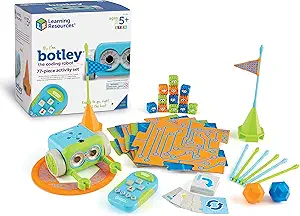 | Best Screen-Free Introduction to Coding for Young Kids | Pieces: 77 | Ages: 5+ | Batteries: Requires 3 AAA for Botley and 2 AAA for remote (not included) | VIEW ON AMAZON | See Our Full Breakdown |
| Snap Circuits Jr. SC-100 STEM Electronics Kit, 100+ Projects, Ages 8+ |  | Best for Electrical Engineering Fundamentals | Number of Projects: 100+ | Parts Included: 29 Snap Circuits parts | Recommended Age: 8 years and up | VIEW ON AMAZON | See Our Full Breakdown |
| Osmo Coding Kit for Kids Ages 5-10+ |  | Best for Interactive, Multi-Modal Coding Learning | Compatibility: iOS 15 or later, various iPads | Included Components: Osmo Base & Reflector, 31 coding blocks, 3 game apps | Ages: 5-10+ | VIEW ON AMAZON | See Our Full Breakdown |
| Ozobot Evo Coding Robot Kit | Ages 5-11 | STEM Coding for Kids & Teachers |  | Best for Progressive Learning and Classroom Use | Includes: 1 Evo robot, 5 dual-tip Color Code Markers | Age Range: Ages 5-11 | Educational Content: Over 700 lessons covering STEAM, CS, and core subjects | VIEW ON AMAZON | See Our Full Breakdown |
| Makeblock mBot STEM Coding Robots for Kids Ages 8-12 |  | Best for Hands-On Robotics with Customization | Recommended Age: 8-12 years | Batteries: Requires 4 AA batteries (not included), remote controller needs CR2025 battery (not included) | Materials: Metal | VIEW ON AMAZON | See Our Full Breakdown |
| Snap Circuits Classic SC-300 STEM Electronics Kit, 300+ Projects, Ages 8+ |  | Best for Wide Range of Electronic Projects and Safe Experimentation | Number of Projects: 300+ | Pieces Included: 60+ | Recommended Age: 8+ | VIEW ON AMAZON | See Our Full Breakdown |
| Kids First Coding & Robotics – Grades K-2 – No App Needed – STEM Learning |  | Best for Early Unplugged Coding and Storytelling | Grades: K-2 | Includes: 64-page manual, model-building exercises, storylines | Features: Unplugged, no software or apps required | VIEW ON AMAZON | See Our Full Breakdown |
| coding for kids kit | Recommended Age |
|---|---|
| BeAndge Robotics STEM Kits for | 8-12 |
| Playz Coding Learning Kit for | — |
| Thames & Kosmos My Robotic Pet | 8+ (with help), 12+ (independent) |
| Learning Resources Botley the | — |
| Snap Circuits Arcade SCA-200 S | 8+ |
| Makeblock mBot Arduino Robot K | — |
| Teach Tech Mech-5 STEM Coding | 10+ |
| Learning Resources Botley The | — |
| Snap Circuits Jr. SC-100 STEM | 8 years and up |
| Osmo Coding Kit for Kids Ages | — |
| Ozobot Evo Coding Robot Kit | | — |
| Makeblock mBot STEM Coding Rob | 8-12 years |
| Snap Circuits Classic SC-300 S | 8+ |
| Kids First Coding & Robotics | — |
More Details on Our Top Picks
BeAndge Robotics STEM Kits for Kids Science Robot Building Crafts Age 8-12
This kit stands out for its versatility, offering six unique projects that combine physics, engineering, and creativity, making it ideal for families seeking multi-faceted activities. Compared with the Thames & Kosmos Robotic Pet, which emphasizes programming and sensor-based interaction, the BeAndge kit provides more hands-on mechanical building, fostering tactile learning. The main tradeoff involves additional needs—batteries and bubble solution—that might complicate setup. The assembly can be challenging for younger children without adult help, but it rewards curiosity with varied projects that keep engagement high. It’s best suited for families wanting a broad, multi-project experience that encourages physical construction and family teamwork.
Pros:- Encourages hands-on learning and creativity across multiple projects
- Promotes family bonding through shared assembly and exploration
- Includes a variety of projects to sustain interest
Cons:- Requires additional items like batteries and bubble solution, adding setup complexity
- Assembly may be challenging for younger children without adult assistance
Best for: Families with children aged 8-12 who enjoy hands-on, multi-activity STEM projects and family bonding.
Not ideal for: Parents seeking a simple or digital coding-focused kit, as assembly may be complex and some projects are physically demanding.
- Number of Projects:6
- Recommended Age:8-12
- Includes:Reptile robot, balance car, bubble machine, fiber lamp, buzzer wire game kit
- Requires (not included):Bubble solution, AA batteries
- Materials:Odorless and safety materials
- Tools Included:Mini screwdriver, step-by-step instruction manual
Our verdict“This kit is best for families seeking a versatile, multi-project STEM experience that emphasizes physical building and creativity.”
Playz Coding Learning Kit for Kids Age 8-12
This kit makes the list for its engaging approach to computer science, with over 30 tools and parts that turn coding concepts into tangible experiments. It surpasses the Makeblock mBot Arduino Robot Kit by offering a broader variety of tools and a more visually appealing instruction guide, making it accessible for beginners as well as those ready for more complexity. The main tradeoff is that it can be too advanced for children under 8 and may require adult supervision for some activities, which could limit independent exploration. The focus on hardware and manual assembly fosters understanding of core STEM principles, making it ideal for children eager to grasp coding fundamentals through hands-on learning rather than digital interfaces.
Pros:- Engages children with a wide range of STEM activities and tools
- Provides detailed, colorful instructions for hours of learning
- Fosters understanding of computer science in a tactile way
Cons:- May be too complex and advanced for early learners under 8
- Some activities require adult supervision, limiting independent play
Best for: Children aged 8-12 interested in a comprehensive, hands-on introduction to coding and STEM concepts.
Not ideal for: Younger children under 8 or advanced coders seeking deep programming challenges, as the kit emphasizes basic concepts and physical assembly.
- Age Range:8-12
- Tools and Parts:30+
- Includes:Instruction guide, science tools
Our verdict“This kit is perfect for kids aged 8-12 who want a thorough, hands-on introduction to coding and STEM topics with plenty of tools to explore.”
Thames & Kosmos My Robotic Pet: Coding Chameleon STEM Building & Experiment Kit
This kit excels by offering a physical, unplugged coding experience through building and programming a color-sensing robotic chameleon. Unlike the Playz Coding Kit, which relies on more abstract concepts, this set emphasizes tangible manipulation and gesture-based commands, making it ideal for kinesthetic learners. The limited programming scope—focused on physical action cards—can feel restrictive compared to digital coding platforms, but it enhances understanding of sensors and mechanical functions. The articulated joints and fragile components require careful handling, especially for younger children. It’s best suited for children who prefer hands-on, physical interaction and are ready for more complex assembly and exploration beyond basic coding.
Pros:- Interactive, engaging, and promotes unplugged STEM learning
- Physical assembly and gesture control foster kinesthetic skills
- Includes comprehensive manual and multiple play modes
Cons:- Requires adult help for younger children due to assembly complexity
- Limited to physical action card programming, which may lack flexibility
- Joints can be fragile, requiring careful handling
Best for: Kids aged 8+ who enjoy physical building, sensor-based interaction, and unplugged STEM activities.
Not ideal for: Children seeking digital coding challenges or those prone to breakage, due to the fragile joints and limited programming flexibility.
- Model Length:15 inches
- Sensors:Color sensor, infrared sensor, RGB LEDs
- Play Modes:Coding Mode, Wild Mode, Pet Mode
- Recommended Age:8+ (with help), 12+ (independent)
Our verdict“This pick is ideal for children who enjoy hands-on, sensor-based coding projects with physical interaction, rather than digital programming.</p>”
Learning Resources Botley the Coding Robot
This robot makes the list for its accessible, screen-free approach to teaching foundational coding skills, making it more suitable for younger children than the Snap Circuits Arcade, which offers more advanced electronics. Botley’s included remote programmer and coding cards help children grasp sequencing, logic, and basic programming in a playful, physical way. Its broad age range—starting at age 5—means it’s adaptable for early learners, although it’s less suitable for those ready to tackle more complex coding challenges. The set’s design encourages active, obstacle-course style play, but its limited scope in coding complexity might leave older or more advanced children wanting more depth.
Pros:- Encourages screen-free, active STEM learning
- Suitable for a wide age range from 5 to 12
- Complete set with multiple components for varied activities
Cons:- Limited to basic coding concepts, may not challenge older or advanced learners
- Requires space for obstacle courses and active play
Best for: Children aged 5 and up beginning their coding journey, especially those who benefit from screen-free, active learning.
Not ideal for: Older children or those seeking advanced programming skills, due to its focus on basic sequencing and logic.
- Ages:5+
- Includes:Botley robot, remote programmer, detachable arms, 40 coding cards, tiles, obstacles
- Coding capabilities:Program up to 80 steps, use loops, create if/then logic
Our verdict“This robot is perfect for early learners who need a friendly, physical introduction to coding without screens or complex concepts.”
Snap Circuits Arcade SCA-200 STEM Electronics Kit for Kids Ages 8+
This kit earns its spot by enabling children to explore over 200 electronic projects with color-coded snap-on components, making complex electrical concepts accessible and safe. Compared with the simpler Snap Circuits Jr., the Arcade version offers a broader range of projects and more advanced features, appealing to older children or those ready for more challenge. The main tradeoff involves the need for 3 AA batteries (not included) and some projects that may be too advanced for very young kids. Its extensive variety of projects ensures long-term engagement, but the complexity can sometimes overwhelm early learners or those new to electronics.
Pros:- Offers over 200 projects for extensive STEM exploration
- Color-coded, easy-to-assemble components for safety and clarity
- No tools or soldering required, making it beginner-friendly
Cons:- Requires 3 AA batteries not included, adding to setup
- Some projects may be too complex for very young or inexperienced children
Best for: Children aged 8 and older who want a comprehensive, expandable electronics experience and enjoy building a variety of projects.
Not ideal for: Younger children under 8 or beginners who might find the project complexity intimidating or frustrating.
- Number of Projects:Over 200
- Components:30
- Recommended Age:8+
- Batteries Required:3 AA (not included)
Our verdict“This kit is ideal for older children eager to explore a wide array of electronics projects with long-term potential.</p>”
Makeblock mBot Arduino Robot Kit with Scratch Coding Box for Kids Ages 8-12
The Makeblock mBot kit stands out for its dual support of block-based and Arduino programming, making it suitable for kids who want to explore both beginner and more advanced coding. Compared with the Botley Robot Activity Set, the mBot offers a richer robotics experience that includes electronics and mechanical building. This flexibility, however, comes with the tradeoff of a steeper learning curve, especially for children without prior electronics knowledge. The included projects like line-following and obstacle avoidance foster practical skills, but some users may find the initial setup lengthy and challenging. This kit is best suited for kids aged 8-12 who are eager to dive into robotics and coding, and for parents seeking a long-term educational investment.Pros:- Supports both block-based and Arduino programming for progressive learning
- Includes diverse projects that teach electronics, robotics, and coding
- Step-by-step manuals and online resources facilitate learning
Cons:- Requires basic electronic understanding for optimal use
- Setup can be time-consuming for beginners
Best for: Children aged 8-12 interested in both coding and robotics with some patience for assembly.
Not ideal for: Younger children or absolute beginners who might find electronics setup overwhelming or who prefer simple screen-free activities.
- Brand:Makeblock
- Age Range:8 years and up
- Learning Objectives:Coding Skills, Programming, STEM
- Included Components:Coding Box, Electronic Components, Building Components
- Model Number:mBot-K08-01
- Languages:9
Our verdict“This kit is perfect for kids curious about robotics and coding who are ready for a comprehensive, multi-layered experience.”
Teach Tech Mech-5 STEM Coding Robot Building Kit for Kids Ages 10+
The Mech-5 kit excels by combining mechanical construction with coding, offering a more physical, engineering-focused experience for children aged 10 and above. Unlike the Learning Resources Botley, which emphasizes screen-free active play, the Mech-5 emphasizes building and programming complex movements like throwing, kicking, and drawing. This makes it ideal for kids who enjoy mechanical puzzles and longer assembly projects, though it demands several hours of focused work, which might be a barrier for some. Its detailed instructions support learning, but the complexity may be daunting for younger children or those new to robotics. Overall, it’s well-suited for older kids or parents looking for a challenging, skill-building robotics kit.Pros:- Encourages mechanical and coding skills through hands-on building
- Multiple movement functions add variety and challenge
- Includes detailed, step-by-step instructions
Cons:- Assembly requires several hours, which might be too time-consuming
- Designed for older children, less suitable for younger kids
Best for: Children aged 10+ with a keen interest in mechanical engineering and longer-term building projects.
Not ideal for: Younger kids or beginners seeking quick, simple coding activities without substantial assembly time.
- Recommended Age:10+
- Type:Mechanical Coding Robot Kit
- Features:Build, code, and operate robot with multiple movement functions
Our verdict“This kit suits older children eager to develop mechanical and programming skills through complex projects.”
Learning Resources Botley The Coding Robot Activity Set – 77 Pieces, Ages 5+
Botley’s screen-free design makes it an excellent choice for introducing very young children to coding concepts through active play. Compared with the Osmo Coding Kit, Botley offers a purely physical experience, which is ideal for kids who are not yet ready for screens or digital devices. Its simple remote programming and variety of accessories encourage problem-solving and creativity, but this simplicity also means it covers only basic coding ideas suitable for early learners. Batteries are not included, adding a minor inconvenience. This set is best for parents seeking a tactile, screen-free activity that promotes foundational STEM skills for children as young as 5.Pros:- Encourages active, screen-free problem solving
- Includes diverse accessories to keep activities engaging
- Easy to set up and use immediately
Cons:- Batteries are not included, requiring additional purchase
- Limited to basic coding functions, not suitable for advanced learners
Best for: Parents of preschool or early elementary children seeking a tactile, screen-free coding experience.
Not ideal for: Older kids or those ready for more complex programming tasks that involve screens and advanced concepts.
- Pieces:77
- Ages:5+
- Batteries:Requires 3 AAA for Botley and 2 AAA for remote (not included)
Our verdict“This activity set is ideal for introducing young children to coding fundamentals in a fun, hands-on way without screens.”
Snap Circuits Jr. SC-100 STEM Electronics Kit, 100+ Projects, Ages 8+
The Snap Circuits Jr. SC-100 offers more than 100 projects that teach electrical engineering basics through colorful, snap-together parts. Unlike the robotics-focused Teach Tech Mech-5, this kit emphasizes circuit design and electronics fundamentals in a straightforward, tool-free format. While the 29 included parts limit project complexity compared to larger kits, this simplicity benefits beginners who want quick results and clear learning. Batteries are required but not included, adding a small hassle. This kit is ideal for kids who prefer hands-on electrical projects without the time investment of building mechanical robots.Pros:- Easy snap-together parts require no tools
- Over 100 engaging electronic projects to explore
- Introduces electrical engineering concepts in a safe, fun way
Cons:- Batteries are not included, adding extra cost
- Limited to 29 parts, which restricts project variety and complexity
Best for: Children aged 8+ interested in basic electronics and quick, tangible project results.
Not ideal for: Kids seeking complex robotics or mechanical engineering projects that go beyond simple circuits.
- Number of Projects:100+
- Parts Included:29 Snap Circuits parts
- Recommended Age:8 years and up
- Batteries Required:Yes
Our verdict“This kit is perfect for beginners who want a straightforward introduction to electronics and circuit design.”
Osmo Coding Kit for Kids Ages 5-10+
The Osmo Coding Kit combines physical coding blocks with digital gameplay, making it a versatile choice for children aged 5-10+ who thrive on hands-on interaction. Unlike the Botley Robot, which is entirely screen-free, Osmo integrates iPad-based activities that promote logic, problem-solving, and teamwork through engaging apps. Its compatibility with various iPads and inclusion of multiple game modes broaden its educational scope, but it requires an iPad (not included), which could be a drawback for some families. The tangible blocks and digital interface work together to foster foundational coding skills with a playful twist.Pros:- Engages children with hands-on and digital activities
- Includes multiple educational apps and physical components
- Versatile for different ages and learning styles
Cons:- Requires an iPad (not included) for full functionality
- Components may vary from images, leading to some user disappointment
Best for: Parents with iPads seeking a multi-modal, engaging introduction to coding for children in early elementary school.
Not ideal for: Users without an iPad or those seeking purely screen-free experiences.
- Compatibility:iOS 15 or later, various iPads
- Included Components:Osmo Base & Reflector, 31 coding blocks, 3 game apps
- Ages:5-10+
- Educational Focus:Coding, logic, teamwork, music
- Requires:iPad (not included)
Our verdict“This kit offers a flexible, multi-sensory approach to early coding education, best suited for families with compatible iPads.”
Ozobot Evo Coding Robot Kit | Ages 5-11 | STEM Coding for Kids & Teachers
The Ozobot Evo Kit stands out for its ability to grow with children, offering five skill levels that range from beginner to master, making it a versatile choice compared to simpler options like Kids First Coding & Robotics. Its extensive library of over 700 lessons covers a broad spectrum of STEAM topics, which can keep kids engaged longer and support classroom environments. However, its reliance on an online platform means access to the internet is necessary for full functionality, and the initial cost may be higher than other beginner sets. Compared to more straightforward kits, Ozobot offers a richer educational experience, but it might be overwhelming for the youngest or tech-shy kids. The durable design makes it suitable for classroom or home use, and its ease of use for beginners is a significant plus. Still, the requirement for online access and potentially steep price are notable tradeoffs.
Pros:- Adapts to a wide age range with multiple skill levels
- Includes a vast library of educational lessons and activities
- Built to withstand classroom wear and tear
- Easy for beginners to start using
Cons:- Requires internet access for full experience
- Higher initial investment compared to basic kits
Best for: Families or educators seeking a scalable, multi-level coding robot that supports comprehensive lessons and classroom integration
Not ideal for: Parents looking for a simple, screen-free experience for very young children or those with limited internet access
- Includes:1 Evo robot, 5 dual-tip Color Code Markers
- Age Range:Ages 5-11
- Educational Content:Over 700 lessons covering STEAM, CS, and core subjects
- Skill Levels:5 levels from beginner to master
- Durability:Classroom-ready, durable robot
Our verdict“This kit is best suited for educators and parents who want a long-term, adaptable coding tool that grows with their child’s skills.”
Makeblock mBot STEM Coding Robots for Kids Ages 8-12
The Makeblock mBot excels for children who enjoy tinkering and customizing their robots, supporting over 100 electronic modules and 500 parts, which is a step up from simpler kits like Snap Circuits Classic SC-300. Its straightforward assembly process makes it accessible for kids aged 8-12, though some initial setup with batteries and software might challenge complete beginners. Unlike the static projects in Snap Circuits, mBot’s versatility allows for a wide variety of functions such as line-following and obstacle avoidance, fostering creative experimentation. Its support for extensive add-ons and compatibility with LEGO parts makes it a flexible platform for ongoing learning. However, the need for batteries and some technical setup might be a hurdle for younger or less tech-savvy kids. This kit makes the most sense for children eager to explore robotics beyond basic electronic projects, ready for more complex builds and coding.
Pros:- Supports extensive customization with over 100 modules and 500 parts
- Easy assembly and clear instructions
- Encourages creative exploration and coding skills
- Compatible with LEGO parts for added versatility
Cons:- Batteries and additional batteries needed, increasing cost
- Some technical setup required, which may be challenging for beginners
Best for: Parents and educators seeking a customizable, expandable robotics platform for ages 8 to 12
Not ideal for: Younger kids under 8 or beginners who prefer a fully assembled, plug-and-play experience without setup fuss
- Recommended Age:8-12 years
- Batteries:Requires 4 AA batteries (not included), remote controller needs CR2025 battery (not included)
- Materials:Metal
- Compatibility:Supports over 100 electronic modules and 500 parts, compatible with LEGO
- Software:mBlock, 3 free Makeblock apps
Our verdict“This kit is perfect for kids eager to build and code complex robots, especially those interested in expanding their projects over time.”
Snap Circuits Classic SC-300 STEM Electronics Kit, 300+ Projects, Ages 8+
The Snap Circuits SC-300 offers an impressive variety of over 300 electronic projects, making it an excellent choice for children interested in electrical engineering, especially when compared to more specialized kits like Osmo Coding Kit. Its colorful, snap-together components eliminate the need for soldering or tools, which enhances safety and ease of use. This makes it particularly suitable for children aged 8 and up who want to explore gadgets like radios, alarms, and doorbells without adult assistance. The extensive project library keeps children engaged and learning through hands-on building. However, it requires batteries (not included), and its focus on electronics might limit appeal for kids more interested in coding or robotics. Still, for a broad introduction to electrical concepts, it offers substantial value and flexibility.
Pros:- Over 300 projects provide extensive learning opportunities
- No tools or soldering needed, ensuring safety
- Colorful, snap-together components for easy assembly
- Award-winning and highly rated educational toy
Cons:- Requires batteries not included
- Limited to electrical projects, which may not suit all interests
Best for: Kids aged 8+ interested in electrical engineering and gadget creation, especially those new to electronics
Not ideal for: Children seeking programmable robots or coding-focused experiences rather than circuit-based projects
- Number of Projects:300+
- Pieces Included:60+
- Recommended Age:8+
- Batteries Required:Yes
Our verdict“This kit is ideal for kids who want to understand how electronic gadgets work through hands-on experimentation and building.”
Kids First Coding & Robotics – Grades K-2 – No App Needed – STEM Learning
The Kids First Coding & Robotics kit is tailored for the youngest learners, focusing on unplugged activities that don’t require screens or apps, unlike electronic-based kits like Ozobot Evo. Its 64-page manual guides kids through story-based exercises involving sequences, loops, and basic programming concepts, making it accessible for early grades. The manual’s narrative approach encourages imagination and understanding of foundational coding ideas without the complications of device setup or digital distractions. However, this simplicity also means it covers only very basic concepts suitable for K-2 students, and physical activities may demand space and adult supervision. It’s an excellent starting point for those who prefer tactile, story-driven learning but less ideal for children ready for more advanced or tech-heavy projects.
Pros:- No electronics, apps, or screens needed, making it very accessible
- Engaging story-driven lessons that teach key programming concepts
- Includes a detailed manual with clear, step-by-step instructions
- Encourages hands-on learning and creativity
Cons:- Limited to very basic coding concepts
- Requires adult supervision for younger children
- Physical activities need space and materials
Best for: Parents of early learners in grades K-2 seeking a screen-free, story-based introduction to coding
Not ideal for: Kids in upper elementary or those ready for screen-based or more complex robotics projects
- Grades:K-2
- Includes:64-page manual, model-building exercises, storylines
- Features:Unplugged, no software or apps required
- Suitable for:Early learners with limited screen time
Our verdict“This kit is best for early elementary children or beginners who benefit from tactile, story-based learning without digital devices.”

How We Picked
I evaluated these coding for kids kits based on several key criteria: the age appropriateness and difficulty level, the quality and durability of the components, the educational value and scope of the projects, ease of use, and overall value for the price. Kits that offered a good balance of engaging activities and clear learning outcomes ranked higher. I also considered user reviews and feedback on the longevity and support available from manufacturers. The ranking reflects how well each kit helps children develop foundational coding and STEM skills while remaining accessible and fun.Factors to Consider When Choosing Coding For Kids Kits
When selecting a coding kit for kids, it’s important to consider several factors that influence how well the kit will meet your child’s learning style and your expectations. The right kit should match your child’s age, interest level, and prior experience with STEM concepts. Additionally, think about the type of coding experience you want to foster — whether through physical building, screen-based programming, or a combination. Budget is also a key factor, as more complex kits tend to cost more but offer richer learning opportunities. Lastly, consider the long-term value and whether the kit can grow with your child’s skills or is best suited for beginners.Age and Skill Level
Matching the kit to your child’s age and skill level is essential to prevent frustration and ensure engagement. Kits designed for younger children, like Botley, focus on simple, screen-free activities, while more advanced options like the mBot or Snap Circuits Jr. are suited for older kids ready for more complex coding and engineering challenges. Choosing an age-appropriate kit helps build confidence and encourages continued learning without overwhelming your child with features beyond their current capabilities.
Type of Coding Experience
Decide whether you want a kit that emphasizes physical building, screen-based programming, or a mix of both. Robotics kits like Makeblock mBot combine building with coding through platforms like Scratch, making them ideal for kids who enjoy hands-on projects. On the other hand, kits like Osmo Coding provide a screen-free experience that teaches logic and problem-solving. Mixing both approaches can offer a well-rounded introduction to coding, but it’s crucial to pick a kit aligned with your child’s interests to maintain motivation.
Price and Value
Budget considerations are important, but spending too little might mean sacrificing quality or educational depth. More expensive kits like Snap Circuits Classic offer extensive project possibilities and durability, providing greater long-term value. Cheaper options may be suitable for beginners or casual learners but often lack the robustness or scope of advanced kits. Look for a balance between cost, project variety, and the quality of components to ensure your investment fosters sustained learning.
Component Quality and Durability
Kids can be rough on their gear, so durability matters. Plastic parts, sturdy wiring, and reliable electronic components ensure the kit can withstand repeated use. Cheaper kits may include fragile parts that break easily, leading to frustration and additional costs. Investing in well-made kits can save money over time and keep your child engaged without frequent repairs or replacements.
Long-term Growth Potential
Some kits are designed with expandable components or more advanced programming options, allowing children to grow with the kit. For instance, a basic robot might be upgradeable with new sensors or software, extending its usefulness. If you’re looking for a kit that can serve as a long-term educational tool, prioritize options with scalable features or compatibility with additional modules.
Frequently Asked Questions
Are coding kits suitable for very young children?
Yes, there are coding kits designed specifically for younger kids, typically aged 4-7, that focus on simple, screen-free activities and basic logic concepts. Kits like Botley the Coding Robot are excellent for introducing foundational skills without overwhelming young learners. These kits emphasize hands-on building and problem-solving, which are critical for early STEM development. However, for very young children, parental supervision and involvement can enhance the experience and ensure they get the most out of the activities.
Should I prioritize kits with screen-based coding or physical building?
Choosing between screen-based coding and physical building depends on your child’s interests and learning goals. Screen-based kits, like mBot and Osmo, introduce children to real programming languages and concepts through interactive platforms, which can be more engaging for tech-savvy kids. Conversely, physical building kits like Snap Circuits or Botley help develop fine motor skills and a tangible understanding of engineering principles. For a balanced approach, look for kits that combine both methods, offering a variety of ways to learn and stay engaged.
How important is the software or app included with these kits?
The software or app plays a significant role in how effectively your child can program and control their projects. User-friendly, well-designed apps can make coding intuitive and fun, especially for beginners. Compatibility across devices, clear instructions, and interactive features enhance the learning experience. However, some kits rely on physical controls or block-based programming that doesn’t require an app, which can be better for younger children or those who prefer hands-on activities. Consider your child’s comfort with technology when evaluating software options.
Are these kits suitable for homeschool or classroom use?
Many coding kits are designed with educational settings in mind, offering comprehensive instructions and multiple project ideas suitable for group or individual learning. Kits like Snap Circuits and Makeblock mBot are popular in classrooms because of their durability, versatility, and scalability. When choosing for homeschool or classroom use, consider kits that include teacher guides, multiple projects, and expandable components to support a range of skill levels. Investing in kits with strong educational support can maximize their effectiveness in structured learning environments.
Is investing in a more expensive kit worth it?
Higher-priced kits often provide more extensive project options, durable components, and better educational value, making them worthwhile investments if your child shows sustained interest in STEM. They tend to include more sophisticated features and longer-lasting materials, which can grow with your child’s skills. However, for complete beginners or casual learners, a more affordable kit may suffice to introduce basic concepts without overwhelming complexity or cost. Consider your child’s enthusiasm and your educational goals when evaluating whether a premium kit is justified.
Conclusion
For parents seeking the best overall experience, the BeAndge Robotics STEM Kit offers a comprehensive introduction to robotics and coding that suits a variety of learning styles. Those on a tighter budget or introducing younger children to coding might prefer the Learning Resources Botley for its simplicity and screen-free design. If you’re looking for a premium, expandable option that can grow with your child’s skills, the Snap Circuits Classic provides extensive project possibilities. Beginners and those wanting a straightforward, engaging start will find the Osmo Coding Kit an excellent choice, while educators will appreciate kits with robust support like the Makeblock mBot. Tailor your choice to your child’s age, interests, and your educational priorities to ensure a rewarding STEM journey.
Columbus Day / Indigenous Peoples' Day Picks
long weekend sales
As an affiliate, we earn on qualifying purchases.