Logitech Spotlight is my best overall pick for presenters who want advanced on-screen control, while the Logitech R500s is a simpler choice with familiar laser-pointer controls. For large rooms, the Logitech R800’s green laser is a standout. Wireless presentation clickers vary most in pointer visibility, connection options, and whether extra controls help or complicate a talk. I weigh those tradeoffs against ease of use and portability across all 15 options. Read on for the full breakdown and a recommendation for your setup.

Get everyday essentials delivered free with Prime
- Fast, free delivery on millions of items
- Prime Video, Amazon Music and more included
- Member-only deals all year
Key Takeaways
- Spotlight ranks first for control flexibility: its on-screen highlighting approach serves presenters who need to direct attention beyond basic slide advancement.
- The Logitech R800 fills a distinct room-size need: its green laser is a stronger fit for distant screens than the red pointers found across much of this lineup.
- Receiver flexibility separates several practical picks: USB-A and USB-C options can reduce adapter hassles on mixed-device teams, though buyers should confirm compatibility with their own presentation setup.
- Simple controls remain a real advantage: the R400 and basic USB clickers suit speakers who want familiar next-and-back buttons without extra features to learn.
- Special controls add tradeoffs: volume, hyperlink, rechargeable, and air-mouse functions can help specific workflows, but they introduce complexity that many slide presenters may not need.
| Wireless Presentation Clicker with Red Laser Pointer and Storage Case |  | Best for a Simple, Ready-to-Pack Setup | Brand / model: UBUYONE WP37-R | Connectivity: Radio frequency | Receiver: USB / Type-C | VIEW LATEST PRICE | See Our Full Breakdown |
| Logitech Spotlight Presentation Remote |  | Best for On-Screen Emphasis | Weight: 49.2 g | Connectivity: Bluetooth Smart, USB-A receiver | Operating range: Up to 100 ft (30 m) | VIEW LATEST PRICE | See Our Full Breakdown |
| Wireless Presentation Clicker with USB-A and USB-C Receiver |  | Best for Mixed-Port Computers | Connectivity: 2.4 GHz radio frequency | Receiver: Built-in USB-A and USB-C | Compatibility: Mac, Windows, Linux; PowerPoint, Keynote, Google Slides, Prezi | VIEW LATEST PRICE | See Our Full Breakdown |
| CLIKBUTM Wireless Presentation Clicker with Red Laser Pointer |  | Best Compact Basic Remote | Brand / model: CLIKBUTM WP08-R | Buttons: 5 | Wireless-control range: 98 ft (30 m) | VIEW LATEST PRICE | See Our Full Breakdown |
| QUI Wireless Presentation Clicker with Volume Control |  | Best for Lightweight Multimedia Controls | Brand / model: QUI BK600 | Connectivity: 2.4 GHz wireless via USB receiver | Maximum range: 328 ft | VIEW LATEST PRICE | See Our Full Breakdown |
| UBUYONE Wireless Presenter Remote with Hyperlink and Volume Controls |  | Best for Advanced On-Screen Controls | Brand and model: UBUYONE GX60 | Wireless control range: Up to 100 meters | Laser: Red; range up to 200 meters | VIEW LATEST PRICE | See Our Full Breakdown |
| QUI Wireless Presentation Clicker with Volume Control and Red Laser Pointer |  | Best for Long-Room Freedom | Brand and model: QUI BK600 | Connectivity: 2.4GHz USB wireless | Maximum range: 328 feet | VIEW LATEST PRICE | See Our Full Breakdown |
| Logitech R800 Wireless Presenter with Green Laser |  | Best for Timed Presentations | Brand and model: Logitech R800 | Connectivity: 2.4 GHz wireless | Maximum range: 100 feet (30 meters) | VIEW LATEST PRICE | See Our Full Breakdown |
| VILNIU Wireless Presentation Clicker with Red Laser Pointer |  | Best for Straightforward Slide Control | Brand and model: VILNIU WP71-RC | Connectivity: Radio frequency | Control range: 98 ft (30 m) | VIEW LATEST PRICE | See Our Full Breakdown |
| DINOSTRIKE Rechargeable Wireless Presenter Remote with Air Mouse |  | Best for Cursor and Slide Control | Brand and model: DINOSTRIKE DM100 | Connectivity: 2.4 GHz radio frequency | Maximum control range: 164 ft | VIEW LATEST PRICE | See Our Full Breakdown |
| Wireless Presentation Clicker Remote (USB) |  | Best for Simple, Software-Free Presentations | Wireless connection: 2.4 GHz RF | Maximum range: 50 ft | Buttons: 3 | VIEW LATEST PRICE | See Our Full Breakdown |
| DinoFire Wireless Presentation Remote with Red Pointer | 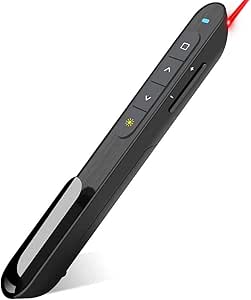 | Best for Shortcut-Rich Presentations | Wireless connection: 2.4 GHz radio frequency | Maximum range: Up to 100 ft (30 m) | Buttons: 6 | VIEW LATEST PRICE | See Our Full Breakdown |
| Logitech R400 Wireless Presenter with Red Laser Pointer | 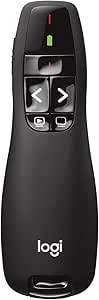 | Best for Familiar, Basic Laser Controls | Wireless connection: 2.4 GHz RF with USB receiver | Maximum range: 50 ft | Buttons: 4 | VIEW LATEST PRICE | See Our Full Breakdown |
| Logitech R500s Wireless Presenter with Red Laser Pointer |  | Best for Flexible Wireless Setup | Wireless connection: USB receiver or Bluetooth Low Energy | Maximum range: Up to 20 m (65 ft) | Buttons: 3 | VIEW LATEST PRICE | See Our Full Breakdown |
| VILNIU Wireless Presentation Clicker with Red Laser Pointer and 2-in-1 USB/Type-C Receiver |  | Best for USB-A and USB-C Compatibility | Wireless connection: Radio frequency | Receiver: 2-in-1 USB-A/USB-C | Maximum clicker range: 98 ft | VIEW LATEST PRICE | See Our Full Breakdown |
| wireless presentation clicker | Battery | Connectivity | Compatible systems | Weight |
|---|---|---|---|---|
| Wireless Presentation Clicker | — | Radio frequency | Windows, Mac OS, Linux | — |
| Logitech Spotlight Presentatio | — | Bluetooth Smart, USB-A receiver | Windows, Mac OS | 49.2 g |
| Wireless Presentation Clicker | 2 AAA batteries, not included | 2.4 GHz radio frequency | — | — |
| CLIKBUTM Wireless Presentation | 1 AAA battery | — | Windows, Mac OS, Linux | — |
| QUI Wireless Presentation Clic | — | 2.4 GHz wireless via USB receiver | Mac OS, Windows, Linux, Android | — |
| UBUYONE Wireless Presenter Rem | 1 AAA alkaline battery | — | Windows, Mac OS, Linux, Android | 31 g |
| QUI Wireless Presentation Clic | 1 AAA; not included | 2.4GHz USB wireless | Windows, Mac OS, Linux, Android | — |
| Logitech R800 Wireless Present | — | 2.4 GHz wireless | — | — |
| VILNIU Wireless Presentation C | — | Radio frequency | — | 70 g |
| DINOSTRIKE Rechargeable Wirele | 300 mAh rechargeable lithium-ion polymer | 2.4 GHz radio frequency | — | 27 g |
| Wireless Presentation Clicker | 1 AAA battery, not included | — | Windows, macOS, Linux, Android, Chromebook | 25.54 g |
| DinoFire Wireless Presentation | 1 AAA battery, not included | — | — | 8.53 g |
| Logitech R400 Wireless Present | 2 AAA batteries | — | — | 0.1 kg |
| Logitech R500s Wireless Presen | 1 AAA battery, included | — | — | — |
| VILNIU Wireless Presentation C | 2 AAA batteries, included | — | Windows, Mac OS, Linux | 58 g |
More Details on Our Top Picks
Wireless Presentation Clicker with Red Laser Pointer and Storage Case
For presenters who want a straightforward clicker with its accessories accounted for, this UBUYONE pairs tactile slide controls with a receiver that stores inside the remote and an included drawstring bag. Its black-screen button adds a useful pause option, while USB and Type-C receiver support gives it flexibility across newer and older computers. Compared with the CLIKBUTM WP08-R, this model includes two AAA batteries and a storage bag, so it is more ready to carry straight to a talk. Both are basic, single-device remotes, though, and neither offers the Spotlight’s on-screen highlighting or rechargeable battery. The main tradeoff is ongoing battery replacement; the long stated laser range also does not extend the 30 m slide-control range.
Pros:- Receiver stores inside the remote, reducing the chance of losing it.
- Includes two AAA batteries and a drawstring storage bag.
- Tactile buttons handle slide navigation, laser, and black-screen control.
- Compatible with Windows, Mac OS, and Linux.
Cons:- Uses AAA batteries instead of rechargeable power.
- Supports one device at a time.
- Slide-control range is 30 m, shorter than the stated 100 m laser range.
Best for: Presenters who want a basic clicker with batteries and a storage bag included for classes, meetings, or occasional talks.
Not ideal for: Frequent presenters seeking rechargeable power, multi-device control, or on-screen highlighting and magnification.
- Brand / model:UBUYONE WP37-R
- Connectivity:Radio frequency
- Receiver:USB / Type-C
- Slide-control range:98 ft (30 m)
- Laser pointer range:328 ft (100 m)
- Compatible systems:Windows, Mac OS, Linux
- Power:2 AAA batteries, included
- Maximum supported devices:1
Our verdict“Choose this UBUYONE if you want a simple, ready-to-pack presenter with included batteries; pick the Logitech Spotlight for advanced on-screen pointing.”
Logitech Spotlight Presentation Remote
The Logitech Spotlight is the lineup’s clearest choice for presenters who need to direct attention to specific details on a screen. Its highlight and magnify pointer can make a chart or small interface easier for an audience to follow than the physical red lasers on the UBUYONE WP37-R or CLIKBUTM WP08-R. Bluetooth and a USB-A receiver offer two ways to connect, and vibration alerts help keep a timed talk on track. That added control comes with a setup cost: the advanced pointer and time features require the Logi Options+ app, and the remote supports only one connected device at a time. It is rechargeable rather than dependent on replaceable AAA batteries, but presenters who need only next and previous slide buttons may find its software-dependent features unnecessary.
Pros:- Highlights and magnifies on-screen content.
- Connects by Bluetooth Smart or USB-A receiver.
- Vibration alerts can help presenters stay on schedule.
- Rapid charging provides up to three hours of use from one minute of charging.
Cons:- Highlighting and time alerts require the Logi Options+ app.
- Supports one connected device at a time.
- Full functionality depends on a computer.
Best for: Presenters who regularly explain charts, diagrams, or detailed slides and want software-assisted highlighting plus time alerts.
Not ideal for: Speakers who want a no-setup remote with a physical laser or need to control multiple devices at once.
- Weight:49.2 g
- Connectivity:Bluetooth Smart, USB-A receiver
- Operating range:Up to 100 ft (30 m)
- Battery type:Lithium-ion polymer
- Charging:1 minute provides 3 hours of use; full charge lasts up to 3 months
- Compatible software:PowerPoint, Keynote, PDF, Google Slides, Prezi
- Compatible systems:Windows, Mac OS
- Buttons:5
Our verdict“Choose the Spotlight if you need to emphasize screen details and manage speaking time; choose the CLIKBUTM for simpler plug-and-play laser pointing.”
Wireless Presentation Clicker with USB-A and USB-C Receiver
When a presentation kit moves between laptops with different ports, this clicker’s built-in USB-A and USB-C connectors save the presenter from carrying an adapter. Its five buttons cover slides, screen modes, volume, window switching, and a red laser, giving it more computer-control functions than the simpler CLIKBUTM WP08-R. The receiver stores magnetically on the lightweight remote, and plug-and-play operation keeps setup simple across Mac, Windows, and Linux. The tradeoffs are practical: its two AAA batteries are not included, and the stated 30 m wireless-control range is distinct from the 100 m laser-pointer distance. Despite the listed support for up to 10 devices, it connects to one at a time, so it is best understood as a flexible-port remote rather than a multi-device controller.
Pros:- Built-in USB-A and USB-C connectors suit a mix of laptop ports.
- Plug-and-play operation requires no driver installation.
- Controls slides, volume, windows, full screen, and black screen.
- Lightweight body stores the receiver magnetically.
Cons:- Requires two AAA batteries, which are not included.
- Wireless control is listed at up to 30 m, while the 100 m figure applies to the laser.
- Supports one connected device at a time.
Best for: Presenters who switch between USB-A and USB-C laptops and want slide, volume, and window controls in one compact remote.
Not ideal for: Buyers who want rechargeable power, included batteries, or a wireless-control range close to the advertised laser distance.
- Connectivity:2.4 GHz radio frequency
- Receiver:Built-in USB-A and USB-C
- Compatibility:Mac, Windows, Linux; PowerPoint, Keynote, Google Slides, Prezi
- Controls:Page up/down, full screen, black screen, volume, window switching
- Laser pointer distance:Up to 100 m
- Wireless-control range:Up to 30 m
- Battery:2 AAA batteries, not included
- Weight / dimensions:0.05 kg; 5.31 × 1.65 × 0.95 in
Our verdict“Choose this model for built-in USB-A and USB-C flexibility and extra controls; the QUI BK600 is lighter if carrying weight matters more.”
CLIKBUTM Wireless Presentation Clicker with Red Laser Pointer
At 109 mm and 38 g with its battery, the CLIKBUTM WP08-R is a compact, uncomplicated laser clicker for presenters who value a small kit over extra controls. Its five buttons and driver-free USB receiver cover common presentation and document use, with support for Windows, Mac, and Linux. Compared with the UBUYONE WP37-R, it uses one AAA battery and has no included storage bag or batteries listed; in return, it is a straightforward carry-along option with the receiver tucked into the battery compartment. The 30 m control range fits ordinary rooms, but this is not the pick for a presenter who wants volume or window controls like the USB-A/USB-C clicker. It also supports only one device at a time.
Pros:- Compact 109 mm body weighs 38 g with battery.
- Receiver stores inside the battery compartment.
- Works with Windows, Mac OS, and Linux without drivers.
- Supports common presentation, document, website, and PDF applications.
Cons:- Requires one AAA battery, with inclusion not specified.
- Wireless control range is 98 ft (30 m).
- Supports one device and lacks the volume and window controls found on some alternatives.
Best for: Teachers, students, and occasional speakers who want a small, lightweight remote for standard slide navigation and laser pointing.
Not ideal for: Presenters who need volume or window controls, rechargeable power, or included batteries and a storage pouch.
- Brand / model:CLIKBUTM WP08-R
- Buttons:5
- Wireless-control range:98 ft (30 m)
- Laser range:328 ft (100 m)
- Size / weight:109 mm; 38 g with battery
- Battery:1 AAA battery
- Connection:Radio frequency via USB receiver
- Compatible systems:Windows, Mac OS, Linux
Our verdict“Choose the CLIKBUTM for a compact, basic laser remote; pick the USB-A/USB-C clicker if you need more computer controls.”
QUI Wireless Presentation Clicker with Volume Control
The QUI BK600 weighs 24 g and combines slide navigation, volume adjustment, and screen switching in a small remote, making it a practical fit for talks that use video or audio. Its listed system support includes Mac, Windows, Linux, and Android, a broader mix than the Logitech Spotlight, which focuses on Windows and Mac. The QUI also adds hyperlink navigation and a clip for carrying. Its stated maximum range of 328 ft is longer than the 30 m control range listed for the USB-A/USB-C clicker, though range claims can describe different functions across models. This remote relies on a USB receiver and a single AAA battery that is not included, and it supports one device. Buyers seeking rechargeability or Spotlight-style screen highlighting should look elsewhere.
Pros:- Combines slide, hyperlink, volume, power, full-screen, and black-screen functions.
- Lightweight 24 g design includes a carrying clip.
- Compatible with Mac OS, Windows, Linux, and Android.
- Listed maximum wireless range is 328 ft.
Cons:- Requires one AAA battery, which is not included.
- Uses a USB receiver rather than Bluetooth connectivity.
- Supports one device at a time.
Best for: Presenters who include video or audio and want a very light remote with volume and screen controls across several operating systems.
Not ideal for: Frequent speakers who want a rechargeable clicker, advanced on-screen highlighting, or batteries included.
- Brand / model:QUI BK600
- Connectivity:2.4 GHz wireless via USB receiver
- Maximum range:328 ft
- Controls:6 buttons
- Functions:Slide and hyperlink navigation, volume, power, full-screen and black-screen switching
- Pointer:Red light
- Compatible systems:Mac OS, Windows, Linux, Android
- Battery / weight:1 AAA battery, not included; 24 g
Our verdict“Choose the QUI BK600 for a light multimedia remote with broad system support; choose the Spotlight if on-screen highlighting matters more than simple controls.”
UBUYONE Wireless Presenter Remote with Hyperlink and Volume Controls
The UBUYONE GX60 suits presenters who need more than basic slide changes: its buttons can open hyperlinks, switch windows, and control full-screen or black-screen views. That makes it more adaptable for demos that move between slides and other content than the VILNIU WP71-RC, which focuses on straightforward navigation. Its 100-meter control range also gives a presenter room to move around a large venue, while the red laser offers a familiar way to point out details.
The tradeoff is a more involved control set that may take practice to use by touch. Mac users may need to make a simple setup adjustment, and the single AAA battery must be replaced when depleted. I’d choose it for software-heavy presentations, but a simpler remote may suit speakers who only advance slides.
Pros:- Hyperlink, window-switching, and screen controls support varied presentation workflows
- 100-meter wireless control range allows movement across a large room
- Works with several operating systems and presentation programs
- Plug-and-play setup usually requires no software installation
Cons:- Mac may require additional setup
- Requires a AAA battery
- Additional controls may take practice to operate without looking
Best for: Presenters who switch between slides, linked resources, and application windows during a talk
Not ideal for: Mac presenters who want setup to be effortless, or speakers who only need basic slide navigation
- Brand and model:UBUYONE GX60
- Wireless control range:Up to 100 meters
- Laser:Red; range up to 200 meters
- Compatible systems:Windows, Mac OS, Linux, Android
- Compatible software:PowerPoint, Keynote, Prezi, Word, Excel, ACDSee, iWork
- Battery:1 AAA alkaline battery
- Weight:31 g
- Dimensions:5.47 × 0.74 × 0.49 in
Our verdict“Choose the UBUYONE GX60 if you need hyperlink and window controls alongside slide navigation; pick the VILNIU WP71-RC for a simpler presenter.”
QUI Wireless Presentation Clicker with Volume Control and Red Laser Pointer
With a stated 328-foot wireless range, the QUI BK600 is aimed at presenters who want to move well beyond the lectern while keeping slide control. Its plug-and-play 2.4GHz connection and six buttons keep the basic setup approachable, and volume control adds convenience for presentations that include audio. Compared with the Logitech R800, it offers a much longer stated control range, while the R800 has a built-in timer and silent vibrating alerts.
The QUI’s red laser provides a familiar pointing cue, but buyers should check whether that suits their display and room; the R800’s green laser is the more display-focused alternative in this lineup. The BK600 connects to one device at a time, and its AAA battery is not included. It makes most sense when walking range matters more than timing aids or multi-device control.
Pros:- Stated 328-foot wireless range supports movement across large rooms
- Volume control is useful for presentations with embedded audio
- Plug-and-play setup needs no driver installation
- Clip helps keep the remote accessible between talks
Cons:- AAA battery is not included
- Controls one device at a time
- No built-in timer or silent alert feature
Best for: Speakers in large rooms who want to roam while controlling slides and presentation audio
Not ideal for: Presenters who need a timer, silent alerts, or a ready-to-use package with battery included
- Brand and model:QUI BK600
- Connectivity:2.4GHz USB wireless
- Maximum range:328 feet
- Buttons:6
- Laser:Red
- Battery:1 AAA; not included
- Compatible systems:Windows, Mac OS, Linux, Android
- Warranty:1 year
Our verdict“Choose the QUI BK600 for long-range slide and volume control, while the Logitech R800 is better suited to speakers who value timing alerts.”
Logitech R800 Wireless Presenter with Green Laser
The Logitech R800 stands out for speakers who need help keeping a talk on schedule. Its LCD timer and silent vibrating alerts can prompt a presenter without interrupting the room, while the green laser is designed to remain visible on LCD and plasma displays and in bright rooms. Compared with the red-laser VILNIU WP71-RC, the R800 adds useful timing feedback; the VILNIU instead offers a simpler navigation-focused setup and lists broader operating-system support.
The R800’s 100-foot range is shorter than the QUI BK600’s stated 328 feet, so it is less compelling for very large venues. Its listed system requirements are also limited to Windows XP or Vista, which makes compatibility a key check for modern setups. I’d pick it for a compatible computer and a presentation where timing matters more than extensive range.
Pros:- LCD timer helps presenters track their talk
- Silent vibrating alerts provide discreet timing reminders
- Green laser is intended for visibility on LCD and plasma displays and in bright rooms
- USB receiver stores inside the presenter
Cons:- Listed system requirements specify Windows XP or Windows Vista
- 100-foot range is shorter than the QUI BK600’s stated range
- Requires two AAA batteries
Best for: Speakers using a compatible Windows computer who want discreet timing reminders and a visible pointer
Not ideal for: Presenters using modern systems outside the listed Windows XP or Vista requirements, or those needing very long range
- Brand and model:Logitech R800
- Connectivity:2.4 GHz wireless
- Maximum range:100 feet (30 meters)
- Laser:Green
- Display and alerts:LCD timer with silent vibrating alerts
- Controls:5 buttons
- Receiver:USB plug-and-play; stores inside presenter
- Batteries:2 AAA alkaline batteries, included
- System requirements:Windows XP or Windows Vista; USB port
Our verdict“Choose the Logitech R800 if its listed computer requirements fit your setup and you want a timer with silent alerts.”
VILNIU Wireless Presentation Clicker with Red Laser Pointer
The VILNIU WP71-RC is a practical pick for presenters who want core slide control without extra functions to learn. Its large buttons are easier to locate by touch, and the USB receiver stores in the remote so it is less likely to get separated in a laptop bag. Unlike the UBUYONE GX60, it does not add hyperlink or window-switching controls; that simpler layout can be a benefit when the job is simply to advance slides and point to content.
The stated 98-foot control range is adequate for many rooms, though the QUI BK600 claims substantially more reach. VILNIU includes two AAA batteries and an on/off switch, but its two-battery requirement adds bulk compared with single-AAA options. Its listed system support also names older Windows versions, so buyers with newer setups should confirm compatibility before relying on it.
Pros:- Large buttons are easy to find by touch
- USB receiver stores in the remote
- Includes two AAA batteries
- On/off switch helps manage battery use
Cons:- Two AAA batteries add to the remote’s carrying needs
- Controls one device at a time
- Listed system support emphasizes older Windows versions
Best for: Presenters who want large, simple controls and a receiver that stores in the remote
Not ideal for: Speakers who need hyperlink or window controls, very long wireless reach, or a rechargeable battery
- Brand and model:VILNIU WP71-RC
- Connectivity:Radio frequency
- Control range:98 ft (30 m)
- Laser:Red; range up to 328 ft (100 m)
- Supported systems:Windows 2003, XP, Vista, 7, 8, 10; Mac OS; Linux
- Supported software:Google Slides, Word, Excel, PowerPoint
- Batteries:2 AAA alkaline batteries, included
- Weight:70 g
- Warranty:1 year
Our verdict“Choose the VILNIU WP71-RC for uncomplicated slide navigation and tidy receiver storage; choose the UBUYONE GX60 for more on-screen controls.”
DINOSTRIKE Rechargeable Wireless Presenter Remote with Air Mouse
The DINOSTRIKE DM100 combines slide navigation with an air mouse, so a presenter can move a cursor as well as change slides without reaching for a laptop. Its rechargeable battery removes the need to keep spare AAA cells on hand, and the USB receiver stores inside the remote. Compared with the VILNIU WP71-RC, it offers more control over on-screen content and a longer stated control range of 164 feet, but the VILNIU’s large-button layout keeps basic slide changes simpler.
The extra cursor function is useful for software demos, yet it may be unnecessary for a conventional talk. The DM100 controls one device at a time, and a full charge takes about three hours. Its air mouse range is shorter than its slide-control range, so buyers should distinguish between the two when planning a presentation. I’d choose it when cursor movement is part of the workflow.
Pros:- Air mouse adds cursor control without reaching for the laptop
- Rechargeable battery avoids disposable AAA replacements
- Slide, volume, and laser controls cover several presentation tasks
- USB receiver stores inside the remote
Cons:- Controls one device at a time
- Charging takes about three hours
- Air mouse range is shorter than the stated slide-control range
Best for: Presenters demonstrating software who need cursor movement alongside slide and volume controls
Not ideal for: Speakers who only advance slides or need to switch between devices during a presentation
- Brand and model:DINOSTRIKE DM100
- Connectivity:2.4 GHz radio frequency
- Maximum control range:164 ft
- Air mouse range:82 ft
- Laser:Red; range up to 656 ft
- Battery:300 mAh rechargeable lithium-ion polymer
- Charging time:3 hours
- Compatibility:Windows 7 or later, Mac OS, Linux, Android
- Weight:27 g
Our verdict“Choose the DINOSTRIKE DM100 when cursor control matters during a talk; choose the VILNIU WP71-RC for simpler slide navigation.”
Wireless Presentation Clicker Remote (USB)
For a presenter who mainly needs dependable slide changes, this clicker keeps the controls straightforward: its three-button layout covers navigation and a black-screen function without adding a long list of shortcuts to learn. The 50-foot 2.4 GHz connection gives room to move around a typical meeting space, while the USB receiver is designed for plug-and-play use across several operating systems. Compared with the DinoFire D05, it gives up the red pointer and extra controls for a simpler handoff between slides. That simplicity also limits it: the receiver sits under the battery cover, and the remote needs an AAA battery that is not included. Its listed warning against use with TV, LED, and LCD screens also narrows where the pointer functions make sense.
Pros:- Three-button layout keeps slide navigation and screen control simple.
- 50-foot 2.4 GHz range allows movement around a meeting room.
- USB receiver is designed for plug-and-play use on multiple operating systems.
- Lightweight ABS body is easy to carry in a pocket.
Cons:- AAA battery is not included.
- Receiver is stored under the battery cover.
- Listed as not recommended for TV, LED, or LCD screens.
Best for: Presenters using a laptop and projector who want basic slide navigation across different operating systems.
Not ideal for: Presenters who need a red laser pointer, fast receiver access, or compatibility with TV, LED, or LCD screens.
- Wireless connection:2.4 GHz RF
- Maximum range:50 ft
- Buttons:3
- Battery:1 AAA battery, not included
- Weight:25.54 g
- Dimensions:5.1 × 3.5 × 1.6 in
- Compatible systems:Windows, macOS, Linux, Android, Chromebook
Our verdict“Choose this for uncomplicated laptop-and-projector slide control if you do not need a built-in laser pointer.”
DinoFire Wireless Presentation Remote with Red Pointer
The DinoFire D05 suits presenters who want more than next and back: its six-button control set includes volume, hyperlink, window switching, and full- or black-screen toggles. Those shortcuts can keep a software-heavy talk moving without reaching for the laptop. Its up-to-100-foot range exceeds the 50-foot reach listed for the Logitech R400, and the receiver stores inside the remote. A red pointer adds a visual cue for projector presentations, though the listing advises against using it with LCD, LED, or TV screens. This extra control comes with a learning curve and a clear battery tradeoff: one AAA cell is required and not included. Presenters who only change slides may find the R400’s simpler four-button layout easier to operate.
Pros:- Six controls cover slide changes, volume, hyperlinks, window switching, and screen toggles.
- Wireless range is listed up to 100 feet.
- USB receiver stores in the remote for transport.
- Red pointer and energy-saving sleep function are included.
Cons:- AAA battery is not included.
- Red pointer is not recommended for LCD, LED, or TV screens.
- Additional shortcuts may be unnecessary for presenters who only advance slides.
Best for: Presenters who switch windows, adjust volume, or open hyperlinks during talks and use a projector-compatible screen.
Not ideal for: Speakers who want only basic slide controls, use an LCD or TV as the display, or need a ready-to-use included battery.
- Wireless connection:2.4 GHz radio frequency
- Maximum range:Up to 100 ft (30 m)
- Buttons:6
- Pointer:Red light
- Battery:1 AAA battery, not included
- Receiver:USB, stored in the remote
- Weight:8.53 g
Our verdict“Pick the D05 if you will use its extra shortcuts and red pointer in a room where the display suits laser use.”
Logitech R400 Wireless Presenter with Red Laser Pointer
The Logitech R400 keeps presentation controls focused: four buttons handle the core slideshow tasks, and a built-in red laser helps direct attention on a compatible projection surface. Its USB receiver connects without software and stores in the presenter, making it a straightforward choice for carrying between rooms. Against the DinoFire D05, the R400 trades the longer listed range and extra shortcuts for a more restrained control set. It also has a shorter stated range than the Logitech R500s, which adds Bluetooth and app-based customization. The main caveat is the supplied system-requirements data: it names Windows XP or Vista and a USB port, so buyers using newer systems should check compatibility before choosing it. Two AAA batteries are required.
Pros:- Four-button layout focuses on core slideshow control.
- Built-in Class 2 red laser pointer.
- USB receiver works without software installation.
- Receiver stores inside the presenter.
Cons:- Requires two AAA batteries.
- Listed system requirements specify Windows XP or Windows Vista.
- 50-foot range is shorter than the DinoFire D05’s listed 100-foot range.
Best for: Presenters who want a familiar four-button layout and built-in red laser for computer-and-projector talks.
Not ideal for: Presenters seeking Bluetooth, app customization, a longer listed range, or clearly documented support for current operating systems.
- Wireless connection:2.4 GHz RF with USB receiver
- Maximum range:50 ft
- Buttons:4
- Laser:Class 2 red
- Battery:2 AAA batteries
- Weight:0.1 kg
- Dimensions:4.55 × 1.08 × 1.49 in
- Listed system requirements:Windows XP or Windows Vista; USB port
Our verdict“Choose the R400 for simple laser-assisted presentations if its stated system requirements fit your computer.”
Logitech R500s Wireless Presenter with Red Laser Pointer
The Logitech R500s is the most flexible connection option among these five: it can pair through its USB receiver or Bluetooth Low Energy, which helps presenters whose device setup makes a receiver inconvenient. Its listed 65-foot range also edges past the R400’s 50 feet, and the companion app adds customizable buttons, battery monitoring, and an on-screen timer. Compared with the VILNIU WP37-R, the R500s offers Bluetooth as an alternative to its receiver, while VILNIU supplies both USB-A and USB-C receiver formats. The app features require software on a compatible Mac or PC, so they are less useful for locked-down work computers. It uses one included AAA battery, and power-saving mode disables the laser when battery power is low.
Pros:- Connects through either USB receiver or Bluetooth Low Energy.
- Listed range reaches up to 65 feet.
- Companion app supports button customization, battery monitoring, and a timer.
- One AAA battery is included, with listed battery life up to 12 months.
Cons:- App features require installation on a compatible Mac or PC.
- Power-saving mode disables the laser when battery power is low.
- Three-button layout offers fewer direct controls than the DinoFire D05.
Best for: Presenters who move between Bluetooth-capable devices and want optional button customization or an on-screen timer.
Not ideal for: Users who cannot install companion software, need a USB-C receiver in the box, or rely on the laser when battery power is low.
- Wireless connection:USB receiver or Bluetooth Low Energy
- Maximum range:Up to 20 m (65 ft)
- Buttons:3
- Laser:Red
- Battery:1 AAA battery, included
- Listed battery life:Up to 12 months
- Compatible operating systems:Windows, Mac OS, iOS, Android
- Compatible presentation software:PowerPoint, Keynote, PDF, Google Slides, Prezi
Our verdict“Choose the R500s if Bluetooth and optional software controls suit your setup and you can accept laser shutoff in battery-saving mode.”
VILNIU Wireless Presentation Clicker with Red Laser Pointer and 2-in-1 USB/Type-C Receiver
The VILNIU WP37-R addresses a practical compatibility snag: its 2-in-1 receiver supports USB-A and USB-C, so presenters can connect to a wider mix of laptops without a separate adapter. The listing gives the clicker a 98-foot control range and a separate 328-foot laser range, plus large buttons intended to reduce accidental presses. Compared with the Logitech R500s, VILNIU offers the USB-C receiver in the package, while the R500s adds Bluetooth and app-based timer and button options. This model is the better fit for presenters who value a direct receiver connection over software extras. It works with one device at a time and needs two AAA batteries; its listed system compatibility is also narrower than the R500s, omitting iOS and Android.
Pros:- 2-in-1 USB-A and USB-C receiver supports varied laptop ports.
- Clicker range is listed up to 98 feet.
- Large buttons and ergonomic grip support confident handheld use.
- Two AAA batteries are included, with an on/off switch to conserve power.
Cons:- Supports only one connected device at a time.
- Requires two AAA batteries rather than an internal rechargeable battery.
- Listed system compatibility does not include iOS or Android.
Best for: Presenters moving between USB-A and USB-C Windows, Mac, or Linux computers who want a receiver-based connection and red pointer.
Not ideal for: People who need Bluetooth pairing, multi-device operation, or a remote that uses fewer than two AAA batteries.
- Wireless connection:Radio frequency
- Receiver:2-in-1 USB-A/USB-C
- Maximum clicker range:98 ft
- Maximum laser range:328 ft
- Battery:2 AAA batteries, included
- Weight:58 g
- Compatible systems:Windows, Mac OS, Linux
- Compatible software:PowerPoint, Google Slides, MS Word, Excel
Our verdict“Pick the WP37-R if USB-A and USB-C receiver flexibility matters more than Bluetooth or app-based controls.”

How We Picked
I ranked these clickers by how well their features address real presentation needs: dependable slide navigation, pointer usefulness at the likely viewing distance, intuitive controls, receiver compatibility, and portability. I gave more weight to a clear advantage that matters during a talk than to a long feature list. The ranking also accounts for the cost of added complexity: features such as air-mouse operation, volume controls, or advanced highlighting make sense only when they fit the speaker’s workflow.
Spotlight leads for its broader presentation control, while the R800 earns a high place for audiences viewing from farther away. The R500s and R400 follow as straightforward Logitech options, with the R500s offering a more current feature mix and the R400 emphasizing familiar basics. The remaining models are positioned by their specific benefits—such as dual-format receivers or extra controls—and by the questions buyers should resolve around compatibility and usability before choosing.
| wireless presentation clicker | Compatible systems |
|---|---|
| Wireless Presentation Clicker | Windows, Mac OS, Linux |
| Logitech Spotlight Presentatio | Windows, Mac OS |
| Wireless Presentation Clicker | — |
| CLIKBUTM Wireless Presentation | Windows, Mac OS, Linux |
| QUI Wireless Presentation Clic | Mac OS, Windows, Linux, Android |
| UBUYONE Wireless Presenter Rem | Windows, Mac OS, Linux, Android |
| QUI Wireless Presentation Clic | Windows, Mac OS, Linux, Android |
| Logitech R800 Wireless Present | — |
| VILNIU Wireless Presentation C | — |
| DINOSTRIKE Rechargeable Wirele | — |
| Wireless Presentation Clicker | Windows, macOS, Linux, Android, Chromebook |
| DinoFire Wireless Presentation | — |
| Logitech R400 Wireless Present | — |
| Logitech R500s Wireless Presen | — |
| VILNIU Wireless Presentation C | Windows, Mac OS, Linux |
Factors to Consider When Choosing Wireless Presentation Clickers
Before choosing a clicker, I’d match the device to the room, computer, and way you present. A feature that helps one speaker can become another button to manage while talking. These broader checks can prevent a mismatch that product specifications alone may not reveal.
Match the Pointer to the Room
Think about the farthest seat and the screen surface before choosing by pointer color alone. A green laser, like the R800’s, can be easier to see at a distance than a red beam, but room lighting and display type affect visibility too. Laser pointers may not show clearly on every projection surface or television, so check the venue equipment when possible. For a small meeting room, basic slide controls may matter more than pointer reach. A digital highlight can be useful when presenting on a screen share, where a physical laser will not appear to remote viewers. Avoid paying for a pointer advantage your audience cannot see.
Check the Receiver Against Your Devices
A clicker’s receiver can determine whether it works smoothly across your work and personal devices. USB-A remains common, while USB-C receivers can save adapter steps on newer laptops. A dual-format receiver may help a shared team, but it does not guarantee compatibility with every operating system or presentation app. Verify whether your computer permits USB accessories, particularly in managed workplaces with restricted ports. If you present from a tablet, check support explicitly rather than assuming a wireless receiver will pair. Keep in mind that Bluetooth support and a USB dongle are different connection methods with different setup steps.
Choose Controls You Can Operate Without Looking
During a talk, a control layout that feels natural can matter more than the number of available functions. Next and back buttons cover the basic job; volume, hyperlink, or air-mouse controls are useful only if your presentation depends on them. Extra buttons can be easy to press by mistake, especially when moving between slides in a dark room. Consider whether you need to control media playback or navigate linked material, and whether those actions are frequent enough to justify a more complex remote. If possible, compare button size and placement before committing. Beginners often benefit from a small, distinct control set they can learn before presenting.
Think Through Battery and Storage Habits
Battery style affects how you prepare for a talk. Rechargeable models can cut down on spare batteries, but they introduce another device that needs charging; replaceable batteries may be easier to swap before a meeting. Check how the remote signals low battery and whether its receiver stores inside the body or a case. A tiny receiver is easy to misplace if it has no dedicated storage spot. For frequent travel, a protective case and a repeatable packing routine may be more valuable than a remote with extra modes. Test the controls and charge or replace batteries before an important presentation, not at the podium.
Spend More Only for a Useful Difference
Paying for advanced controls makes sense when they solve a recurring problem, such as guiding attention on a shared screen or presenting in a large room. For ordinary slide advancement, a straightforward remote may serve just as well and require less setup. Consider the full workflow: presentation software, room display, computer ports, and whether you present in person, remotely, or both. A green laser is of limited use for an online audience, while screen-based highlighting cannot help if the presentation computer does not support the needed software. Make a short list of the two features you will use most, then select the simplest model that covers them. This keeps niche capabilities from crowding out reliability and ease of use.
Frequently Asked Questions
Will a wireless presentation clicker work with my Mac or Chromebook?
Compatibility depends on the clicker’s receiver and the presentation app, so check both before buying. A USB-A or USB-C receiver may work as a standard input device, but some computers or workplace settings restrict external accessories. Confirm that your chosen app recognizes slide-advance commands and test the remote with the actual device you plan to use. If you present across several operating systems, a model with a receiver suited to each device can make setup easier. Do not assume that a USB-C plug alone guarantees support.
Is a green laser worth choosing over a red laser?
A green laser is often easier to spot from farther away, which can help in a large room; that is why the R800 stands out for distant audiences. In a small meeting space, a red laser may be entirely adequate. Screen material, ambient light, and venue rules can change how useful either color is. Some displays do not show a physical laser clearly, and a laser does not appear to people watching a screen share. Choose based on where and how your audience will view the presentation.
Should I choose a clicker with a laser or on-screen highlighting?
A laser pointer suits an in-person talk when the audience can see the projected screen and the venue permits laser use. On-screen highlighting, as offered by Spotlight, can direct attention within a digital presentation and may suit screen sharing better. The two approaches solve different problems, so consider whether your audience is in the room, online, or both. Software support and setup can affect advanced digital controls, while a laser is usually more direct to operate. If you mainly advance slides, either pointer feature may be unnecessary.
Do I need USB-A, USB-C, or both on the receiver?
Choose the receiver format that fits the computer you will actually use, including any work laptop you cannot modify. USB-A can suit older or docked machines, while USB-C may connect directly to newer laptops. A dual-format option can reduce adapter juggling when presenters share equipment. Still, confirm the specific receiver and operating-system support rather than relying on connector shape alone. If you already carry a dependable adapter, a single-format remote may be simpler.
Is an air-mouse or volume control useful for ordinary slide presentations?
For a talk built around slides, next and back controls are usually the main requirement. Volume buttons help when you regularly play audio or video, while an air mouse can support software navigation beyond slide changes. Those additions also create more controls to learn and can make accidental presses more likely. Consider the tasks you perform in most presentations, not the occasional one-off. If those extra functions rarely come up, a simpler remote such as the R400 may be easier to use confidently.
Conclusion
For most presenters, I recommend the Logitech Spotlight as the best overall because its advanced on-screen control gives it a clear role beyond basic slide advancement. The Logitech R800 is my pick for large rooms where a green laser can help audiences see the pointer, while the R500s is a strong value-minded choice for speakers who want familiar controls and a capable everyday remote. Beginners may prefer the straightforward Logitech R400 or a basic USB model with fewer functions to learn. For mixed-device teams, look at the USB-A and USB-C receiver options; choose the rechargeable DINOSTRIKE only if its air-mouse features suit your workflow. Match the remote to your room, computer, and presentation habits, and the right choice becomes much clearer.