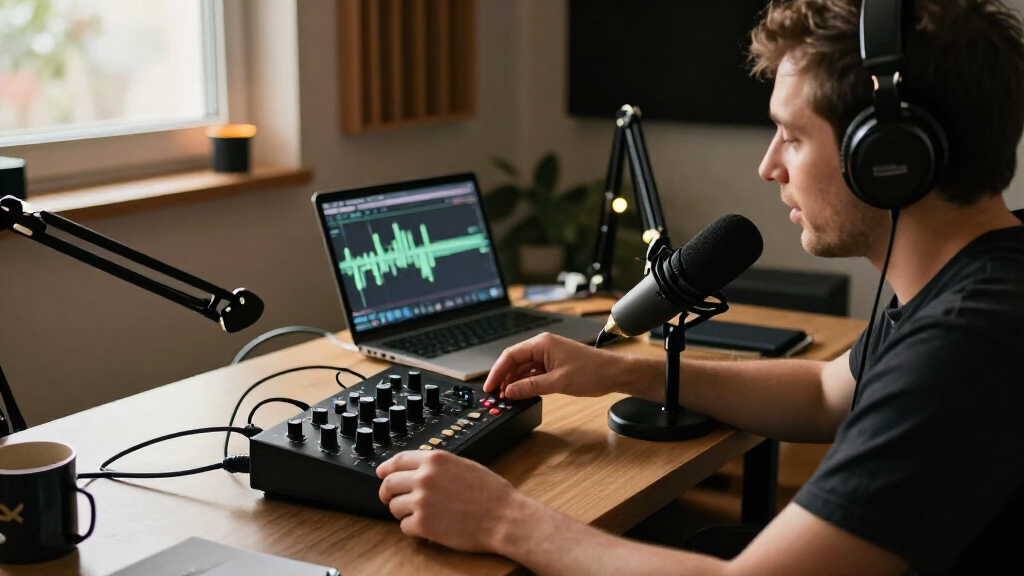

For most solo podcasters, the Focusrite Scarlett Solo 4th Gen is the best overall choice, pairing a straightforward setup with a single-mic workflow. The Zoom PodTrak P4 is a stronger fit for portable, multi-guest recording, while the MAONO E2 Gen2 suits creators who want mixer-style controls. The main tradeoff is between a simple interface for recording into a computer and a podcast-focused mixer or recorder with more inputs and hands-on controls. Bundle kits can bring several microphones together, but may offer less flexibility as a studio grows. Read on for how these 13 options compare and which one fits your recording setup.

Get everyday essentials delivered free with Prime
- Fast, free delivery on millions of items
- Prime Video, Amazon Music and more included
- Member-only deals all year
Key Takeaways
- The Scarlett Solo 4th Gen is the clearest all-around fit for one-person shows; the older 3rd Gen can make sense when its feature set meets your needs.
- The Zoom PodTrak P4 is the standout for recording several guests away from a computer, while its recorder-first workflow differs from a basic USB interface.
- The Focusrite Scarlett 2i2 4th Gen gives two-mic creators a more direct upgrade path than a single-input interface.
- MAONO’s P1, E2 Gen2, and P2 Hybrid lean into podcast controls and connectivity, with different compromises around input count and intended setup.
- Four-microphone bundles address group recording in one package, but buyers should weigh included gear against long-term flexibility and individual component needs.
| Focusrite Scarlett Solo 3rd Gen USB-C Audio Interface |  | Best for Solo Hosts | Connectivity: USB | Channels: 2 | Inputs: XLR and instrument | VIEW LATEST PRICE | See Our Full Breakdown |
| Focusrite Scarlett Solo 4th Gen USB-C Audio Interface |  | Best Refined Solo Interface | Connectivity: USB | Channels: 2 | Microphone input: 1 XLR mic preamp | VIEW LATEST PRICE | See Our Full Breakdown |
| BRVOMUSSY Podcast Equipment Bundle for Two with Audio Mixer, Voice Changer, and Condenser Microphones |  | Best All-in-One Starter Kit for Two | Connectivity: Bluetooth, USB | Channels: 2 | Connector type: XLR | VIEW LATEST PRICE | See Our Full Breakdown |
| M-Audio M-Track Duo USB Audio Interface |  | Best Value for Two Mic Inputs | Audio resolution: 48 kHz | Inputs: 2 combo XLR/line/instrument inputs | Phantom power: Yes | VIEW LATEST PRICE | See Our Full Breakdown |
| M100 Podcast Equipment Bundle for 4 with Audio Interface and 4 Dynamic Microphones |  | Best for Four-Person Shows | Channels: 4 | Microphones: 4 dynamic microphones: 2 XLR and 2 dual 3.5 mm | Connectivity: Dual USB, XLR, 3.5 mm | VIEW LATEST PRICE | See Our Full Breakdown |
| Podcast Recording Bundle with Microphones, Audio Mixer, and Voice Changer |  | Best Complete Starter Bundle | Channels: 2 | Connectivity: USB | Output connector: USB Type-C | VIEW LATEST PRICE | See Our Full Breakdown |
| MAONO P1 USB Audio Interface with 70 dB Gain |  | Best for Flexible Recording | Channels: 2 | Audio quality: 24-bit/192 kHz | Maximum gain: 70 dB | VIEW LATEST PRICE | See Our Full Breakdown |
| MAONO E2 Gen2 Podcast Audio Interface and Mixer |  | Best for Mobile Live Shows | Inputs: 2 XLR combo inputs | Channels: 10 | Preamp gain: Up to 60 dB | VIEW LATEST PRICE | See Our Full Breakdown |
| SINWE BM-800 Podcast Equipment Bundle with F998 Audio Mixer | 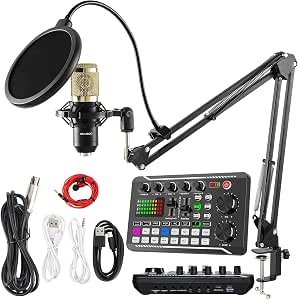 | Best All-in-One Desktop Kit | Microphone: BM-800 cardioid condenser | Audio mixer: F998 | Mixer channels: 4 | VIEW LATEST PRICE | See Our Full Breakdown |
| BlueAVS AR013 USB Audio Interface, 2-In/4-Out, 24-Bit/192 kHz |  | Best for High-Resolution Recording | Inputs/outputs: 2-in/4-out | Audio inputs: 2 XLR/¼-inch TRS combo inputs | Maximum sample rate: 192 kHz | VIEW LATEST PRICE | See Our Full Breakdown |
| Zoom PodTrak P4 Portable Podcast Recorder |  | Best for Portable Group Podcasts | Microphone inputs: 4 XLR inputs with phantom power | Headphone outputs: 4, with individual volume controls | Connections: Phone TRRS jack and USB 2.0 | VIEW LATEST PRICE | See Our Full Breakdown |
| MAONO P2 Hybrid USB Audio Interface with Dual XLR Inputs |  | Best for Computer and Mobile Streaming | Channels: 2 | Connectivity: USB | Microphone gain: 56 dB | VIEW LATEST PRICE | See Our Full Breakdown |
| Focusrite Scarlett 2i2 4th Gen USB-C Audio Interface |  | Best for Studio-Focused Two-Mic Recording | Channels: 2 | Microphone preamps: 2 | Connectivity: USB | VIEW LATEST PRICE | See Our Full Breakdown |
| podcast audio interface | Connectivity | Channels |
|---|---|---|
| Focusrite Scarlett Solo 3rd Ge | USB | 2 |
| Focusrite Scarlett Solo 4th Ge | USB | 2 |
| BRVOMUSSY Podcast Equipment Bu | Bluetooth, USB | 2 |
| M-Audio M-Track Duo USB Audio | — | — |
| M100 Podcast Equipment Bundle | Dual USB, XLR, 3.5 mm | 4 |
| Podcast Recording Bundle with | USB | 2 |
| MAONO P1 USB Audio Interface w | USB | 2 |
| MAONO E2 Gen2 Podcast Audio In | AUX, Bluetooth, USB-C | 10 |
| SINWE BM-800 Podcast Equipment | Bluetooth, USB | — |
| BlueAVS AR013 USB Audio Interf | USB-C | — |
| Zoom PodTrak P4 Portable Podca | — | — |
| MAONO P2 Hybrid USB Audio Inte | USB | 2 |
| Focusrite Scarlett 2i2 4th Gen | USB | 2 |
More Details on Our Top Picks
Focusrite Scarlett Solo 3rd Gen USB-C Audio Interface
The Scarlett Solo 3rd Gen suits a podcast built around one host recording a microphone and, when needed, an instrument. Its single mic preamp keeps the setup compact, while Gain Halo metering gives a clear visual cue for setting levels before recording. Air mode can add presence to a voice, though it is a tonal option rather than a fix for a poor microphone or room. Compared with the Scarlett Solo 4th Gen, this model has the same basic one-mic workflow but lacks the newer model’s stated 120 dB dynamic range and independent headphone volume control. The two-channel limit also makes either Solo a poor fit for co-hosts using separate microphones. I’d choose this generation for a straightforward solo desk setup, with the tradeoff that expansion means replacing the interface.
Pros:- One XLR mic input and an instrument input support a simple voice-and-guitar setup.
- Gain Halo metering helps identify input levels at a glance.
- Switchable Air mode offers an extra tonal option for vocals and acoustic instruments.
- Bundled recording software and plug-ins provide tools to start producing.
Cons:- Only one microphone preamp limits interviews and multi-host recording.
- No external power supply is included.
Best for: Solo podcasters who record one microphone at a time and want a compact interface with visible gain feedback.
Not ideal for: Co-hosts who need two separate microphone preamps or podcasters planning to record several guests at once.
- Connectivity:USB
- Channels:2
- Inputs:XLR and instrument
- Maximum sample rate:192 kHz
- Bit depth:24-bit
- Compatible operating systems:Mac OS, Windows OS, iOS
- Dimensions:1.71 x 5.65 x 3.77 in
- Warranty:3 years
Our verdict“Choose the Scarlett Solo 3rd Gen for a compact one-host podcast setup with straightforward level feedback.”
Focusrite Scarlett Solo 4th Gen USB-C Audio Interface
For a solo host who wants a polished desktop interface without adding a second mic channel, the Scarlett Solo 4th Gen makes a stronger case than the older Scarlett Solo 3rd Gen. Its stated 120 dB dynamic range, Air mode, and independent headphone volume control focus on recording and monitoring a single voice comfortably. The XLR preamp and Hi-Z input also let a host connect a mic and instrument, although that is less useful for a spoken-word show than having another mic preamp. Compared with the M-Audio M-Track Duo, it offers a higher stated sample-rate ceiling and more bundled software, while the M-Audio provides two combo inputs and phantom power. The Solo’s main tradeoff is capacity: it is a one-mic interface, so a co-host or guest pushes it beyond its intended workflow.
Pros:- 120 dB dynamic range is specified for the interface.
- Independent headphone volume control allows monitoring to be adjusted separately.
- Air mode adds a tonal option for voice recording.
- Includes several recording applications and plug-ins.
Cons:- Only one microphone preamp is available.
- Two channels leave little room for a separate guest microphone or additional sources.
Best for: Solo hosts who want a compact USB interface with independent headphone level control and bundled production software.
Not ideal for: Two-person shows that need each speaker on a separate XLR microphone input.
- Connectivity:USB
- Channels:2
- Microphone input:1 XLR mic preamp
- Instrument input:1 Hi-Z input
- Maximum sample rate:192 kHz
- Dynamic range:120 dB
- Compatible operating systems:Mac OS, Windows OS, iOS
- Warranty:Three years
Our verdict“Pick the Solo 4th Gen if your show is centered on one host and you value its monitoring controls and software bundle.”
BRVOMUSSY Podcast Equipment Bundle for Two with Audio Mixer, Voice Changer, and Condenser Microphones
The BRVOMUSSY bundle is aimed at two people who want microphones, boom arms, and basic show effects in one package. That makes setup more approachable than assembling separate pieces around an interface such as the M-Audio M-Track Duo, which supports two combo inputs but does not include microphones or arms. The mixer’s sound effects and voice variations may suit casual streams or playful episodes, while its broad device compatibility gives buyers several connection options. The tradeoff is that the listed data does not establish the same recording specifications as the dedicated Scarlett interfaces, and the description flags possible driver installation help from support. Its battery also needs charging before first use or after long storage. I’d favor it for a simple two-person, effects-forward setup, but not for a buyer prioritizing a conventional studio interface workflow.
Pros:- Includes two condenser microphones and two boom arms.
- Mixer adds noise reduction, sound effects, and voice variations.
- Supports computers, smartphones, and listed gaming consoles.
- Includes accessories intended to make a basic setup more self-contained.
Cons:- Driver installation may require contacting support, according to the description.
- Battery needs charging before first use or after extended storage.
- The provided product data does not specify a maximum sample rate or bit depth.
Best for: Two-person beginner streamers or podcasters who want microphones, arms, and voice effects in one starter package.
Not ideal for: Hosts seeking a clearly specified computer recording interface with a conventional multi-mic studio workflow.
- Connectivity:Bluetooth, USB
- Channels:2
- Connector type:XLR
- Microphones:2 condenser microphones
- Microphone polar pattern:Unidirectional
- Signal-to-noise ratio:78 dB
- Power source:Battery powered
- Compatibility:Windows, iOS, Android, Mac OS, Chrome OS, PC, smartphones, PS4, Xbox
Our verdict“Choose this kit for a casual two-person show where included microphones and sound effects matter more than detailed recording specifications.”
M-Audio M-Track Duo USB Audio Interface
The M-Track Duo earns its place for podcasters who need two combo inputs and want to connect microphones, instruments, or line-level sources. Phantom power supports compatible condenser microphones, while zero-latency direct monitoring lets speakers hear their input without relying on a computer playback path. That makes it more suitable for a two-source recording than either Scarlett Solo, each of which has only one mic preamp. Its stated 48 kHz resolution is a narrower specification than the Scarlett Solo models’ 192 kHz ceiling, though that difference may matter less to a spoken-word show than having the second input. The included MPC Beats software adds a starting point for production, but its iOS setup requires an adapter and the headphone jack may need a 1/4-inch adapter. This is the practical pick for a simple two-mic computer rig.
Pros:- Two combo inputs accept microphones, instruments, and line-level sources.
- Phantom power supports compatible condenser microphones.
- Direct monitoring avoids distracting playback delay while recording.
- USB power and compact design suit portable desk setups.
Cons:- 48 kHz audio resolution is below the 192 kHz ceiling listed for the Scarlett Solo interfaces.
- iOS use requires an Apple Lightning to USB 3 Camera Adapter.
- Headphones may need a 1/4-inch adapter.
Best for: Two-person podcast teams who need two mic-capable inputs and direct monitoring on a compact computer interface.
Not ideal for: Mobile-first creators who want plug-and-play iOS use without an adapter or buyers seeking a higher stated sample rate.
- Audio resolution:48 kHz
- Inputs:2 combo XLR/line/instrument inputs
- Phantom power:Yes
- Outputs:Stereo 1/4-inch outputs
- Headphone output:1/4-inch
- Monitoring:Zero-latency direct monitoring with USB/Direct switch
- Power:USB-powered
- Compatible platforms:Mac, PC, iOS with adapter
Our verdict“Choose the M-Track Duo when two flexible inputs and direct monitoring matter more to your podcast than a higher sample-rate ceiling.”
M100 Podcast Equipment Bundle for 4 with Audio Interface and 4 Dynamic Microphones
When a podcast regularly seats four speakers, the M100 bundle’s appeal is its four microphones and four-channel interface arriving with desktop stands and accessories. That gives it a more guest-ready format than the two-input M-Audio M-Track Duo, which would require additional equipment for a group recording. Dual USB connections are another unusual fit for creators who want to connect two computers or mobile devices. Noise reduction, real-time monitoring, and effects add flexibility for streaming, though the number of features and controls may take time to learn. The microphone connections are mixed—two XLR and two dual 3.5 mm—so buyers should check that arrangement against their preferred mic setup. At six pounds and battery powered, it is less like a minimal desktop interface; warranty details are also not provided.
Pros:- Includes four dynamic microphones and four desktop stands.
- Four-channel interface is suited to group recording.
- Dual USB connections support two computers or mobile devices.
- Monitoring, noise reduction, sound effects, and voice changing are included.
Cons:- Mixed microphone connections include two XLR and two dual 3.5 mm inputs.
- Multiple functions and controls may take time to learn.
- Warranty details are not specified in the product data.
Best for: Four-person podcast teams who want a bundled set of microphones, desktop stands, and a mixer-style interface.
Not ideal for: Solo hosts or small desks where a compact two-input interface would be simpler and easier to place.
- Channels:4
- Microphones:4 dynamic microphones: 2 XLR and 2 dual 3.5 mm
- Connectivity:Dual USB, XLR, 3.5 mm
- Power source:Battery powered
- Battery capacity:4000 mAh
- Input:XLR and 6.35 mm instrument jack
- Item weight:6 pounds
- Compatibility:Windows, Mac, iOS, Android
Our verdict“Choose the M100 when your regular show has four speakers and you want the microphones and basic accessories in one bundle.”
Podcast Recording Bundle with Microphones, Audio Mixer, and Voice Changer
Two microphones, suspension arms, and a battery-powered mixer make this the most ready-to-start two-person package among these picks. Compared with the SINWE BM-800 bundle, it adds USB-C connections for phones, tablets, computers, and gaming consoles, plus direct instrument inputs for guitar, bass, and electronic drums. Noise reduction, DSP, four voice variations, and ten sound effects suit casual shows and streams where live effects matter as much as clean speech.
The tradeoff is that this bundle centers on convenience and built-in effects rather than detailed recording specifications: its data lists two channels but no sample rate or preamp gain. The battery needs a full charge before first use, and driver installation may require customer support. Buyers seeking a more conventional recording interface with published high-resolution specs should compare it with the MAONO P1.
Pros:- Includes two condenser microphones and suspension arms for a two-host setup.
- USB-C connectivity supports computers, phones, tablets, and gaming consoles.
- Noise reduction, DSP, four voice variations, and ten effects support live production.
- Accepts direct guitar, bass, and electronic drum input.
Cons:- Recording sample rate and preamp gain are not specified in the supplied product data.
- Battery should be fully charged before first use.
- Driver installation may require contacting customer support.
Best for: New two-person podcast hosts who want microphones, arms, and a mixer in one kit and plan to record across phones or computers.
Not ideal for: Producers who need clearly specified recording resolution, advanced routing, or a driver setup they can manage without support.
- Channels:2
- Connectivity:USB
- Output connector:USB Type-C
- Power source:Battery powered
- Microphones included:2 condenser microphones
- Voice variations:4
- Sound effects:10
- Weight:1.48 kg
Our verdict“Choose this bundle for an effects-friendly two-person setup with microphones included, and look elsewhere if recording specifications matter most.”
MAONO P1 USB Audio Interface with 70 dB Gain
Up to 70 dB of gain, auto gain, direct monitoring, and loopback give the MAONO P1 a practical mix of recording and streaming controls. Its two-channel design is simpler than the MAONO E2 Gen2, which adds multiple sound effects, voice effects, and a built-in battery; the P1 instead lists 24-bit/192 kHz recording and broad compatibility with computers and mobile devices. Its compact zinc-alloy housing also suits a desk or a small mobile recording kit.
That flexibility comes with a software caveat: some routing and effects depend on ProStudio2, and the supplied frequency-response figure of 20 kHz offers limited detail. The listed operating systems include Android, ChromeOS, Windows, and iOS, but not macOS, despite Mac appearing among the listed inputs. Check compatibility for your intended setup before choosing it over the Focusrite Scarlett 2i2 4th Gen.
Pros:- Supports recording up to 24-bit/192 kHz.
- Provides up to 70 dB of gain, auto gain, and direct monitoring.
- Loopback and mute controls support streaming workflows.
- Compact zinc-alloy housing and USB connections suit computer and mobile recording.
Cons:- Some routing and effects features depend on ProStudio2 software.
- The listed 20 kHz frequency-response figure provides limited specification detail.
- Mac appears among the listed inputs, but macOS is absent from the supported operating systems list.
Best for: Solo podcasters and streamers who want high gain, loopback, and mobile-device connections in a compact two-channel interface.
Not ideal for: Buyers who need a clearly documented macOS compatibility listing or want onboard voice effects without routing software.
- Channels:2
- Audio quality:24-bit/192 kHz
- Maximum gain:70 dB
- Connectivity:USB
- Housing:Zinc alloy
- Dimensions:5.9 × 5.98 × 3.46 in
- Supported operating systems:Android, ChromeOS, Windows, iOS
- Supported software:Pro Tools, Ableton Live, Studio One, Logic Pro, Cubase, GarageBand, FL Studio, OBS Studio
Our verdict“Pick the P1 for a compact, high-gain recording interface with loopback, after checking that its software and operating-system support fit your setup.”
MAONO E2 Gen2 Podcast Audio Interface and Mixer
Two XLR combo inputs and a built-in battery make the E2 Gen2 a natural fit for podcasters who want to host or stream away from a fixed desk. It offers up to 60 dB of preamp gain, loopback, mute and monitoring controls, plus eight customizable sound effect buttons. Compared with the BlueAVS AR013, which focuses on high-resolution recording and selectable monitoring modes, the E2 puts more emphasis on live show controls and battery-powered use.
The E2’s stated maximum sample rate is 48 kHz, so the AR013 is the stronger match for buyers who prioritize 24-bit/192 kHz recording. Its battery is rated for up to eight hours, and it does not support phone charging or power delivery. The larger, feature-rich control surface makes sense for interactive shows, but less so for someone seeking a compact, straightforward interface for voice capture.
Pros:- Two XLR combo inputs and preamps with up to 60 dB of gain.
- Eight customizable sound effect buttons plus voice effects.
- Loopback, mute, and monitoring controls support live production.
- Built-in 1500 mAh battery is rated for up to eight hours.
Cons:- Maximum sample rate is 48 kHz, below the BlueAVS AR013’s listed 192 kHz.
- Battery life is limited to up to eight hours.
- Does not support phone charging or power delivery.
Best for: Mobile podcasters and livestream hosts who need two XLR microphones, onboard effects, and loopback for sessions away from a powered desk.
Not ideal for: Producers who need higher than 48 kHz recording, phone charging, or a small interface focused on clean voice capture.
- Inputs:2 XLR combo inputs
- Channels:10
- Preamp gain:Up to 60 dB
- Maximum sample rate:48 kHz
- Connectivity:AUX, Bluetooth, USB-C
- Battery:1500 mAh; up to 8 hours of use
- Weight:0.89 kg
- Dimensions:9.64 × 6.18 × 2.16 in
Our verdict“Choose the E2 Gen2 for battery-powered podcasting and onboard live controls, and choose a different interface if high-resolution recording is your priority.”
SINWE BM-800 Podcast Equipment Bundle with F998 Audio Mixer
A BM-800 microphone, F998 mixer, earbuds, stand, and four cables give this bundle more of the basic desk setup than an interface-only pick such as the BlueAVS AR013. The four-channel mixer includes effects and voice modes for podcasting, streaming, voice-over, and music recording, while USB and Bluetooth provide connection options. It is a practical way to assemble a starter station without sourcing each accessory separately.
Compared with the two-microphone bundle earlier in this roundup, the SINWE package includes one microphone and has no specified battery power, so it is better suited to a fixed recording spot than a mobile two-host show. The listing gives 24-bit audio and a 120 kHz sample rate, but does not clarify much about the mixer’s preamps. Phone and tablet use also requires adapters that are not included, and warranty information is unspecified.
Pros:- Includes a BM-800 microphone, mixer, earbuds, desktop stand, and four cables.
- Four-channel mixer provides room for multiple audio sources.
- Built-in effects and voice modes suit podcasting, streaming, and voice-over.
- Lists USB and Bluetooth connectivity.
Cons:- Phone and tablet adapters are required but not included.
- Only one microphone is included, limiting immediate two-host use.
- Warranty information is unspecified.
Best for: First-time solo podcasters setting up a fixed desk who want a microphone, mixer, stand, earbuds, and cables in one package.
Not ideal for: Two-person or mobile creators who need a second microphone, included phone adapters, or clearly documented preamp performance.
- Microphone:BM-800 cardioid condenser
- Audio mixer:F998
- Mixer channels:4
- Connectivity:Bluetooth, USB
- Sample rate:120 kHz
- Bitrate:24-bit
- Output connector:USB Type-B
- Included accessories:3-meter earbuds, desktop mic stand, 4 data cables
Our verdict“Choose the SINWE kit for a bundled solo desktop setup, but plan for adapters if you intend to record from a phone or tablet.”
BlueAVS AR013 USB Audio Interface, 2-In/4-Out, 24-Bit/192 kHz
Two XLR/TRS combo inputs, 24-bit/192 kHz recording, and +48V phantom power put the AR013 in the conventional recording-interface lane. It can accommodate condenser microphones as well as guitars and line-level devices, while four balanced outputs provide more routing options than a basic two-output setup. Zero-latency monitoring offers four modes, including crossfeed, giving this model a more focused recording and listening feature set than the effects-led MAONO E2 Gen2.
That focus means fewer live podcast extras: the AR013 has no listed battery, sound effect buttons, or voice modes. It also has only two input channels and needs a USB-connected compatible device to operate. Compared with the MAONO P1, it lists +48V phantom power and four outputs, but its monitoring options and published dynamic range are the details that distinguish it for a studio-style setup.
Pros:- Records up to 24-bit/192 kHz.
- Two combo inputs accept microphones, guitars, and line-level sources.
- +48V phantom power supports condenser microphones.
- Zero-latency monitoring offers OFF, MONO, Crossfeed, and STEREO modes.
Cons:- Only two audio input channels are available.
- Requires a USB connection to a compatible device.
- Does not list onboard battery power, voice effects, or sound effect buttons.
Best for: Home podcasters and musicians who use up to two microphones or instruments and want high-resolution recording with phantom power and balanced outputs.
Not ideal for: Mobile hosts who need a battery-powered mixer, onboard voice effects, or more than two simultaneous input channels.
- Inputs/outputs:2-in/4-out
- Audio inputs:2 XLR/¼-inch TRS combo inputs
- Maximum sample rate:192 kHz
- Bit depth:24-bit
- Phantom power:+48V
- Monitoring:Zero-latency; OFF, MONO, Crossfeed, and STEREO modes
- Dynamic range:103 dB
- Connectivity:USB-C
- Compatible operating systems:Android, Linux, Windows, iOS, macOS
Our verdict“Pick the AR013 for a USB-connected studio setup that values high-resolution recording, phantom power, and monitoring choices over live effects.”
Zoom PodTrak P4 Portable Podcast Recorder
The Zoom PodTrak P4 is the clearest fit here for recording a group away from a desk: four XLR inputs and four individually controlled headphone outputs let guests hear the session without adding a separate headphone amp. Its phone connection and automatic Mix-Minus make remote call-ins easier to manage than on the Focusrite Scarlett 2i2 4th Gen, which is a two-channel computer interface rather than a standalone podcast recorder. Sound pads add a way to trigger clips during a show, while USB mode also lets the P4 serve as an interface. The tradeoff is its up to 3.5 hours of battery life on two AA batteries; it is better suited to planned sessions than long recording days without spare power. Choose it for mobile, multi-person shows, not for advanced studio routing.
Pros:- Four XLR microphone inputs with phantom power support multi-host setups.
- Four headphone outputs have individual volume controls for guests.
- Phone connection and automatic Mix-Minus support remote interviews.
- Can record portably or operate as a USB audio interface.
Cons:- Battery life is limited to up to 3.5 hours on two AA batteries.
- Its portable recorder workflow is less suited to users seeking a conventional computer-first studio interface.
Best for: Podcast hosts recording up to four XLR microphones on location, especially when guests need separate headphone volume controls or remote phone call-ins.
Not ideal for: Creators who record long sessions away from power or need a computer-focused interface with more detailed studio workflow features.
- Microphone inputs:4 XLR inputs with phantom power
- Headphone outputs:4, with individual volume controls
- Connections:Phone TRRS jack and USB 2.0
- Recording format:WAV
- Battery:2 AA batteries; up to 3.5 hours
- Recording time:Up to 24 hours
- Storage capacity:1 TB
- Dimensions:6.1 × 4.41 × 1.85 in
- Weight:130 g
Our verdict“Choose the PodTrak P4 for portable four-microphone podcasts and remote call-ins, provided you can manage its short battery runtime.”
MAONO P2 Hybrid USB Audio Interface with Dual XLR Inputs
The MAONO P2 suits creators who want a two-input interface to connect with both a computer and a phone or tablet. That dual-device setup, along with loopback and independent mute controls, can simplify a livestream or remote podcast where computer audio and a mobile source share the session. Compared with the Focusrite Scarlett 2i2 4th Gen, the P2 emphasizes creator routing and mobile connections, while the Scarlett lists 69 dB of analogue gain and level-setting aids such as Auto Gain and Clip Safe. The P2’s stated 24-bit/192 kHz recording is capable on paper, but the supplied frequency-response detail is limited to a 20 kHz listing, and some software features may take setup. Its two-channel design also cannot match the PodTrak P4’s four-mic group capacity.
Pros:- Can connect a computer and a phone or tablet simultaneously.
- Dual XLR inputs support two-microphone recording.
- Direct monitoring, loopback, and independent mute controls support creator workflows.
- Compact aluminum-alloy housing and broad listed device compatibility.
Cons:- Two channels limit it to smaller microphone setups compared with the Zoom PodTrak P4.
- Some software features may require setup.
- The listed 20 kHz frequency response gives limited detail about its full response range.
Best for: Solo or two-person podcasters and livestreamers who want to route audio between a computer and a phone or tablet.
Not ideal for: Hosts recording more than two microphones or buyers who want detailed published frequency-response specifications and a simple, minimal software setup.
- Channels:2
- Connectivity:USB
- Microphone gain:56 dB
- Maximum sample rate:192 kHz
- Audio resolution:24-bit
- Frequency response:Listed as 20 kHz
- Compatible operating systems:Android, ChromeOS, Windows, iOS, macOS
- Housing:Aluminum alloy
- Dimensions and weight:6.42 × 8.27 × 3.23 in; 0.5 kg
Our verdict“Pick the MAONO P2 for a two-input show that mixes computer and mobile audio, but look to the PodTrak P4 for more microphone channels.”
Focusrite Scarlett 2i2 4th Gen USB-C Audio Interface
For a computer-based podcast with one or two microphones, the Scarlett 2i2 4th Gen brings the strongest stated recording and level-control credentials of these three picks. Its 120 dB dynamic range, two low-noise preamps, and Auto Gain and Clip Safe features are aimed at getting a usable vocal level with less manual adjustment. Air mode offers another way to shape vocal presence. Compared with the MAONO P2, the Scarlett emphasizes preamp performance and recording tools over simultaneous phone-and-computer routing; compared with the Zoom PodTrak P4, it trades standalone recording and four mic inputs for a computer-centered two-channel workflow. That makes it a better match for a home studio than a mobile group show. It also needs a compatible computer or device and recording software, so it is not a self-contained recorder.
Pros:- Two low-noise microphone preamps support a two-mic podcast setup.
- 120 dB dynamic range and up to 192 kHz sample rate are suited to detailed recording.
- Auto Gain and Clip Safe help manage recording levels.
- Air mode and included recording software and plugins add recording and tone-shaping options.
Cons:- Requires a compatible computer or device and recording software.
- Two inputs and no standalone recorder mode are less suited to mobile group sessions than the Zoom PodTrak P4.
Best for: Home-studio podcasters recording one or two voices into a computer who value assisted gain setting and a broad dynamic range.
Not ideal for: Mobile interviewers who need standalone recording, or group hosts who need more than two microphone inputs and several headphone feeds.
- Channels:2
- Microphone preamps:2
- Connectivity:USB
- Maximum sample rate:192 kHz
- Dynamic range:120 dB
- Analogue gain:69 dB
- Compatible operating systems:Mac OS, Windows OS, iOS
- Dimensions:4.61 × 7.09 × 1.87 in
- Warranty:3 years
Our verdict“Choose the Scarlett 2i2 4th Gen for a computer-based one- or two-mic studio, and choose the PodTrak P4 when portable group recording matters more.”

How We Picked
I ranked these options by how well their input count, controls, recording workflow, and included equipment match common podcast setups. I gave more weight to reliable fit for solo and co-host recording, clear paths for connecting microphones, and ease of use than to headline specifications alone. I also considered portability and whether a product records directly or depends on a computer, since those choices shape where and how a show can be made.
The ranking favors capable interfaces with a focused use case and room for a buyer to make an informed choice. The Scarlett Solo 4th Gen leads as a straightforward solo option; the PodTrak P4 ranks highly for portable guest sessions, and the 2i2 serves two-mic recording. Podcast bundles and compact mixers earn places for their all-in-one appeal, though their bundled components and narrower upgrade paths make them less universal.
| podcast audio interface | Connectivity |
|---|---|
| Focusrite Scarlett Solo 3rd Ge | USB |
| Focusrite Scarlett Solo 4th Ge | USB |
| BRVOMUSSY Podcast Equipment Bu | Bluetooth, USB |
| M-Audio M-Track Duo USB Audio | — |
| M100 Podcast Equipment Bundle | Dual USB, XLR, 3.5 mm |
| Podcast Recording Bundle with | USB |
| MAONO P1 USB Audio Interface w | USB |
| MAONO E2 Gen2 Podcast Audio In | AUX, Bluetooth, USB-C |
| SINWE BM-800 Podcast Equipment | Bluetooth, USB |
| BlueAVS AR013 USB Audio Interf | USB-C |
| Zoom PodTrak P4 Portable Podca | — |
| MAONO P2 Hybrid USB Audio Inte | USB |
| Focusrite Scarlett 2i2 4th Gen | USB |
Factors to Consider When Choosing Podcast Audio Interfaces
Choose around the show you plan to record, not just the number of controls on the front panel. A few decisions about guests, recording location, and future growth can prevent a mismatch.
Count microphones, not people
Start by counting the microphones you expect to record at the same time. Two hosts sharing one mic need a different setup from two hosts with separate mics, and remote guests may add another input requirement. Leave room for an occasional in-person guest if that is part of your plan. A common mistake is buying a one-input interface because it is marketed for podcasting, then discovering that separate host tracks matter. Separate tracks make it easier to adjust each voice in editing. If your format is likely to expand, an extra input can be more useful than a long list of effects.
Decide whether you need a recorder or a computer interface
A USB interface sends microphone audio to a computer, where recording software handles the session. A portable recorder can capture a show without relying on a laptop during recording, which is handy for interviews on location. Think through what happens if the computer restarts, runs out of battery, or becomes part of the room setup. Recording directly to a device can simplify some sessions, while computer-based recording can fit a workflow built around editing software and existing files. Check how recordings are saved and moved before buying. The most convenient setup is the one that matches where you will actually record and edit.
Check the connections your microphones require
Do not assume that every microphone uses the same connector or power. XLR microphones need compatible inputs and may need phantom power if they are condenser models; dynamic microphones typically do not need phantom power. USB microphones connect differently and may not work as intended through a conventional XLR interface. Bundles can include microphones and cables, but verify what each microphone needs and whether the interface supports it. Also check headphone connections and monitoring controls so hosts can hear themselves while recording. A connection mismatch can turn an otherwise suitable kit into an extra-parts project.
Separate useful controls from effects you may not use
Mixer-style interfaces may add voice effects, sound pads, or dedicated mute controls. These can help with live, informal shows where hosts want to change sound without editing. For a scripted interview or a show that is edited later, clean gain control and dependable monitoring may matter more than built-in effects. Consider whether you want to operate controls while speaking or keep the recording setup as simple as possible. Extra functions can shorten a live workflow, but they also mean more settings to learn. Match the controls to the show format rather than treating a longer feature list as a better fit.
Think about the upgrade path before choosing a bundle
A bundle can be a practical way to get multiple microphones and a mixer together, especially when several people are starting from scratch. Its convenience depends on whether the included microphones suit your voices, room, and recording habits. Bundled gear may be less adaptable if you later want different microphones, more inputs, or separate computer recording for each speaker. Compare the package as a whole: interface connections, microphone type, headphones, cables, and any stand or mounting needs. Buying components separately can make it easier to choose each piece, but requires more setup decisions. The right approach depends on whether immediate group recording or gradual customization matters more to you.
Plan for the room as well as the interface
An interface cannot remove echo, nearby traffic, or a noisy computer fan from a recording. In a reflective room, microphone placement and soft furnishings may improve speech more than a more advanced mixer. Dynamic microphones are often practical when several people share a room because each speaker can stay close to their mic, though placement still matters. Headphones help hosts monitor interruptions and unwanted noise during a session. Leave space for stands and cables before choosing a multi-microphone arrangement. A smaller setup that works in your actual room can be easier to use consistently than a feature-rich kit that crowds it.
Frequently Asked Questions
Can I start a two-host podcast with a single-input interface?
Yes, if both hosts share one microphone or if only one voice needs a separate track at a time. That setup gives you fewer independent controls when balancing voices in editing, and shared-mic placement can be awkward. For two microphones recorded at once, choose an interface with two suitable inputs or a recorder designed for multiple speakers. Also check that your recording software can capture the inputs as separate tracks. Your choice depends on whether a compact setup or independent voice editing matters more.
Is a podcast bundle a better starting point than buying an interface alone?
A bundle can simplify setup when you need several microphones and related equipment at once. It is most useful when the included microphone types, connections, and number of inputs suit your planned show. An interface alone may be a better starting point if you already own a microphone or want to choose each component yourself. Before buying a bundle, identify anything it does not include, such as headphones, stands, or compatible cables. The package is only convenient if its parts fit together and your recording needs.
Should I choose a portable recorder for interviews outside my studio?
A portable recorder is a sensible choice if you want to capture guests without setting up a computer at every location. Check the number of microphone inputs, headphone monitoring options, and how you will transfer recordings to your editing setup. A USB interface can still work on location when a laptop is part of your workflow, but it ties recording to that computer. Consider power and storage as well as portability, since both affect an actual field session. For a fixed desk setup, the recorder’s standalone features may matter less.
Do I need voice effects and sound pads for a podcast?
No. They are most useful when you want to trigger sounds or change a voice during a live or lightly edited show. If your priority is clean dialogue and detailed editing, basic gain, monitoring, and reliable recording may serve you better. Effects also add controls that hosts need to understand before recording. Decide whether you will use them during every episode or only occasionally. That answer can help you choose between a mixer-focused device and a simpler interface.
When is it worth choosing a two-input interface over a solo model?
Choose two inputs when you expect to record two microphones at once, want separate tracks for two speakers, or anticipate occasional in-person guests. A solo model remains a reasonable fit for a one-mic show and can keep setup simple. Buying extra capacity can save a replacement later, but unused inputs do not improve a recording on their own. Check that the two inputs support the microphone connections and monitoring setup you need. Your recording format, rather than a vague plan to grow, is the best guide.
Conclusion
Best overall: I recommend the Focusrite Scarlett Solo 4th Gen for a solo host seeking a straightforward computer-based setup. Best value: the M-Audio M-Track Duo is worth a look for buyers who need two inputs without the more podcast-specific controls of mixer-style models. Best for beginners: the BRVOMUSSY two-person bundle may suit new co-hosts who want microphones and a mixer together, provided its included components match their needs. Best premium: the Scarlett 2i2 4th Gen is the more capable pick for two-mic recording and a studio workflow. Best for specific needs: choose the Zoom PodTrak P4 for portable guest sessions, or a four-microphone bundle when a group needs a ready-made starting point. Let your number of simultaneous microphones and recording location make the final call.
Halloween Picks
halloween
As an affiliate, we earn on qualifying purchases.