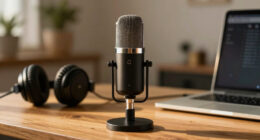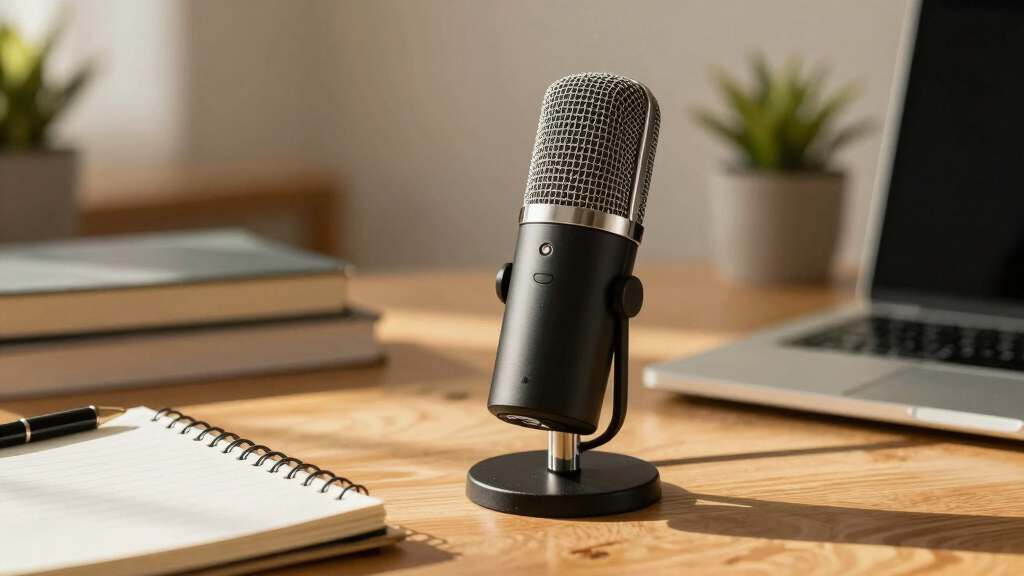

Choosing the right USB microphone for podcasting can significantly impact your sound quality and overall production. The Logitech Blue Yeti stands out as the best overall pick thanks to its versatility and clear audio, making it suitable for most podcasters. The MAONO AU-A04 offers excellent value with high-resolution sound at an affordable price, while the HyperX SoloCast delivers simplicity and quality for gaming and casual recording. The main tradeoffs in this category often involve balancing sound quality, ease of use, and price. Keep reading to see how each model stacks up and find the best fit for your podcasting setup.
Key Takeaways
- Top picks balance sound clarity, ease of use, and build quality, with the Blue Yeti leading for overall versatility.
- Value-oriented microphones like the MAONO AU-A04 offer high resolution without breaking the bank, ideal for beginners.
- Some microphones, such as the FIFINE models, add features like RGB lighting or integrated boom arms, appealing to streamers and gamers.
- Wireless options like the MAONO PD200W expand flexibility but often come with higher price tags and complexity.
- Choosing between XLR and USB depends on future upgrade plans; most podcasters should prioritize USB for simplicity.






More Details on Our Top Picks
Logitech Blue Yeti USB Microphone – Midnight Blue
The Blue Yeti stands out for its flexibility with four distinct pickup patterns, making it ideal for podcasters who want to switch between solo recording and interview setups effortlessly. Compared with the ZealSound K66, it offers more creative control with onboard Blue VO!CE effects, but this comes with a bulkier design that may take up more desk space. The plug-and-play compatibility on both Mac and PC simplifies setup, and the adjustable desktop stand helps position the mic precisely. However, its size and higher price point may be less appealing for those with limited space or tighter budgets.
Pros:- Multiple pickup patterns for versatile recording styles
- High-quality broadcast sound with integrated Blue VO!CE effects
- Easy plug-and-play setup with broad compatibility
- Adjustable desktop stand for precise positioning
Cons:- Bulkier design requires more desk space
- Premium price may be prohibitive for casual users
Best for: Podcasters and streamers who need a flexible, all-in-one microphone with creative audio effects.
Not ideal for: Users with limited desk space or those seeking a budget-friendly option, as its bulk and premium price may be a drawback.
- Pickup Patterns:Cardioid, Omni, Bidirectional, Stereo
- Connectivity:USB
- Color:Midnight Blue
- Software:Blue VO!CE effects
- Onboard Controls:Headphone volume, pattern selection, mute, mic gain
- Included Stand:Desktop stand
Bottom line: This mic is best suited for serious podcasters and streamers who value flexibility and professional sound quality.
MAONO USB Microphone 192kHz/24Bit Plug & Play for PC, Podcast, Gaming, YouTube – AU-A04
The MAONO AU-A04 offers impressive 192kHz/24Bit audio quality, making it a strong choice for those who want professional sound without a hefty price tag. Its all-metal build and included accessories, like a boom arm, shock mount, and pop filter, provide a comprehensive recording setup that rivals more expensive bundles like the Blue Yeti. Unlike the Yeti, it lacks multi-pattern options, limiting versatility for different recording scenarios, and its maximum frequency response of 16kHz isn’t ideal for high-fidelity studio work. Still, for budget-conscious content creators who need a solid, ready-to-go setup, it hits a sweet spot.
Pros:- High-resolution 192kHz/24Bit audio quality
- Includes a full recording kit with boom arm and accessories
- Plug-and-play with no drivers needed
- Compatible with a wide range of devices including gaming consoles
Cons:- Limited to cardioid pickup pattern only
- Maximum frequency response of 16kHz is less suitable for high-fidelity studio work
Best for: Budget-conscious podcasters and streamers seeking a complete, high-resolution recording package.
Not ideal for: Professional studio users or those requiring multi-pattern versatility, as it primarily offers cardioid pickup and limited frequency response.
- Sample Rate:192kHz/24Bit
- Connectivity:USB, USB Type-C
- Special Features:Cardioid pattern, professional sound chipset
- Compatible Devices:PC, Mac, PS4, PS5, Mobile
- Frequency Response:30Hz – 16kHz
- Color:Black
Bottom line: This microphone delivers great value for creators wanting high-res audio and a complete setup on a budget.
HyperX SoloCast USB Condenser Gaming Microphone for PC, PS4, PS5, Mac
The HyperX SoloCast excels as an entry-level microphone with high-quality 24-bit/96 kHz recording, making it well-suited for new podcasters and gamers. Its tap-to-mute sensor with LED indicator simplifies live control, and the adjustable stand allows easy positioning for various setups. Compared to the TONOR TC-777, it offers a more streamlined design and reliable USB-C connectivity, but it’s limited to a single cardioid pattern, reducing its flexibility for multi-directional recording needs. Its straightforward approach makes it ideal for beginners but less suitable for multi-mic or complex studio environments.
Pros:- High-quality 24-bit/96 kHz audio recording
- Simple tap-to-mute with LED indicator for live control
- Adjustable stand for flexible positioning
- USB-C connectivity for fast, reliable connection
Cons:- Limited to cardioid polar pattern only
- Requires external stand or boom arm for optimal positioning
Best for: New podcasters and gaming streamers seeking an easy-to-use, high-quality mic with minimal setup fuss.
Not ideal for: Advanced users or those needing multi-pattern options, as SoloCast only captures in cardioid mode and lacks advanced controls.
- Connection:USB-C
- Polar Pattern:Cardioid
- Sampling Rate:96 kHz
- Bit Depth:24-bit
- Mute Control:Tap-to-mute with LED indicator
- Stand:Adjustable, swivels
Bottom line: Ideal for beginners who want a reliable, easy-to-use microphone for streaming and casual podcasting.
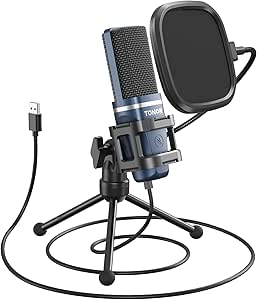
TONOR TC-777 Podcast Microphone with Tripod Stand and Pop Filter
The TONOR TC-777 offers a solid entry point into podcasting and streaming, combining a cardioid pickup pattern with a complete bundle of accessories like a tripod stand, pop filter, shock mount, and windscreen. Its 80 dB signal-to-noise ratio helps produce clear voice recordings, making it a practical choice alongside the HyperX SoloCast. However, it isn’t compatible with Xbox consoles, and its maximum frequency response of 20 KHz pales in comparison to higher-end models, limiting its ability to capture nuanced audio for professional productions. Still, for beginners looking for an all-in-one starter kit, it provides great value.
Pros:- Reduces background noise with cardioid pickup pattern
- Includes comprehensive accessories for immediate use
- Plug-and-play USB connectivity
- Compatible with PC, Mac, PS4, and PS5
Cons:- Not compatible with Xbox consoles
- Limited to 20 KHz frequency response
Best for: New podcasters and streamers wanting a comprehensive starter kit without complex setup.
Not ideal for: Users seeking a microphone compatible with Xbox or requiring professional-grade audio fidelity.
- Connectivity Technology:USB
- Polar Pattern:Unidirectional
- Frequency Response:20 KHz
- Signal-to-Noise Ratio:80 dB
- Item Dimensions:5.91 x 1.97 x 1.57 inches
- Item Weight:345 Grams
Bottom line: Best suited for beginners who want an all-in-one setup for casual streaming and podcasting.
The ZealSound K66 delivers studio-quality audio with advanced noise cancellation, making it ideal for creators who record in noisy environments. Its broad device compatibility, including mobile devices and Macs, along with real-time monitoring features, make it a flexible choice—especially compared to the Blue Yeti, which is bulkier and less mobile. However, its limited frequency response of 18kHz may not satisfy those seeking high-fidelity studio recordings. The physical controls provide quick adjustments, but some users might prefer the precision of software-based tuning. Overall, it’s a smart pick for content creators who prioritize noise reduction and convenience across devices.
Pros:- Studio-quality sound with noise reduction features
- Wide compatibility across mobile and desktop devices
- Real-time monitoring with low latency
- Physical controls for gain, volume, and mute
Cons:- Limited to 18kHz frequency response
- Manual adjustments may be less precise than software-based controls
Best for: Content creators and streamers who need effective noise cancellation and versatile device compatibility.
Not ideal for: Professional recording studios or users requiring extended frequency response, as its specs are more suited for streaming and casual content.
- Frequency Response:40Hz–18kHz
- Sampling Rate:46kHz
- Connectivity:USB-C, Lightning, 3.5mm headphone jack
- Features:Noise reduction, gain control, monitoring, echo
- Sensitivity:–45dB ±3dB
Bottom line: This mic suits streamers and creators in noisy settings who want clear, natural vocals across multiple devices.
MAONO PD200W Hybrid Wireless Podcast Microphone for PC, Dynamic XLR USB Mic with Desktop Stand, Software, Noise Cancellation, for Vocal Recording, Streaming, Content Creation, Home Studio, Voiceover
The MAONO PD200W stands out for its hybrid connectivity options—wireless, USB, and XLR—making it ideal for creators who need adaptability across different setups. Compared with the Blue Yeti, which offers only USB, this mic provides greater versatility but requires more setup, especially for dual-mic recording. Its noise cancellation and high SPL handling support professional vocal quality in noisy environments. However, the complexity of its software and setup may challenge beginners, and some accessories like camera mounts are sold separately. This pick is perfect for podcasters or streamers who want an all-in-one solution that can evolve with their needs, but less so for those seeking a simple plug-and-play experience.
Pros:- Flexibility with wireless, USB, and XLR connections
- Studio-quality sound with noise cancellation and high SPL handling
- Supports dual microphones for interviews or duo podcasts
- Long battery life and stable wireless range
Cons:- Camera/Lightning accessories sold separately
- Setup for dual-mic recording can be complex
- App features may be overwhelming for some users
Best for: Content creators who need flexible, multi-connection options for different recording scenarios
Not ideal for: Beginners seeking a straightforward, single-connection microphone with minimal setup
- Type:Dynamic Microphone
- Connectivity:Wireless, USB, XLR
- Pickup Pattern:Cardioid
- Signal-to-Noise Ratio:82dB
- Maximum SPL:128dB
- Battery Life:up to 60 hours
Bottom line: This microphone suits experienced creators who want versatile connectivity and professional sound, accepting some complexity in setup.
FIFINE K688 Podcast Microphone Kit, USB/XLR Dynamic Microphone with Boom Arm for PC, Streaming, Voice-Over, Music Recording
The FIFINE K688 offers a practical solution for newcomers and semi-professionals, combining USB and XLR options in a single package. Unlike the Blue Yeti that only offers USB, this kit provides more flexibility, especially for those who want to upgrade their setup later. Its noise reduction features and sturdy boom arm ensure clearer recordings with minimal background noise. However, the XLR function is limited by the need for an external audio interface, and some controls are disabled when using XLR, which could frustrate users looking for full control directly on the mic. This is a solid choice for users starting out or those needing a versatile mic for both streaming and recording, but less ideal for those expecting plug-and-play simplicity or advanced onboard controls.
Pros:- Dual USB and XLR connectivity for future-proofing
- Good noise reduction and clear sound quality
- Sturdy boom arm with vibration reduction
- Adjustable volume knob for easy control
Cons:- Function keys are disabled in XLR mode
- Requires external audio interface for XLR use
- Some features only work with USB connection
Best for: Entry-level or intermediate creators seeking a versatile, upgradeable microphone kit
Not ideal for: Advanced podcasters or streamers who want a fully integrated, all-in-one solution with on-mic controls
- Connectivity Technology:USB, XLR
- Connector Type:USB Type-C, XLR
- Special Features:Mute, Noise Reduction, Volume Control
- Frequency Response:50Hz-16KHz
- Signal-to-Noise Ratio:80dB
- Power Source:Corded Electric
Bottom line: Ideal for beginners and hobbyists looking for a flexible setup that can grow with their skills, accepting some extra equipment requirements.
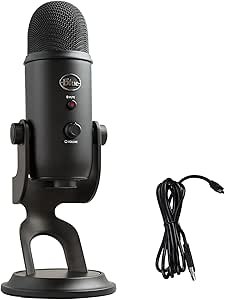
Logitech Blue Yeti USB Microphone for PC, Mac, Gaming, Recording, Streaming, Podcasting, Studio and Computer – Blackout
The Blue Yeti remains a staple for those seeking a versatile USB microphone, thanks to its four pickup patterns—cardioid, omnidirectional, bidirectional, and stereo—that adapt to various recording needs. Its onboard controls and Blue VO!CE software provide professional enhancements, making it attractive for streamers and podcasters who want quick setup and editing capabilities. Compared to the FIFINE K688, which offers more physical controls and XLR options, the Yeti’s simplicity and software flexibility come at the expense of less hardware tactile feedback. Some users find the desktop stand less stable, affecting sound quality in dynamic environments, and software setup can be complex for beginners. This mic suits creators who want an all-in-one USB solution with customizable sound effects, but less so for those preferring hardware-based control or XLR connectivity.
Pros:- Four versatile pickup patterns for different recording scenarios
- Onboard controls for quick adjustments
- Blue VO!CE software offers professional sound effects
- Plug ‘n Play with Windows and Mac
Cons:- Full functionality depends on Logitech G HUB software
- Desktop stand may be less stable for active setups
- Software setup can be complex for newcomers
Best for: Content creators prioritizing ease of use with flexible patterns and onboard effects
Not ideal for: Users requiring XLR connectivity or a more stable, professional mounting setup
- Microphone Type:Condenser
- Connectivity:USB
- Pickup Patterns:Cardioid, Omnidirectional, Bidirectional, Stereo
- Software:Blue VO!CE
- Controls:Headphone volume, pattern selection, mute, gain
- Included Accessories:Desktop stand
Bottom line: This microphone is perfect for creators who want quick, flexible setup with advanced sound customization, accepting some dependency on software and stability issues.
FIFINE USB Microphone, Metal Condenser Recording Microphone for Mac, Windows, Cardioid Laptop Mic for Vocals, Voice Overs, Streaming, Meetings, YouTube
The FIFINE USB Microphone offers a straightforward, durable choice for those starting out or needing a reliable, no-fuss mic. Its metal construction and plug-and-play setup make it ideal for streamers, YouTubers, or casual podcasters who want decent sound quality without breaking the bank. Compared to the MAONO PD200W, which offers wireless and XLR options, this model is purely USB but shines in simplicity and durability. Its cardioid pattern and noise reduction help capture clear vocals, but it lacks advanced controls or software enhancements, which might limit professional polish. For users who prioritize ease of use and ruggedness over feature-rich options, this mic is a strong contender, though it’s less suited for those demanding high-end audio or multiple connection types.
Pros:- Robust metal build for long-term durability
- Simple plug-and-play setup
- Clear sound with noise reduction
- Affordable price point
Cons:- Limited to USB-A connection only
- No onboard controls or advanced features
- Not compatible with Xbox or phones
Best for: Beginners and casual content creators seeking a durable, easy-to-use USB microphone
Not ideal for: Advanced users or streamers needing multiple connection options or onboard controls
- Connectivity:USB-A
- Cable Length:5.9 feet
- Compatibility:Mac OS, Windows, PS4, PS5
- Design:Metal condenser microphone with tripod stand
- Power Supply:USB-powered
- Pickup Pattern:Cardioid
Bottom line: This microphone is well-suited for newcomers or casual creators needing a sturdy, easy-to-use USB mic without extra bells and whistles.
FIFINE USB/XLR Dynamic Microphone for Podcast Recording, Gaming, Streaming with RGB Light and Mute Button
The FIFINE AM8 stands out for combining both USB and XLR connections, offering flexibility for users who want to start simple or upgrade to more professional setups. Compared with the Blue Yeti, which is purely USB, this model caters to those who value future-proofing with XLR options. The built-in RGB lighting adds a fun aesthetic but can be distracting or inactive when using XLR, which may disappoint users seeking a fully customizable visual setup. Its 50Hz-16KHz frequency response is adequate for voice but may lack the richness some podcasters desire. The mute button and headphone jack support real-time monitoring, enhancing recording control. However, the absence of an XLR cable and the limited frequency range can impact higher-quality studio recordings. This pick makes the most sense for streamers and gamers who want versatility and style without sacrificing essential features.
Pros:- Dual USB and XLR connectivity for versatile use
- Customizable RGB lighting with multiple modes
- Built-in mute button and headphone monitoring for real-time control
Cons:- RGB lighting and some features are inactive with XLR connection
- XLR cable not included, adding extra cost
- Limited frequency response may restrict audio richness
Best for: Streamers and gamers who want a flexible microphone that can evolve from USB to XLR and enjoy customizable lighting.
Not ideal for: Purely professional podcasters seeking a high-fidelity, studio-grade microphone, as the frequency response and XLR features are somewhat limited.
- Frequency Response:50Hz-16KHz
- Connection Types:USB, XLR
- RGB Lighting:Yes, 3 modes, 10+ colors
- Mute Button:Yes, USB only
- Headphone Jack:Yes
- Stand Mounting:3/8’’ and 5/8’’ metal threads
Bottom line: This microphone is ideal for content creators who want a stylish, flexible option that can grow with their setup, though it may fall short for those needing high-end studio sound.

How We Picked
The microphones included in this roundup were selected based on a combination of performance, usability, build quality, and value for podcasting purposes. We prioritized models that deliver clear, professional sound without requiring extensive setup or expensive equipment. Ease of use, durability, and compatibility with common podcasting software also played a significant role. The ranking reflects how well each microphone balances these factors while considering price and feature set, ensuring options for different experience levels and budgets.Factors to Consider When Choosing Usb Microphone Podcast
When choosing a USB microphone for podcasting, it’s important to consider several factors that affect your recording quality and experience. These elements help avoid common pitfalls like poor sound clarity or complicated setup, ensuring you get the best value from your investment. Understanding these aspects can also prevent overspending on features you don’t need or missing out on features that could improve your content.Sound Quality and Audio Clarity
The primary factor in selecting a podcast microphone is its ability to capture clear, natural sound. Look for models with condenser capsules for detailed recordings or dynamic mics for better noise rejection in noisy environments. Pay attention to frequency response and sensitivity, as these influence how well the microphone reproduces your voice. A microphone with high sound fidelity helps produce professional-sounding podcasts that engage listeners.Ease of Use and Setup
A plug-and-play USB microphone simplifies setup, especially for beginners. Features like one-touch mute, onboard volume controls, and straightforward software compatibility save time and reduce frustration. Avoid overly complex models that require additional drivers or software, unless you need advanced features. The goal is to find a microphone that works seamlessly with your existing setup and requires minimal fuss.Build Quality and Durability
Since podcasting often involves regular use, selecting a microphone with a sturdy build is wise. Metal housings and quality components ensure longevity and consistent performance. Consider additional accessories like adjustable stands or shock mounts, which can help reduce vibrations and improve sound quality. A well-built microphone minimizes the risk of damage, especially if you record on the go or in different locations.Additional Features and Flexibility
Features such as cardioid pickup patterns, headphone monitoring, gain control, and mute buttons can enhance your recording experience. Some models include software for noise cancellation or echo reduction, which can be beneficial if your environment isn’t perfectly soundproof. Wireless connectivity or bundled accessories like boom arms add convenience but may add to the cost—balance these extras against your needs.Price and Value
While high-end microphones offer superior sound, budget options can still deliver quality for casual or beginner podcasters. Consider what features are essential for your use case and avoid paying extra for bells and whistles you won’t need. Investing in a mid-range microphone often provides the best balance between cost and performance, ensuring you don’t overspend while still achieving good sound quality.Frequently Asked Questions
Should I choose a condenser or dynamic USB microphone for podcasting?
Condenser microphones are generally more sensitive and capture a wider range of frequencies, making them ideal for studio-quality recordings. They tend to pick up more background noise, so they work best in controlled environments. Dynamic microphones, meanwhile, are less sensitive and excel at rejecting ambient sounds, making them suitable if you record in noisy spaces or want a more focused sound. Your choice depends on your environment and desired sound profile.
Is it worth investing in a microphone with XLR connectivity for podcasting?
For most podcasters starting out, USB microphones offer enough quality and simplicity, making XLR models unnecessary unless you plan to upgrade to a professional studio setup later. XLR microphones require an audio interface and more complex setup, but they can deliver higher sound fidelity and more control over your audio. If you’re serious about audio quality and willing to invest in extra equipment, an XLR setup can be beneficial, but for beginners, USB options usually suffice.
Do I need a pop filter or shock mount for my USB microphone?
Adding a pop filter helps reduce plosive sounds when pronouncing words with ‘p’ and ‘b’ sounds, resulting in cleaner recordings. A shock mount minimizes vibrations and handling noise, which is useful if your microphone is prone to movement or placed on a desk. These accessories improve overall sound quality and professionalism, especially if you record for extended periods or in less-than-ideal environments. However, some microphones come with built-in protections or are designed to resist noise, so evaluate your needs accordingly.
Can I use a USB microphone for live streaming and gaming?
Yes, many USB microphones are suitable for live streaming and gaming, offering quick setup and decent sound quality. Features like mute buttons, headphone monitoring, and adjustable gain are especially helpful during live sessions. However, if you want a more immersive audio experience or higher fidelity, consider models with cardioid patterns and noise rejection. For casual streaming, most USB mics provide a great balance of convenience and sound quality.
How important is software compatibility when choosing a USB microphone?
Software compatibility is important because it ensures your microphone works seamlessly with your preferred recording or streaming programs. Most modern USB microphones are compatible with popular software like OBS, Audacity, and Zoom, but checking specific system requirements can save headaches. Some microphones include dedicated software for noise reduction or sound tuning, which can be a bonus if you want more control. Ultimately, choose a model that integrates smoothly into your existing setup for a hassle-free experience.
Conclusion
For those just starting out or seeking a reliable all-rounder, the Logitech Blue Yeti remains the best overall choice, offering excellent sound and versatile features. Budget-conscious podcasters will find the MAONO AU-A04 provides impressive clarity at an affordable price. If you prefer a simple, plug-and-play model, the HyperX SoloCast offers straightforward setup and quality performance. For advanced users or streamers wanting lighting and extra features, models like the FIFINE RGB microphone are compelling options. Ultimately, your ideal microphone depends on your environment, budget, and future plans—consider these factors carefully to make the best purchase.