This checklist is for newsrooms, publishers, and researchers preserving digital files, recordings, and paper materials. It helps you think through the gear and storage choices involved in keeping an archive organized and accessible.

Get everyday essentials delivered free with Prime
- Fast, free delivery on millions of items
- Prime Video, Amazon Music and more included
- Member-only deals all year
The sections follow the work: storing digital files, digitizing media, capturing video, converting cassette audio, organizing documents, and supplying backup power. One section offers scanner selection advice without naming a product.
Use each pick as a starting point, then check that it fits your devices, media formats, and storage workflow. Before committing, confirm connections, supported formats, physical dimensions, and how the item will fit into your existing preservation process.
Archival Storage Drives
A portable drive can give an archive a dedicated place for working copies or transfers. The Samsung T9 listing specifies 4TB capacity and USB 3.2 Gen 2×2, with up to 2,000 MB/s stated in the product name. Those details make compatibility and workflow the key checks: confirm your computer supports the connection and that your process can use the stated interface and performance.
A common mistake is treating one drive as a complete preservation plan. Decide how the drive will be used, label it consistently, and establish a routine for making and checking separate copies. Consider who needs access, how files will be organized, and whether the drive will travel between locations. Keep handling and storage practices consistent with your archive’s needs.
Before choosing, check the device’s available ports, included cable details, operating system requirements, and the amount of space your current collection needs. Plan for future growth as well as the initial transfer, and test the workflow with representative files before relying on it for a large archive.
What to look for:
- Confirm your computer supports USB 3.2 Gen 2×2
- Compare 4TB capacity with current and planned files
- Check cable and port compatibility
- Plan separate copies and a file verification routine
- Test transfers with representative archive files
Samsung T9 Portable SSD 4TB, USB 3.2 Gen 2×2, Up to 2,000 MB/s
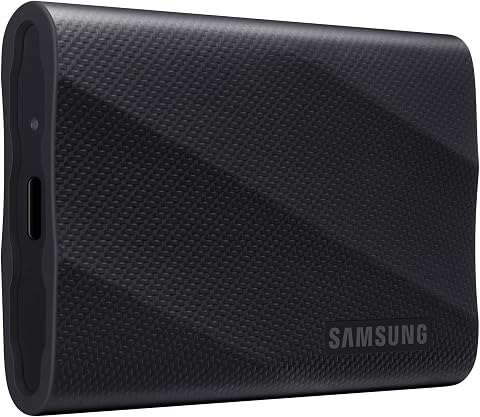
The Samsung T9 is a 4TB portable solid-state drive with read and write speeds of up to 2,000 MB/s when used with a compatible host and cable. It features Dynamic Thermal Guard, AES 256-bit hardware encryption, and compatibility with computers, gaming consoles, tablets, and iPhone 15 and 16.
Pros:
- Up to 2,000 MB/s read and write speeds with compatible equipment
- Dynamic Thermal Guard helps control heat during heavy use
- AES 256-bit hardware encryption
- Rated to endure drops up to 9.8 ft
Cons:
- Maximum speeds require a compatible USB 3.2 Gen 2×2 host and cable
- Host device compatibility may vary
Best for: Teams needing a portable drive for file transfers or working storage
Not ideal for: Archives that need a complete backup system from one device
Bottom line: Check interface compatibility and build a separate-copy routine before adding the T9 to your workflow.
Media Digitization Scanner
A scanner helps turn paper records and images into files that can be organized, shared, and preserved. The right choice depends on the materials in your collection and how they can be handled safely. Start by identifying document sizes, page condition, and volume, then consider whether pages can pass through a feeder or need careful placement on a flat surface.
One common mistake is selecting a scanner based only on speed or advertised resolution. Fragile, bound, oversized, or unusually shaped materials may need a different handling approach from loose sheets. Consider color needs, image detail, duplex scanning, file formats, and whether the scanner software fits your operating system and filing workflow. For valuable or delicate originals, prioritize a process that avoids unnecessary strain.
Before buying, measure representative items and check the device’s supported sizes, scanning area, feeder limits, and software requirements. Test a range of materials and review the resulting files for legibility and consistent naming. A repeatable capture process makes it easier to locate and use digitized records later.
What to look for:
- Match the scanning area to your largest materials
- Check feeder handling against page condition and binding
- Consider color, detail, and duplex needs
- Confirm supported file formats and operating system
- Test sample scans for readability and consistent results
Video Capture Device
A capture card can be useful when video needs to enter a computer-based archive workflow. The listed Elgato 4K Pro is an internal capture card, so the first question is whether the computer has a compatible installation slot and enough room inside its case. Check the system requirements and connection path for the video sources you intend to capture.
A frequent buying mistake is assuming a capture device will accept every source or preserve every signal in the desired way. Verify supported inputs, formats, resolutions, and software compatibility against the actual playback equipment and computer. Also consider how you will capture audio, name files, document source details, and review recordings for completeness. A test capture can reveal workflow issues before you process important material.
Check the physical dimensions, installation requirements, and compatibility with the computer’s operating system and recording software. Plan for adequate storage and file handling around captured footage, and define a repeatable process for documenting source media and capture settings. Those steps help keep files understandable after the original capture session.
What to look for:
- Confirm an available compatible internal slot
- Check case clearance and installation requirements
- Match supported inputs to source equipment
- Verify software and operating system compatibility
- Plan audio capture, file naming, and review
Elgato 4K Pro Internal Capture Card

An internal HDMI 2.1 capture card with 8K60 passthrough and 4K60 HDR10 capture. It supports VRR and low-latency streaming, with recording up to 1080p at 240 fps, and is compatible with Windows 10, PCs, and gaming consoles.
Pros:
- Supports 8K60 passthrough and 4K60 capture
- HDMI 2.1 with VRR passthrough
- Records up to 1080p at 240 fps
- Designed for low-latency gameplay and capture synchronization
Cons:
- Requires a PCIe slot and Windows 10 system
- The listed capture resolution is 1080p, while 4K60 is described in the product description
Best for: Users capturing video on a desktop with a compatible internal slot
Not ideal for: Setups that require an external plug-in capture device
Bottom line: Confirm the computer, source connections, and recording software all fit this internal card.
Audio Cassette Converter
Cassette audio can hold interviews, reports, and other material that may not exist in another format. This listing describes a portable cassette player and tape recorder with AM/FM radio, but the product name does not establish a digital output or computer connection. If your goal is digitization, verify the actual outputs and the steps needed to record audio into your chosen system.
A common mistake is assuming that a cassette player with recording functions automatically converts tapes into digital files. Check whether the device provides the connections your workflow requires, and whether you will need separate cables or recording equipment. Consider tape condition, playback speed, monitoring, and how you will identify each recording. Handle older tapes carefully and test on material that is not your only copy.
Before choosing, confirm the playback and output options in the product details and compare them with your computer or recorder. Establish a process for capturing, labeling, and reviewing each side of a tape, including any pauses or interruptions. A clear conversion path matters as much as the player when the goal is a usable digital archive.
What to look for:
- Verify audio outputs and any digital connection
- Check cable needs against your recording equipment
- Confirm cassette format and playback controls
- Plan a safe test with noncritical material
- Label and review recordings after capture
Cassette Player Tape Recorder with AM/FM Radio, Portable Compact Audio Player wi

This portable cassette player allows you to listen to tapes and radio stations, as well as record audio with voice activation. It features a lightweight design, multiple power options, and comes with essential accessories for easy use.
Pros:
- Multi-functional with playback, recording, and radio features
- Portable and lightweight design for on-the-go use
- Multiple power options for convenience
Cons:
- Requires batteries or external power source (not included)
- Limited frequency response range
- Basic features may lack advanced audio controls
Best for: People who need a portable cassette player and recorder
Not ideal for: Digitization workflows requiring an unverified direct computer connection
Bottom line: Confirm the outputs and recording path before relying on this cassette device for digitization.
Archival File Storage
Physical storage helps keep paper items together and easier to locate. The BCW listing describes a magazine and document bin that holds up to 80 magazines, with a five-pack included in the product name. That stated capacity can be a useful reference, but actual fit depends on the size, thickness, and condition of the materials you plan to store.
A common mistake is filling bins to their stated capacity without considering how materials will be retrieved or supported. Group items by a consistent scheme, label the bins clearly, and leave enough room to remove documents without bending or forcing them. Check whether the bin dimensions suit your shelves and the formats in your collection. For delicate or valuable items, consider suitable protective enclosures as part of the storage plan.
Measure representative magazines and documents, then compare them with the bin’s interior dimensions and the shelf space available. Think through access, labeling, and handling before assigning a bin to a collection. A simple inventory that records bin location can help staff find items without repeatedly moving or sorting the contents.
What to look for:
- Compare interior dimensions with your materials
- Check shelf depth and available storage space
- Estimate capacity from actual item thickness
- Use consistent labels and an inventory
- Plan retrieval without bending or tightly packing items
BCW Magazine & Document Bin, Black, Holds Up to 80 Magazines, 5 Pack

This high-capacity storage bin holds up to 80 magazines, keeping collections organized and protected. Made from durable, acid-free plastic, it features a stackable design, sliding lid locks, and includes a movable partition for added organization.
Pros:
- Large capacity for storing up to 80 magazines
- Durable, acid-free plastic construction
- Stackable design saves space
- Includes sliding lid locks and identification slots
Cons:
- Limited to magazine and document storage only
- May be bulky for small storage spaces
Best for: Organizing magazines and documents in labeled groups
Not ideal for: Materials that need a specialized protective enclosure
Bottom line: Measure your collection and shelving, then plan labels and retrieval before filling the bins.
Backup Power Supply
A power station can support equipment during an outage or in a location without convenient power, depending on the devices and setup. The BLUETTI FridgePower listing states 2016Wh capacity, expandable to 4032Wh, and LFP battery chemistry. Those specifications give you a starting point for matching the unit to the equipment your preservation work must keep running.
A common mistake is choosing a power station based only on its capacity figure. Check the output types, continuous and surge capability, charging options, and compatibility with each device. Add up the needs of equipment that may run at the same time, and decide how long it must operate. For archival work, consider which equipment is essential and how you will safely resume or verify interrupted transfers.
Review the product details for outlet types, operating limits, expansion requirements, and the manufacturer’s guidance for storage and use. Confirm that the planned equipment fits the available outputs and that your charging plan is practical. A tested outage procedure can clarify which systems to power first and how to protect work in progress.
What to look for:
- Match output types to the equipment in your workflow
- Check continuous and surge power needs
- Estimate runtime for devices used together
- Confirm expansion and charging requirements
- Plan how to handle interrupted transfers
BLUETTI FridgePower Power Station, 2016Wh Expandable 4032Wh LFP Battery

The BLUETTI FridgePower is a compact, ultra-slim backup power station designed specifically for household refrigerators and critical appliances. It features an 1800W output, low standby power, and can be expanded up to 8064Wh for extended runtime during power outages.
Pros:
- Ultra-slim, space-efficient design fits behind appliances or in tight spaces
- High power output suitable for refrigerators, sump pumps, and other household devices
- Expandable battery capacity for longer backup runtime
- Smart UPS with quick switching during power outages
Cons:
- Relatively heavy at 44 pounds, may require assistance for installation
- Limited runtime of approximately 4 hours at full load
- Requires some DIY installation and mounting
Best for: Teams that need backup power for selected equipment
Not ideal for: Setups where output compatibility or runtime has not been checked
Bottom line: Match outputs and expected runtime to essential devices, then rehearse how you will protect work in progress.
Start with the preservation steps that protect the most important material: identify what needs digitizing, confirm a workable capture path, and establish organized storage with separate copies. Then add the scanner, capture card, cassette equipment, physical bins, and backup power that fit your actual formats and systems. Prioritize compatibility and handling before adding capacity or convenience.
You do not need to solve every archive challenge at once. Begin with a small, representative set of materials, document the process, and refine it as you learn what your collection needs. A steady, repeatable workflow makes preservation easier to maintain over time.
Black Friday Picks

Vitamix 62827 Vita-Prep Blender, Black, 32 oz
As an affiliate, we earn on qualifying purchases.