
This checklist is for newsroom teams and independent journalists preparing to record interviews, report in the field, and publish video. It covers a set of tools for audio, lighting, camera support, presenting, and file storage.

Get everyday essentials delivered free with Prime
- Fast, free delivery on millions of items
- Prime Video, Amazon Music and more included
- Member-only deals all year
The sections follow those jobs: capture sound, record interviews, light a scene, stabilize a camera, support on-camera delivery, and store recorded files. Each pick is identified by its product name, with practical points to consider before choosing it.
Use the checklist to compare each item with your existing gear and workflow. Confirm connection types, device compatibility, physical setup needs, and how you plan to carry or mount the equipment before purchasing.
Portable audio recorder
A portable recorder is a key part of a field reporting kit when you need to capture audio separately from a camera or phone. The Zoom F3 Professional 2-Channel Field Recorder is the pick for this slot. Before choosing a recorder, map out who or what you need to record at the same time: one reporter, a guest, or multiple sources may call for different input and channel arrangements. Check the recorder’s available connections against your microphones and any cables or adapters already in your kit.
A common mistake is buying around the recording device alone and overlooking the rest of the audio chain. Confirm how your microphones connect, how you will monitor the sound while recording, and whether the recorder’s controls suit your working conditions. Consider the size and weight of the full setup, including cables, headphones, batteries, and any protective case. If you expect to move between locations, think through how quickly you can start, check levels, and pack the recorder away. Make sure the recorder’s file handling fits your editing workflow, too, and plan how you will label and back up recordings so important interviews remain easy to find.
What to look for:
- Inputs that match your microphones and cables
- A channel layout suited to the number of sources you record
- A practical way to monitor audio during recording
- Controls you can operate comfortably in the field
- A file and backup workflow that suits your editing setup
Zoom F3 Professional 2-Channel Field Recorder
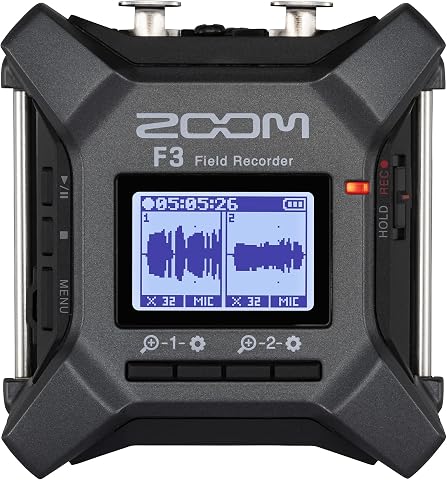
The Zoom F3 records two-channel audio in 32-bit float WAV format, helping capture quiet dialogue and sudden peaks without manual level adjustments. It has two locking XLR/TRS inputs, low-noise preamps, wireless control, and flexible battery or USB power options for field and location recording.
Pros:
- 32-bit float recording handles a wide range of audio levels
- Two locking inputs help keep connections secure
- Low-noise preamps support clean recordings
- Flexible battery and USB power options
Cons:
- Requires two AA batteries for battery-powered operation
- Built-in storage is not specified; recording uses MicroSD
Best for: Reporters who need a dedicated two-channel recorder.
Not ideal for: Teams whose microphone setup needs more than two channels.
Bottom line: Choose the Zoom F3 after confirming your microphones, monitoring setup, and channel needs.
Wireless interview microphone
Wireless lavalier microphones can help reporters record interviews without running a cable from the subject to the recording device. The Shure MoveMic 2 Kit Wireless Lavalier Microphone System fills this checklist slot. Before committing, check how the kit connects to the camera, phone, or other device you plan to use, and confirm that any required receiver or adapter is included or already available. Compatibility matters most when the microphone is part of a fast-moving workflow.
Think through the interview environment and how the microphone will be attached to each speaker. A common buying mistake is assuming a wireless kit will work with every recording device or that its mounting approach suits every outfit. Review the included components and instructions, then confirm the transmitter and receiver arrangement fits your recording plan. Consider how you will monitor the signal, manage charged equipment, and keep the microphone secure while a subject moves. If you often record two people, verify how the kit handles the number of speakers you need. Run a setup check with your actual device and clothing before an assignment, so placement, connection, and monitoring are familiar when the interview begins.
What to look for:
- Compatibility with your camera, phone, or recording device
- Included receiver, adapters, and mounting pieces
- A setup suited to the number of interview subjects
- A secure placement method for the clothing you encounter
- A clear plan for monitoring and charging the system
Shure MoveMic 2 Kit Wireless Lavalier Microphone System

The Shure MoveMic 2 Kit is a dual wireless lavalier microphone system designed for creators, filmmakers, podcasters, and livestreamers. It offers flexible recording options with compatibility for phones, cameras, and computers, and provides up to 8 hours of battery life per microphone for mobile recording sessions.
Pros:
- Wireless dual-channel microphone system suitable for various content creation needs
- Compatible with phones, cameras, and computers for versatile recording
- Long battery life of up to 8 hours per microphone with charging case
Cons:
- Requires compatible devices and apps for full functionality
- Limited details on range and interference resistance
- No mention of included accessories beyond microphones and receiver
Best for: Reporters who want a lavalier setup for interviews.
Not ideal for: Teams that have not confirmed device and connection compatibility.
Bottom line: Check the kit’s included components and test its connection with your recording device.
LED video light
Lighting helps a newsroom create a usable image when the available light or shooting position does not suit the story. The Godox Litemons LP600R 60W RGB LED Light Panel 2-Light Kit is the pick for this slot. A two-light kit can suit setups where you want to place lights in more than one position, but first consider the spaces you regularly record in. Check that you have room to position the panels and stands safely, with access to power or a workable battery plan for your location.
A common mistake is focusing on color options before checking whether the lights fit the actual camera and interview setup. Consider the panel dimensions, mounting points, controls, power connections, and how you will transport both lights and their accessories. Think through whether the kit can be adjusted to match the room and the look you need, and whether you can manage glare or shadows with your available space. Confirm what stands, cables, power supplies, or cases are included rather than assuming they come with the panels. If you work alone, practice setting up and adjusting the lights before a shoot. A simple repeatable layout can help you get the scene ready without spending interview time troubleshooting positions or power.
What to look for:
- Panel dimensions that fit your shooting spaces
- Mounting options compatible with your stands
- Included power supplies, cables, and accessories
- Controls suited to the adjustments you expect to make
- A transport and setup plan for carrying two lights
Godox Litemons LP600R 60W RGB LED Light Panel 2-Light Kit
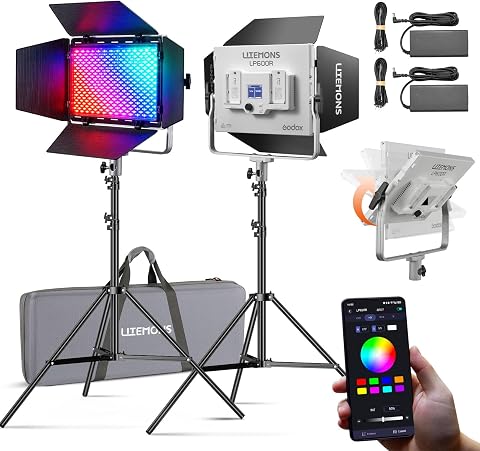
This kit includes two RGB LED panels with stands, yokes, barndoors, power adapters, cords, and a carry bag. Each panel offers an 1800K–10000K color temperature range, 14 lighting effects, app control, and AC or NP-F battery power.
Pros:
- Wide 1800K–10000K color temperature range and full RGB spectrum
- 14 built-in lighting effects
- App control with adjustable brightness
- Includes two panels and a range of setup accessories
Cons:
- Requires two NP-F batteries per panel for battery operation; batteries may need to be purchased separately
- Lightweight stands are recommended primarily for indoor studio use
Best for: Teams that need a pair of lights for interview scenes.
Not ideal for: Reporters who cannot carry or position two panels.
Bottom line: Confirm the kit’s mounting and power needs before planning a two-light setup.
Camera tripod
A tripod supports a stable camera position for interviews, standups, and other reporting footage. The HEIPI W28S Carbon Fiber Travel Tripod with Arca-Swiss Ball Head is the selection here. Check that the tripod’s mounting plate and head work with your camera or quick-release plate before buying. The camera, lens, and any accessories you plan to leave attached should also be considered as a complete setup when checking fit and handling.
Travel use makes folded size, packed weight, and setup steps especially relevant. A common mistake is choosing a tripod based on its material or travel description without checking whether it suits the camera height and shooting positions you need. Think about the ground and spaces where you report, including whether the tripod can be placed securely without blocking people or pathways. Confirm the included head and mounting interface are compatible with your existing gear, and check how you will carry the tripod alongside a camera bag. If multiple team members use the same kit, make sure they can operate the locks and adjustments comfortably. Practice mounting your camera and leveling the setup before the assignment; that makes it easier to spot missing plates or mismatched hardware ahead of time.
What to look for:
- Mounting plate compatibility with your camera
- A head and interface that suit your existing plates
- Folded size and packed weight for your travel setup
- A stable placement plan for your usual shooting locations
- Locks and adjustments you can operate confidently
HEIPI W28S Carbon Fiber Travel Tripod with Arca-Swiss Ball Head

This versatile travel tripod converts into a full-size tripod, a standalone sub-tripod, or a removable ball head for low-angle and desktop shots. It weighs 3 lbs, folds to 17.7 inches, and includes a quick-release ball head with panoramic panning modes and a hidden phone clamp.
Pros:
- Configures as a full-size tripod, sub-tripod, or removable ball head
- Lightweight and compact for travel
- Quick-release design supports one-handed camera attachment
- Ball head includes panoramic panning modes and a hidden phone clamp
Cons:
- No minimum height is provided
- Phone clamp is integrated into the ball head
Best for: Journalists who need camera support they can transport.
Not ideal for: Teams whose camera plates do not match its mounting interface.
Bottom line: Verify plate compatibility and packed dimensions with your camera kit.
Teleprompter monitor
A teleprompter can help presenters deliver prepared copy while keeping their attention near the camera. The Glide Gear TMP 1000 Teleprompter for Cameras, Smartphones, and Tablets is the pick in this category. Before choosing it, identify the device you plan to use for the script and the camera or phone you will record with. Check the supported device sizes and mounting arrangement against your actual equipment, including any case or lens accessories that affect fit.
A common buying mistake is assuming that a teleprompter works with every camera, phone, or tablet simply because the product name lists several device types. Confirm the compatibility details and what supports or adapters the package includes. Consider how far you sit or stand from the camera, how much copy you need to display, and whether your chosen script device remains readable in that position. Plan where the prompter will sit relative to the lens and lighting so the setup fits the room. If different presenters use it, check that adjustments are straightforward for them. Rehearse with the intended script app and recording device before publishing, and verify that the camera view is clear and the text scroll feels manageable at your normal speaking pace.
What to look for:
- Supported phone and tablet dimensions
- Camera and lens compatibility for your setup
- Included mounts, supports, and adapters
- A readable text position for your presenter distance
- Clear camera framing with the prompter installed
Glide Gear TMP 1000 Teleprompter for Cameras, Smartphones, and Tablets

The TMP 1000 teleprompter uses 17-inch 70/30 beam-splitting glass with adjustable height for clear, flexible viewing. Its cushioned tray fits tablets and smartphones, while multiple mounting options, an adjustable camera sled, and a collapsible aluminum design support studio or mobile use.
Pros:
- Fits a wide range of tablets and smartphones
- Adjustable glass height and camera sled
- Offers multiple mounting options
- Collapsible design and carry case support portability
Cons:
- Requires a compatible tablet or smartphone for displaying text
Best for: Presenters who read prepared copy on camera.
Not ideal for: Teams that have not checked device size and camera fit.
Bottom line: Match the prompter’s supported devices and mounts to your camera setup.
Portable SSD drive
Portable storage gives a newsroom a way to move recorded files between a field setup and an editing workstation. The SanDisk 4TB Extreme PRO Portable SSD is the pick for this slot. Check that its connection works with the computers, cameras, or adapters in your workflow, and confirm the available ports before relying on it for an assignment. Consider how much footage you expect to move and how you organize project folders, since usable space depends on the files you keep and your retention habits.
A common mistake is treating a portable drive as the only copy of important reporting. Plan how footage will be copied to the newsroom’s storage and verified, and decide who is responsible for keeping the working and backup copies organized. Confirm the drive’s cable and connector fit your devices, and consider whether you need an adapter for older equipment. Think about how the drive will be carried, labeled, and protected during travel. If several people share it, agree on folder names and handoff steps to avoid confusion between interviews and assignments. Check that your editing computer can read the drive format, especially if files move between different operating systems. A short test transfer before a deadline can reveal connection or workflow issues while there is still time to address them.
What to look for:
- Connection and cable compatibility with your devices
- A storage workflow suited to your footage volume
- A backup and file verification process
- A drive format readable by your editing computers
- A labeling and handoff plan for shared newsroom use
SanDisk 4TB Extreme PRO Portable SSD

This portable SSD offers up to 2,000 MB/s read and write speeds in a rugged design with a forged aluminum chassis and silicone shell. It has IP65 water and dust resistance, up to 3-meter drop protection, a carabiner loop, and a 5-year limited warranty.
Pros:
- Fast read and write speeds
- Rugged design with water and dust resistance
- Up to 3-meter drop protection
- Compact and lightweight, with a carabiner loop
Cons:
- Maximum speeds depend on compatible hardware and conditions
Best for: Teams moving recorded footage between locations and editors.
Not ideal for: Workflows that rely on a single copy of important files.
Bottom line: Check device connections and establish a verified backup routine for footage.
Build the kit in the order that addresses your most immediate reporting need: start with dependable audio capture, then add interview microphones, camera support, and lighting for the shoots you handle most often. Add a teleprompter when prepared on-camera delivery is part of your work, and set up portable storage alongside a clear backup process. Prioritize workflow fit and compatibility at each step.
You do not need to assemble every part at once. Compare each pick with the gear and routines your newsroom already uses, confirm the connections and mounting details, and test the setup before an assignment. A well-matched checklist makes it easier to arrive prepared and focus on the reporting.