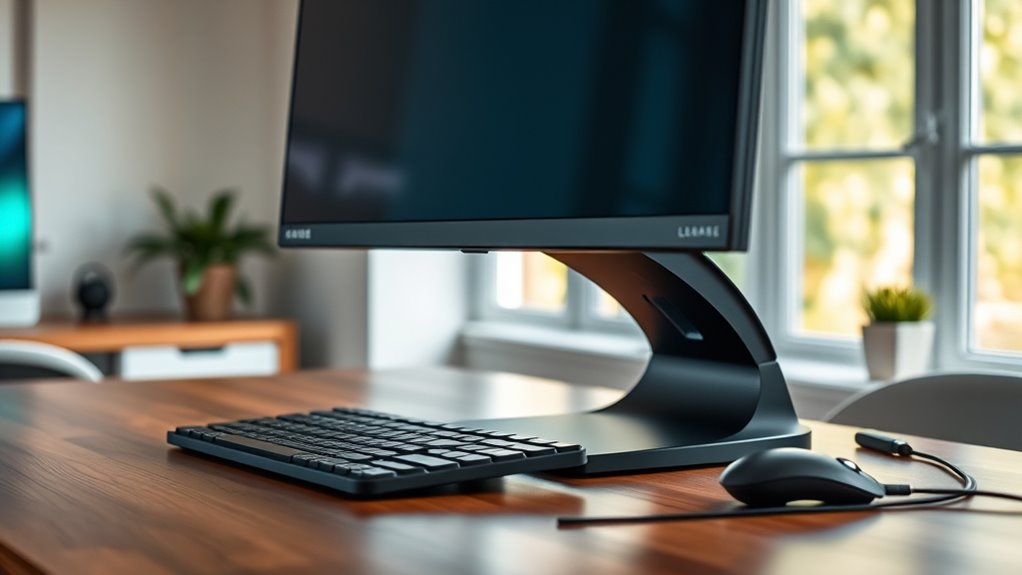

Choosing the right monitor stand can significantly improve your workspace comfort and productivity. The best options combine adjustability, stability, and ease of use, but tradeoffs often include price and complexity. The VIVO Dual Monitor Desk Mount stands out for its flexibility and robust build, making it ideal for multi-monitor setups. Meanwhile, the Amazon Basics Height Adjustable Stand offers excellent value for those seeking simple, reliable support. For gamers or those needing full motion, the HUANUO FlowLift™ Dual Monitor Stand provides impressive adjustability, but at a higher cost. Continue reading for a detailed comparison of these and other top picks to find your perfect fit.

Get everyday essentials delivered free — and shop member deals
- Fast, free delivery on millions of items
- Access to Prime Big Deal Days deals on October 6–7
- Prime Video, Amazon Music and more included
Key Takeaways
- Flexible dual-monitor setups dominate the top tier, emphasizing adjustability and stability.
- Value-oriented options like the Amazon Basics stand deliver solid performance at lower prices but may lack advanced features.
- Full-motion arms are ideal for ergonomic customization, but they tend to be pricier and more complex to install.
- Build quality varies significantly; heavier steel stands generally last longer and support more weight.
- Compatibility with VESA mounts and screen sizes is critical—verify your monitor’s specifications before choosing a stand.
| VIVO Dual Monitor Stand, Fully Adjustable Arms for 17 to 32 inch Screens, Mechanical Articulating Desk Mount, VESA 75×75, 100×100, Max 19.8 lbs, Black |  | Best Overall Dual Monitor Mount for Flexibility | Screen Size Compatibility: 17-32 inches | Weight Capacity: 19.8 lbs per monitor | VESA Pattern: 75x75mm, 100x100mm | VIEW ON AMAZON | See Our Full Breakdown |
| Amazon Basics Height Adjustable Monitor Stand Riser with Storage Organizer, 3-Level Stackable Design, Durable ABS Plastic, Supports up to 22 lbs, Black | 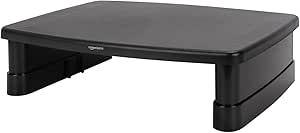 | Best Value for Ergonomic Height Adjustment | Dimensions: 11.6 inches x 11 inches | Height levels: 2.87, 4.2, 4.8 inches | Material: ABS plastic | VIEW ON AMAZON | See Our Full Breakdown |
| Single LCD Computer Monitor Free-Standing Desk Stand Mount Riser for 13 to 32 inch screens |  | Best for Single Monitors with High Flexibility | Compatibility: 13-32 inches, VESA 50x50mm, 75x75mm, 100x100mm | Weight Capacity: 77 lbs | Tilt: -15° to +10° | VIEW ON AMAZON | See Our Full Breakdown |
| VIVO Dual Monitor Desk Mount for 13-30 inch Screens, Heavy Duty Steel Stand with Adjustable Arms, C-Clamp and Grommet Mount, Black |  | Best Heavy-Duty Dual Mount for Larger Monitors | Screen Size Compatibility: 13-30 inches | Maximum Weight per Monitor: 22 lbs | VESA Mounting: 75x75mm, 100x100mm | VIEW ON AMAZON | See Our Full Breakdown |
| Pixio PS1D Wave Pink Dual Monitor Arm Stand Desk Mount |  | Best Stylish Dual Arm for Personalization and Comfort | Monitor Size Support: up to 32 inches | Weight Capacity: 19.8 lbs per arm | VESA Compatibility: 75x75mm, 100x100mm | VIEW ON AMAZON | See Our Full Breakdown |
| HUANUO FlowLift™ Dual Monitor Stand, Fully Adjustable Gaming Monitor Desk Mount for 13–32″ Computer Screens, Full Motion VESA 75×75/100×100 with C-Clamp & Grommet Base, Each Arm Holds 4.4 to 19.8 lbs |  | Best for Flexible Ergonomics and Heavy Monitors | Supported Monitor Size: 13-32 inches | Max Monitor Weight: 19.8 lbs | VESA Compatibility: 75x75mm, 100x100mm | VIEW ON AMAZON | See Our Full Breakdown |
| VIVO Dual Monitor Desk Stand for 2 Screens up to 27 Inches |  | Best for Simplicity and Stability in Dual Monitor Setup | Supported Screen Size: 13-27 inches | Maximum Weight: 22 lbs per monitor | VESA Compatibility: 75x75mm, 100x100mm | VIEW ON AMAZON | See Our Full Breakdown |
More Details on Our Top Picks
VIVO Dual Monitor Stand, Fully Adjustable Arms for 17 to 32 inch Screens, Mechanical Articulating Desk Mount, VESA 75×75, 100×100, Max 19.8 lbs, Black
This VIVO dual monitor stand stands out for its full range of articulation, including tilt, swivel, and rotation, making it ideal for users who need customized viewing angles. Compared to the VIVO Dual Monitor Desk Stand, which supports smaller screens, this model accommodates larger 17-32 inch monitors, offering more versatility. However, its maximum weight limit of 19.8 lbs per arm might restrict heavier setups. The mounting options, including C-clamp and grommet, provide flexible desk fitment, but assembly requires careful handling of hardware. Overall, this stand offers remarkable adjustability for multi-monitor users who prioritize space-saving design.
Pros:- Fully adjustable for perfect ergonomic positioning
- Compatible with most 17-32 inch monitors
- Helps free up desk space by elevating monitors
Cons:- Back of arms may extend past desk edge, potentially obstructing workspace
- Maximum weight limit of 19.8 lbs per monitor may exclude heavier displays
Best for: Professionals who need to optimize multiple large monitors with full ergonomic control
Not ideal for: Users with very heavy monitors over 20 lbs or limited desk space for mounting hardware
- Screen Size Compatibility:17-32 inches
- Weight Capacity:19.8 lbs per monitor
- VESA Pattern:75x75mm, 100x100mm
- Max Height:Not specified
- Color:Black
- Mounting Options:C-clamp, grommet mount
Our verdict“This stand is best suited for users seeking extensive flexibility and space efficiency with mid-sized monitors.”
Amazon Basics Height Adjustable Monitor Stand Riser with Storage Organizer, 3-Level Stackable Design, Durable ABS Plastic, Supports up to 22 lbs, Black
This Amazon Basics riser provides practical height adjustments with its three-level stacking system, supporting up to 22 lbs on a compact platform. Unlike the Pixio PS1D Wave Pink, which offers more ergonomic flexibility with multiple axes, this stand focuses on straightforward elevation and stability. Its stackable design offers space-saving benefits, but the limited height options may not suit those requiring more precise ergonomic setups. The durable ABS plastic and non-skid feet ensure stability during daily use, though it may not withstand very heavy or irregularly shaped equipment. Ideal for users seeking an affordable, simple solution to elevate their monitor or laptop.
Pros:- Adjustable height for ergonomic comfort
- Lightweight and durable construction
- Stackable design maximizes desk space
Cons:- Supports only devices up to 22 lbs, limiting for heavy monitors
- Limited height options may not fit all ergonomic needs
Best for: Home office workers needing an adjustable, space-efficient riser for lighter equipment
Not ideal for: Professionals with heavy or multiple monitors requiring advanced articulation
- Dimensions:11.6 inches x 11 inches
- Height levels:2.87, 4.2, 4.8 inches
- Material:ABS plastic
- Supports:Up to 22 lbs
- Color:Black
- Stackable:Yes
Our verdict“This stand offers a budget-friendly, effective solution for elevating lighter monitors and laptops in small workspaces.”
Single LCD Computer Monitor Free-Standing Desk Stand Mount Riser for 13 to 32 inch screens
This stand supports a wide range of monitors from 13 to 32 inches with up to 77 lbs capacity, offering extensive ergonomic adjustments including tilt, swivel, and rotation. Compared to the dual-arm options like the VIVO Dual Monitor Stand, this model is better suited for single large displays that need precise positioning. Its stand features cable management and four height levels, but the large footprint might be a drawback for smaller desks. While stability is solid when assembled correctly, very heavy or uneven monitors can pose risks if not properly secured. It’s an excellent choice for users prioritizing detailed control over a single monitor’s setup.
Pros:- Supports monitors up to 32 inches and 77 lbs
- Adjustable tilt, swivel, and rotation for ergonomic comfort
- Includes cable management for a tidy workspace
Cons:- Designed for single monitor use, not suitable for multi-screen setups
- Requires space for the stand on the desk
Best for: Professionals with a single large monitor requiring full ergonomic customization
Not ideal for: Users who need to support dual screens or have limited desk space
- Compatibility:13-32 inches, VESA 50x50mm, 75x75mm, 100x100mm
- Weight Capacity:77 lbs
- Tilt:-15° to +10°
- Swivel:-50° to +50°
- Rotation:360°
- Material:Tempered safety glass
Our verdict“Ideal for users needing maximum flexibility and stability for a single, large monitor.”
VIVO Dual Monitor Desk Mount for 13-30 inch Screens, Heavy Duty Steel Stand with Adjustable Arms, C-Clamp and Grommet Mount, Black
This VIVO dual mount excels at supporting two monitors from 13 to 30 inches, each up to 22 lbs, with robust steel construction for durability. Its fully adjustable arms allow tilt, swivel, and rotation, making it comparable to the HUANUO FlowLift™ in terms of versatility, but with a more straightforward setup. Its sturdy design is ideal for heavier monitors, but requires sufficient desk space and a solid mounting surface. Limited to VESA 75x75mm or 100x100mm, it may not fit monitors with unconventional mounting patterns. The three-year warranty adds peace of mind, yet assembly can be tight for larger monitors. This mount is suited for those needing a reliable, heavy-duty solution for dual large screens.
Pros:- Supports two monitors up to 30 inches and 22 lbs each
- Fully adjustable for ergonomic positioning
- Heavy-duty steel construction with a 3-year warranty
Cons:- Requires ample desk space and a sturdy mounting surface
- Limited to monitors with VESA 75x75mm or 100x100mm
Best for: Office workers or gamers with multiple mid-sized monitors who prioritize durability
Not ideal for: Users with very limited desk space or monitors outside the supported size range
- Screen Size Compatibility:13-30 inches
- Maximum Weight per Monitor:22 lbs
- VESA Mounting:75x75mm, 100x100mm
- Tilt Range:+90° to -90°
- Swivel:180°
- Mounting Options:C-Clamp, Grommet
Our verdict“A dependable, sturdy option for users with multiple mid-sized monitors needing maximum stability.”
Pixio PS1D Wave Pink Dual Monitor Arm Stand Desk Mount
The Pixio PS1D Wave Pink offers a vibrant aesthetic combined with full ergonomic adjustability for two monitors up to 32 inches and 19.8 lbs. Its design provides height, tilt, swivel, and pivot controls, similar to the HUANUO FlowLift™, but with a distinctive color that adds personality to any workspace. Its cable management system keeps clutter at bay, yet the pink color may not match all professional environments. The weight limit per arm is lower than some dual mounts, which could restrict larger or heavier monitors. Assembly is straightforward, but stability depends on proper installation. This choice is ideal for those who want style, flexibility, and dual-monitor support in a colorful package.
Pros:- Supports two monitors up to 32 inches and 19.8 lbs
- Adjustable height, tilt, swivel, and pivot for ergonomic comfort
- VESA compatible with cable management for tidy setup
Cons:- Limited to monitors weighing 19.8 lbs per arm
- Color may not suit all professional or neutral workspace styles
Best for: Creative professionals or gamers wanting a colorful, adjustable dual monitor setup
Not ideal for: Users with heavy, VESA non-compatible monitors or minimalist workspace aesthetics
- Monitor Size Support:up to 32 inches
- Weight Capacity:19.8 lbs per arm
- VESA Compatibility:75x75mm, 100x100mm
- Adjustment Features:height, tilt, swivel, pivot
- Color:Pink
- Number of Monitors:2
Our verdict“Perfect for style-conscious users seeking a flexible, colorful dual monitor mount that balances function with flair.”
HUANUO FlowLift™ Dual Monitor Stand, Fully Adjustable Gaming Monitor Desk Mount for 13–32″ Computer Screens, Full Motion VESA 75×75/100×100 with C-Clamp & Grommet Base, Each Arm Holds 4.4 to 19.8 lbs
This dual monitor stand excels in providing full motion flexibility, making it ideal for users who need to frequently adjust their screens for optimal comfort. Its full-motion capabilities (+85°/-50° tilt, ±90° swivel, 360° rotation) surpass the more static tilt range of the VIVO stand, allowing precise positioning. The dual C-clamp and grommet mounting options ensure a secure fit on sturdy wooden desks, but this model is less suited for glass or plastic desks, unlike the VIVO stand, which offers simpler setup and compatibility with different desk materials. While the HUANUO stand supports monitors up to 32 inches and 19.8 lbs, its fully adjustable arms are a boon for gamers and designers who need dynamic viewing angles. However, the setup can be complex due to specific desk compatibility requirements, and the maximum height adjustment of 15.75 inches might be limiting for taller users. Overall, this pick makes the most sense for those prioritizing maximum flexibility and sturdy mounting options, especially in a dedicated workspace.
Pros:- Full motion adjustment offers excellent ergonomic flexibility
- Dual C-clamp and grommet mounting options for secure installation
- Supports monitors up to 32 inches and 19.8 lbs
Cons:- Requires specific desk materials and thickness, limiting use on some desks
- Complex setup process for compatibility and installation
Best for: Gamers, designers, or remote workers who need highly adjustable monitors and have sturdy wooden desks.
Not ideal for: Users with glass or plastic desks, or those seeking a quick setup without detailed compatibility checks.
- Supported Monitor Size:13-32 inches
- Max Monitor Weight:19.8 lbs
- VESA Compatibility:75x75mm, 100x100mm
- Mounting Options:C-clamp & Grommet
- Tilt Range:+85°/-50°
- Height Adjustment:up to 15.75 inches
Our verdict“Ideal for users who need maximum adjustability and secure mounting on compatible wooden desks, despite setup complexity.”
VIVO Dual Monitor Desk Stand for 2 Screens up to 27 Inches
The VIVO dual monitor stand offers a straightforward, stable solution for users with screens up to 27 inches, making it an excellent choice for those new to monitor mounts or with limited desk space. Compared with the HUANUO model, it has a heavy-duty base and full articulation (tilt +90° to -90°, swivel 180°, rotation 360°), providing versatile positioning. Its easy VESA mounting and detachable plates simplify installation, especially for users who prefer a quick setup. However, the base size of 13″ x 10.5″ may not fit all desk configurations, and stability can be compromised if monitors are pulled far forward or backward—particularly if the monitors are heavier or positioned at extreme angles. While it supports two monitors up to 27 inches and 22 lbs each, the maximum height adjustment is limited, and the stand’s articulation may be less smooth when pushing the limits of extension. This makes it best suited for users prioritizing stability and simplicity over maximum ergonomic flexibility.
Pros:- Supports two monitors up to 27 inches and 22 lbs each
- Heavy-duty base provides excellent stability
- Full articulation for customizable viewing angles
- Easy to install with detachable VESA plates
Cons:- Monitor stability may decrease when pulled too far forward or backward
- Base dimensions may not fit all desk spaces
Best for: Office workers or students with dual monitors up to 27 inches who need a reliable, easy-to-install stand with full articulation.
Not ideal for: Gamers or creative professionals requiring extensive tilt, rotation, or taller height adjustments, or users with limited desk space.
- Supported Screen Size:13-27 inches
- Maximum Weight:22 lbs per monitor
- VESA Compatibility:75x75mm, 100x100mm
- Base Dimensions:13 x 10.5 inches
- Tilt Range:+90° to -90°
- Swivel:180°
- Rotation:360°
- Height Adjustment:Yes
Our verdict“A solid choice for those seeking a stable, straightforward dual monitor setup with full articulation, suitable for standard desk environments.”
How We Picked
I evaluated these monitor stands based on key factors that matter most to users: stability, adjustability, build quality, ease of installation, and value for money. I also considered the variety of mounting options and compatibility with different monitor sizes and weights. Products were ranked to balance performance and affordability, ensuring options suitable for both casual users and more demanding setups. The top picks represent a blend of durability, functionality, and user-friendliness, helping buyers find a stand that aligns with their specific needs and budget.Factors to Consider When Choosing Monitor Stands
Selecting the right monitor stand involves considering several factors beyond just price. Understanding what features will genuinely improve your workspace can prevent overspending or ending up with an inadequate product. Here are key considerations that help you make a more informed decision, whether for ergonomic benefits, space-saving needs, or budget constraints.Adjustability and Range of Motion
Look for stands that offer height, tilt, swivel, and rotation adjustments, especially if you spend long hours at your desk. Full-motion arms allow you to customize your setup for ergonomic comfort, reducing strain on your neck and shoulders. However, more adjustable models tend to be more complex to install and may come at a higher price. Prioritize what range of motion you need based on your workspace and usage habits to avoid paying for unnecessary features.
Build Quality and Stability
Stands made from heavy-duty steel or high-quality materials tend to last longer and support heavier monitors securely. Cheaper plastic options might be tempting but can wobble or sag over time, especially with larger screens. Check the weight capacity and mounting stability—clamp and grommet options can also influence how secure your monitor feels. A stable stand prevents accidents and ensures your screen remains at the desired position without shifting.
Compatibility and Mounting Options
Verify that your monitor’s size, weight, and VESA compatibility match the stand’s specifications. Some stands support only certain sizes or require adapters. Dual monitor stands often need more space and a sturdy desk surface; ensure your workspace can accommodate the setup. Also, consider whether you prefer clamp or grommet mounting for flexibility and ease of installation—each has its pros and cons depending on your desk type.
Space and Desk Compatibility
Assess your desk space and layout before choosing a stand. Clamp mounts save surface area but require a sturdy edge, while freestanding or grommet-mounted options can take up more room but provide more flexibility. Compact or adjustable stands are ideal for smaller desks or shared workspaces. Think about how your monitor’s placement affects your workflow and whether the stand allows easy access to cables and other peripherals.
Price and Value
While it might be tempting to opt for the cheapest option, investing in a well-built stand can pay off through durability and better ergonomics. Premium models often offer smoother adjustments, higher weight capacities, and additional features like cable management. However, if your setup is temporary or budget-constrained, a simpler stand may suffice. Balance your needs with your budget to find a stand that offers good value without unnecessary extras.
Frequently Asked Questions
Can I use a monitor stand for curved or ultrawide monitors?
Yes, many monitor stands support curved and ultrawide screens, but it’s important to check the weight capacity and VESA compatibility. Larger monitors require stands with a broader base or stronger arms to prevent wobbling. Dual stands, especially those with fully adjustable arms, tend to be a good fit for these types of screens because they distribute weight evenly and allow for customized positioning. Always verify your monitor’s specifications against the stand’s limits before purchasing.
Are adjustable monitor stands better than fixed ones?
Adjustable stands generally provide more ergonomic benefits by allowing you to customize height, tilt, and rotation, which can reduce neck and eye strain. Fixed stands may be simpler and cheaper but limit your ability to optimize your setup. If you work long hours or switch between sitting and standing, an adjustable stand is often worth the extra investment for comfort. However, for casual use or temporary setups, a fixed stand might be sufficient.
How much weight should my monitor stand support?
The weight support varies widely among stands, so always check your monitor’s weight and compare it with the stand’s maximum capacity. Most stands support monitors up to 22 lbs, but larger or heavier screens require more robust options. Overloading a stand can cause instability or damage, so sticking within the specified weight limits is essential for safety and longevity. If you plan to add accessories or multiple monitors, consider a stand with a higher weight capacity.
Should I choose a clamp or grommet mount?
Clamp mounts are easier to install and remove, making them ideal for temporary or shared workspaces. Grommet mounts require drilling a hole in your desk but offer a more permanent and stable solution. The choice depends on your desk material and your preference for flexibility or permanence. For a cleaner look and more stability, grommet mounts are often preferred, especially for heavier or dual-monitor setups.
Is cable management important in a monitor stand?
Yes, cable management features help keep your workspace tidy and prevent cable clutter from interfering with adjustments or causing damage. Many stands include clips, channels, or sleeves to organize power and data cables neatly behind the monitor. This not only improves aesthetics but also reduces tripping hazards and makes it easier to change or upgrade your setup later. Consider stands with integrated cable management if you prioritize a clean, organized desk.
Conclusion
For general office work and casual use, the Amazon Basics Height Adjustable Stand offers excellent value with straightforward functionality. Those seeking maximum ergonomic flexibility will appreciate the VIVO Dual Monitor Desk Mount for its full adjustability and stability. Gamers or intensive multitaskers should consider the HUANUO FlowLift™ Dual Monitor Stand for its full-motion arms, despite the higher price. Beginners or temporary setups benefit from simple, easy-to-install options, while professionals with large, heavy monitors should prioritize robust, high-capacity stands. Make your choice based on your workspace needs and how much you prioritize adjustability versus simplicity.
Halloween Picks
halloween
As an affiliate, we earn on qualifying purchases.