
A good wireless presentation remote keeps you moving freely instead of tethered to a laptop, and the differences between models come down to range, connectivity, and control features rather than basic slide advancing, which almost all of them handle. The Logitech Spotlight takes the top spot for its haptic feedback, precise cursor control, and premium build, while the DINOSTRIKE with air mouse control stands out as the value pick with its rechargeable battery and motion-based pointing. Budget clickers like the Norwii and QUI models get the job done for classroom and occasional use, but they cut corners on range and button feel. The main tradeoff in this category is price versus precision: cheap remotes advance slides reliably, while premium ones add timer alerts, vibration cues, and on-screen highlighting that matter most for high-stakes talks. Read on for the full breakdown of all 15 models.

Get everyday essentials delivered free with Prime
- Fast, free delivery on millions of items
- Prime Video, Amazon Music and more included
- Member-only deals all year
Key Takeaways
- The Logitech Spotlight and Spotlight 2 dominated every precision-related comparison — haptic time alerts and air-mouse highlighting simply don’t exist at lower price points, which is why they top the list despite costing several times more than generic clickers.
- USB-C receivers are still rare in this category: only three of the fifteen models (the USB-A & USB-C dual-receiver clicker, the Spotlight family, and the USB A & USB C Presentation Remote Clicker) support newer laptops without a dongle or adapter, a deciding factor for MacBook and ultrabook owners.
- Volume control and hyperlink buttons were the most useful ‘bonus’ features found on mid-range models — remotes with these let presenters embed video clips and interactive links without returning to the keyboard.
- Generic-brand remotes clustered tightly in features and quality; ranking among them came down to range claims, battery type (rechargeable vs. AAA), and whether a carrying case was included.
- The classic Logitech R400 remains the best beginner pick because its four-button simplicity eliminates the mis-press risk that plagues feature-heavy remotes used under stage pressure.
| Wireless Presenter Remote with Hyperlink, Volume Control, and Long Range for PowerPoint and Keynote |  | Best Long-Range Pick | Control Range: 100 meters | Laser Range: 200 meters | Compatibility: Windows, Mac OS, Linux, Android | VIEW LATEST PRICE | See Our Full Breakdown |
| DINOSTRIKE Wireless Presenter Remote with Air Mouse Control, Rechargeable USB PPT Clicker, RF 2.4GHz |  | Best for Interactive Presentations | Wireless Frequency: 2.4GHz RF | Control Range: 164 ft | Laser Pointer Range: 656 ft | VIEW LATEST PRICE | See Our Full Breakdown |
| Presentation Clicker with USB Receiver, Wireless Presenter for PC & Mac |  | Best for Modern Laptops | Laser Pointer: Red | Connectivity: USB-A & USB-C receivers | Range: 100 ft | VIEW LATEST PRICE | See Our Full Breakdown |
| Wireless Presenter Remote Control for PPT and Slides |  | Best Budget Basic | Range: 50 feet | Wireless Technology: 2.4 GHz | Compatibility: Windows, Mac | VIEW LATEST PRICE | See Our Full Breakdown |
| Presentation Clicker with USB-A & USB-C Receiver, 2.4GHz Wireless Remote with Volume Control & Red Light Pointer |  | Best Travel Pick | Connectivity: USB-A & USB-C built-in receiver | Wireless Range: Up to 100 ft (30 m) | Wireless Technology: 2.4 GHz | VIEW LATEST PRICE | See Our Full Breakdown |
| Presentation Clicker for PowerPoint Wireless Remote Control with Laser Pointer |  | Best Budget Pick | Dimensions: 109mm | Weight: 38g | Battery: 1 AAA battery | VIEW LATEST PRICE | See Our Full Breakdown |
| Logitech Wireless Presenter R400 USB A PowerPoint Clicker with Laser | 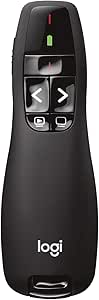 | Most Trusted Classic | Laser Type: Class 2 red laser | Wireless Technology: 2.4GHz RF | Range: 50 feet | VIEW LATEST PRICE | See Our Full Breakdown |
| Logitech Spotlight 2 Presentation Remote Wireless Clicker Haptics – Black |  | Best Premium Pick | Haptic Feedback: Yes | Highlighting Effects: Spotlight, Squarelight, Magnify, Annotate, Digital pointer | Connectivity: Bluetooth, Logi Bolt USB-C receiver | VIEW LATEST PRICE | See Our Full Breakdown |
| QUI Presentation Clicker with Volume Control, Wireless Presenter Remote |  | Best Long Range on a Budget | Connectivity: USB 2.4GHz receiver | Maximum Range: 328 feet | Button Quantity: 6, including volume control | VIEW LATEST PRICE | See Our Full Breakdown |
| Logitech Spotlight Presentation Remote Wireless – Black |  | Best for On-Screen Emphasis | Connectivity: USB-A receiver and Bluetooth Smart | Range: 100 feet (30 meters) | Battery Life: Up to 3 months on full charge | VIEW LATEST PRICE | See Our Full Breakdown |
| Wireless Presenter with Volume Control and RF 2.4GHz USB PowerPoint Clicker |  | Best for Volume and Hyperlink Control | Wireless Range: 100 feet | Power Source: 1x AAA battery (not included) | Buttons: Soft rubber, bumped for easy control | VIEW LATEST PRICE | See Our Full Breakdown |
| Presentation Clicker for PowerPoint, Wireless Presenter Remote with Case |  | Best Green Laser Pick | Wireless Control Distance: 98 ft / 30 m | Laser Pointer Range: 328 ft / 100 m (green) | Battery: Rechargeable | VIEW LATEST PRICE | See Our Full Breakdown |
| Norwii Wireless Presentation Clicker with Laser Pointer |  | Best for Large Rooms on a Budget | Range: 328 feet (100 meters) | Laser Pointer: Red light, IEC-60825-1 safety standard | Functions: Black/full screen, page forward/backward | VIEW LATEST PRICE | See Our Full Breakdown |
| Kensington Wireless Presenter with Red Laser Pointer |  | Best for Secure Corporate Environments | Wireless Range: 65 feet | Laser Color: Red | Encryption: AES 128-bit | VIEW LATEST PRICE | See Our Full Breakdown |
| Presentation Remote Clicker, Wireless Presenter for PowerPoint, USB A & USB C, RF 2.4GHz |  | Best Budget Compact Pick | Maximum Range: 50 feet | Connectivity: RF 2.4GHz, USB A & USB C receiver | Buttons: 3 | VIEW LATEST PRICE | See Our Full Breakdown |
| wireless presentation remote | Compatibility |
|---|---|
| Wireless Presenter Remote with | Windows, Mac OS, Linux, Android |
| DINOSTRIKE Wireless Presenter | Windows 7/8+, Mac OS, Linux, Android |
| Presentation Clicker with USB | Windows, macOS, PowerPoint, Keynote, Google Slides |
| Wireless Presenter Remote Cont | Windows, Mac |
| Presentation Clicker with USB- | Mac, Windows, Linux; PowerPoint, Keynote, Google Slides, Prezi |
| Presentation Clicker for Power | PowerPoint, Keynote, Google Slides, Windows, Mac |
| Logitech Wireless Presenter R4 | — |
| Logitech Spotlight 2 Presentat | Windows, macOS, Android, iPadOS, Chromebook |
| QUI Presentation Clicker with | PowerPoint, Keynote, Google Slides, Excel, ACDSee, Prezi, Mac, Windows, Linux, Android |
| Logitech Spotlight Presentatio | Windows, Mac OS, PowerPoint, Keynote, PDF, Google Slides, Prezi |
| Wireless Presenter with Volume | Windows |
| Presentation Clicker for Power | Windows, Mac OS, Linux, Android |
| Norwii Wireless Presentation C | Windows, macOS, Linux, Android |
| Kensington Wireless Presenter | PowerPoint, Keynote |
| Presentation Remote Clicker | — |
More Details on Our Top Picks
Wireless Presenter Remote with Hyperlink, Volume Control, and Long Range for PowerPoint and Keynote
Most clickers in this roundup promise 100 feet of range, but this one stretches control to 100 meters with a laser visible up to 200 meters out. That makes this model better suited to large auditoriums and lecture halls than the DINOSTRIKE air-mouse option below, whose 164-foot control range assumes you stay closer to the podium. The standout feature set goes beyond basic slide flipping: hyperlink navigation, window switching, and volume control let you run a full multimedia presentation without returning to your laptop. The tradeoff is friction. Unlike the plug-and-play B0BMQ4KLY2 clicker, Mac users face a small setup procedure, some functions require software configuration, and you’ll need to supply your own AAA battery. For presenters working big rooms, those annoyances are a fair price for the reach.
Pros:- Exceptional 100-meter control range for large venues
- Laser pointer visible up to 200 meters
- Hyperlink, window switching, and volume controls beyond basic slide advancement
- Works across Windows, Mac, Linux, and Android
Cons:- Requires setup and possible software configuration, especially on Mac
- AAA battery not included
- Advanced functions may not work with all presentation software
Best for: Conference speakers and lecturers presenting in large auditoriums where distance from the laptop exceeds 100 feet
Not ideal for: Mac users who want zero-setup simplicity, or anyone expecting a battery in the box — expect a small configuration session before first use
- Control Range:100 meters
- Laser Range:200 meters
- Compatibility:Windows, Mac OS, Linux, Android
- Battery:1 AAA battery (not included)
- Special Functions:Hyperlink, window switching, volume control
- Laser Type:Red
Our verdict“Buy this if you present in big rooms and need the longest range in the lineup; skip it if you want a grab-and-go clicker for small meetings.”
DINOSTRIKE Wireless Presenter Remote with Air Mouse Control, Rechargeable USB PPT Clicker, RF 2.4GHz
What separates the DINOSTRIKE from every other budget clicker here is air mouse control — you can wave it like a pointer to move the cursor, which means live demos, embedded videos, and web navigation all work without a spare hand on the trackpad. The rechargeable 300 mAh battery also removes the recurring AAA cost that the hyperlink remote above and the B0BMQ4KLY2 model both impose, charging fully in about three hours. Its software support is unusually broad for the price, covering everything from Prezi to Google Slides to Excel. The costs: an air mouse has a learning curve, the cursor can drift mid-sentence until you calibrate your wrist, and the laser is genuinely intense in darkened rooms — brighter than some audiences will appreciate. Frequent heavy use also drains the battery faster than the rated runtime suggests.
Pros:- Air mouse control enables live demos and cursor navigation
- Rechargeable battery with fast 3-hour charging
- 656-foot laser range for large venues
- Broad software support including Prezi, Google Slides, and Office apps
Cons:- Air mouse feature takes practice and can feel twitchy
- Laser may be painfully bright in dark rooms
- Battery life shortens with frequent use
Best for: Trainers and educators who run interactive demos with embedded media and need cursor control, not just slide advancement
Not ideal for: Speakers who only advance slides — the air mouse adds weight, cost, and a learning curve you won’t use
- Wireless Frequency:2.4GHz RF
- Control Range:164 ft
- Laser Pointer Range:656 ft
- Battery Capacity:300 mAh rechargeable
- Charging Time:3 hours
- Compatibility:Windows 7/8+, Mac OS, Linux, Android
- Supported Software:PowerPoint, Keynote, PDF, Word, Excel, Google Slides, Prezi
- Special Features:Air mouse control, volume adjustment
Our verdict“The right choice if your presentations involve live software demos; pure slide-flippers should save money with a simpler clicker.”
Presentation Clicker with USB Receiver, Wireless Presenter for PC & Mac
The cleverest detail here is the dual USB-A and USB-C receivers, which solves the problem that trips up older models like the Logitech R400: walk up to a MacBook or a new ultrabook and you’re stuck without a dongle adapter. Having both receivers means this clicker works with essentially any computer in the room — a genuine advantage for guest presenters and shared conference rooms where you can’t predict the hardware. The rechargeable battery also beats the AAA-dependent B09LHCK9ZL remote, which ships without batteries at all. Be realistic about the range, though: 100 feet is fine for classrooms and meeting rooms, but it’s a fraction of what the hyperlink remote above offers, so large halls are out. This is also a straightforward slide-and-laser tool — no volume keys, no air mouse, no hyperlink tricks.
Pros:- Dual USB-A and USB-C receivers cover old and new laptops
- Rechargeable battery avoids ongoing battery purchases
- Works with PowerPoint, Keynote, and Google Slides on Windows and macOS
- Built-in red laser for highlighting
Cons:- 100-foot range limits use to small and mid-sized rooms
- No volume control or advanced functions
- Depends on devices having free USB ports
Best for: Consultants and guest speakers who present from unfamiliar laptops, especially newer USB-C-only machines
Not ideal for: Auditorium presenters — the 100-foot range is the shortest serious reach in this batch, and there are no advanced controls
- Laser Pointer:Red
- Connectivity:USB-A & USB-C receivers
- Range:100 ft
- Battery:Rechargeable
- Compatibility:Windows, macOS, PowerPoint, Keynote, Google Slides
Our verdict“Pick this if you present from borrowed or mixed hardware and value never hunting for a dongle; large-venue speakers need more range.”
Wireless Presenter Remote Control for PPT and Slides
This is the stripped-down, lowest-friction option in the lineup: plug in the receiver, advance slides, done. Its 50-foot range is the shortest here — half what the dual-receiver clicker above offers and a small fraction of the 100-meter hyperlink remote — but for a classroom, huddle room, or thesis defense, that distance is plenty, and the ergonomic ABS body is comfortable through long sessions. Compared with the DINOSTRIKE, you give up the rechargeable battery (you’ll buy your own AAA), the air mouse, and the volume controls; what you get in return is simplicity and a lower price that makes it easy to stock a whole department without a purchasing argument. One real limitation: it shouldn’t be relied on for presentations routed through TVs or LED displays, so screen-based setups need a different tool. Mac users also face minor setup steps.
Pros:- Plug-and-play USB receiver with no drivers
- Comfortable, lightweight ergonomic design
- 50-foot range sufficient for meeting rooms
- Lowest-complexity option for basic slide control
Cons:- Shortest range in the roundup at 50 feet
- AAA battery not included
- Not recommended for TV, LED, or LCD screen setups
Best for: Schools and small offices buying clickers in bulk for standard conference-room slide decks
Not ideal for: Anyone presenting on TV or LED screens, or needing volume and hyperlink controls — this remote covers page navigation only
- Range:50 feet
- Wireless Technology:2.4 GHz
- Compatibility:Windows, Mac
- Battery:1 AAA (not included)
- Material:ABS plastic
- Setup:Plug-and-play USB receiver
Our verdict“The sensible cheap pick for ordinary room-sized presentations; anyone with bigger venues or smarter needs should step up a tier.”
Presentation Clicker with USB-A & USB-C Receiver, 2.4GHz Wireless Remote with Volume Control & Red Light Pointer
At 55 grams with a built-in dual-format receiver that stows inside the body, this is the clicker that disappears into a laptop bag and never gets left behind — the receiver can’t be lost in a taxi because it lives in the remote. Like the B0GXV8F6BP model, it covers both USB-A and USB-C ports with no drivers or software, and it adds volume control, which that model lacks, plus compatibility stretching to Linux and Prezi. The honest tradeoff is capability: this is a basic-control device, so presenters who want the air mouse of the DINOSTRIKE or the hyperlink navigation of the long-range remote will find nothing here beyond slides, volume, and the bright red laser — which is admittedly too aggressive for dim rooms. Running on two AAA batteries (not included) also means carrying spares on multi-day trips, unlike rechargeable rivals.
Pros:- Ultra-light 55g body with receiver stored inside
- USB-A and USB-C compatibility with no drivers needed
- Volume control plus slide and laser functions
- Works with Mac, Windows, Linux, PowerPoint, Keynote, Google Slides, and Prezi
Cons:- Limited to basic controls with no advanced features
- Requires 2 AAA batteries not included in the box
- Laser may be distracting in dim settings
Best for: Frequent-traveler presenters who want a sub-60-gram clicker with a stowed receiver that works on any laptop without setup
Not ideal for: Power presenters — advanced functions like hyperlinking or cursor control simply aren’t here, and batteries are an ongoing cost
- Connectivity:USB-A & USB-C built-in receiver
- Wireless Range:Up to 100 ft (30 m)
- Wireless Technology:2.4 GHz
- Pointer:Bright red laser
- Power:2x AAA batteries (not included)
- Compatibility:Mac, Windows, Linux; PowerPoint, Keynote, Google Slides, Prezi
- Weight:55 g
- Setup:Plug and play, no drivers
Our verdict“The best grab-and-go companion for speakers who live out of a carry-on; skip it if your presentations demand more than slides and volume.”
Presentation Clicker for PowerPoint Wireless Remote Control with Laser Pointer
For presenters who want the basics done well without paying Logitech prices, this no-name clicker covers the fundamentals. The ergonomic shell is a genuine step up from flat, boxy rivals like the QUI remote, and the 98-foot control range is more than most conference rooms demand. Plug-and-play setup means no drivers, no fumbling before a talk. Compared with the Logitech R400, you get roughly double the range at a lower price, though the tradeoff is consistency — budget RF remotes can occasionally drop clicks at the edge of their range. The built-in dongle storage is a thoughtful touch that prevents the classic lost-receiver disaster. The AAA battery lasts around two months, so keep a spare in your bag.
Pros:- Comfortable ergonomic shape for long presentations
- 98-foot range outperforms similarly priced clickers
- Works across PowerPoint, Keynote, and Google Slides
- Built-in storage keeps the USB dongle from getting lost
Cons:- AAA battery needs replacing every two months with regular use
- Laser pointer visibility drops in bright rooms
- No rechargeable option
Best for: Students and occasional presenters who need a reliable, comfortable clicker for under budget
Not ideal for: Frequent business travelers who want USB-C connectivity or rechargeable batteries instead of replaceable AAAs
- Dimensions:109mm
- Weight:38g
- Battery:1 AAA battery
- Control Distance:98FT / 30M
- Laser Pointer Range:328FT / 100M
- Setup:Plug-and-play, no drivers
- Compatibility:PowerPoint, Keynote, Google Slides, Windows, Mac
Our verdict“A sensible low-cost choice for anyone presenting occasionally who values comfort over advanced features.”
Logitech Wireless Presenter R400 USB A PowerPoint Clicker with Laser
The R400 has been the default corporate clicker for over a decade, and that longevity is its own argument. Where newer budget options like the B09X1G5DCC clicker promise longer range on paper, the R400 delivers dependable 50-foot performance with Logitech’s well-tested 2.4GHz RF — every click lands when it should. The touch-sensitive keys are large and intuitive enough that you can operate it without looking down, something many six-button budget remotes fumble. Its honest limitation is scope: a red laser and forward/back buttons, nothing more. Compared with the Logitech Spotlight, there’s no highlighting, no timer, no haptics — but also no app dependency and no charging cable to forget. It’s USB-A only, which is increasingly a problem on modern laptops.
Pros:- Proven Logitech RF reliability with zero dropped inputs
- Large, intuitive keys operable without looking
- Plug-and-play with no software installation
- Receiver docks inside the body for travel
Cons:- AAA batteries not included and must be replaced over time
- USB-A receiver only, no Bluetooth fallback
- Laser visibility weakens against bright or dark backgrounds
Best for: Professionals who want a battle-tested, zero-maintenance clicker for standard slide decks
Not ideal for: Users with USB-C-only laptops or presenters who want on-screen highlighting instead of a laser
- Laser Type:Class 2 red laser
- Wireless Technology:2.4GHz RF
- Range:50 feet
- Batteries:AAA
- Receiver Storage:Built-in docking bay
- Setup:Plug-and-play, no software
Our verdict“The safest bet for no-nonsense presenters who value reliability over features.”
Logitech Spotlight 2 Presentation Remote Wireless Clicker Haptics – Black
The Spotlight 2 is what a presentation remote looks like when someone rethinks the category. Instead of a red laser, you get digital highlighting, magnification, and annotation that work on any projected content — a real advantage over the R400’s laser, which vanishes against bright slides. The haptic feedback quietly confirms every advance, which matters more than it sounds when you’re presenting in the dark. Connectivity is the most flexible here: Bluetooth plus a Logi Bolt USB-C receiver, covering everything from a Windows podium PC to an iPad. Battery life stretches to three months, and a one-minute charge buys three hours of presenting. The catch: several of the best features live behind the Logi Options+ app, and at this price you’re paying a premium many presenters simply don’t need.
Pros:- Digital highlighting and magnification replace limiting red lasers
- Haptic feedback confirms inputs without looking
- Dual connectivity via Bluetooth and USB-C Logi Bolt receiver
- Three-month battery life with one-minute quick charge
Cons:- Premium price far above standard clickers
- Advanced features require installing Logi Options+
- Real-world battery life varies with haptics and usage
Best for: Keynote speakers and executives who present weekly and want highlighting, timers, and premium build
- Haptic Feedback:Yes
- Highlighting Effects:Spotlight, Squarelight, Magnify, Annotate, Digital pointer
- Connectivity:Bluetooth, Logi Bolt USB-C receiver
- Battery Life:Up to 3 months per full charge
- Quick Charge:Up to 3 hours from 1-minute charge
- Range:Up to 30 meters (100 feet)
- Compatibility:Windows, macOS, Android, iPadOS, Chromebook
Our verdict“The best remote available for frequent presenters, provided they’ll actually use the smart features they’re paying for.”
QUI Presentation Clicker with Volume Control, Wireless Presenter Remote
Range is this remote’s whole pitch, and at 328 feet, it beats even the premium Logitech Spotlight by more than triple. That matters if you present in auditoriums, training halls, or anywhere you’ll roam far from the podium. The addition of volume control is rare at this price — the R400 doesn’t have it — and useful for decks with embedded video. Six buttons keep operation simple, though presenters who want blank-screen or timer functions will find that button budget limiting. Compatibility is impressively broad, spanning Prezi, Excel, Linux, and Android alongside the usual PowerPoint and Keynote. The clip is handy for lectern storage. Compared with the B09X1G5DCC clicker, you trade a bit of ergonomic polish for sheer reach and volume keys — a fair swap for large-venue presenters.
Pros:- 328-foot range is the longest in this lineup
- Volume control included, unlike most budget clickers
- Works with Prezi, Excel, Linux, and Android
- Pocket clip makes it easy to carry between rooms
Cons:- Only six buttons, limiting advanced controls
- Battery not included — an extra purchase
- Plastic build feels basic next to Logitech options
Best for: Teachers and trainers working in large halls who need maximum roaming distance and volume control
Not ideal for: Executive presenters wanting premium feel or advanced features like highlighting and haptics
- Connectivity:USB 2.4GHz receiver
- Maximum Range:328 feet
- Button Quantity:6, including volume control
- Batteries:1 AAA (not included)
- Compatibility:PowerPoint, Keynote, Google Slides, Excel, ACDSee, Prezi, Mac, Windows, Linux, Android
- Color:Purple
Our verdict“The go-to budget choice for big rooms where walking away from the podium is the whole point.”
Logitech Spotlight Presentation Remote Wireless – Black
The original Spotlight occupies a smart middle ground in Logitech’s line: it delivers the advanced pointer system — highlight, magnify, and a mouse-like cursor — that the R400 lacks, at a lower price than the Spotlight 2. For presenters whose content lives on video walls or bright LED screens where red lasers are useless, the digital highlighting alone justifies the upgrade. Smart time management nudges you subtly as your slot runs down, a feature traveling speakers learn to love. It connects via USB-A receiver or Bluetooth and charges in minutes rather than eating AAAs. Compared with its successor, you give up the USB-C Logi Bolt receiver and haptic feedback; and like the newer model, unlocking the full feature set means installing Logi Options+. Setup takes longer than a plug-and-play clicker, so configure it before presentation day.
Pros:- Highlighting and magnification work on any screen content
- Smart time management helps keep talks on schedule
- USB-A and Bluetooth dual connectivity
- Three-month battery life with one-minute quick charging
Cons:- Full feature set requires the Logi Options+ app
- Initial setup is more involved than basic clickers
- USB-A receiver only, unlike Spotlight 2’s USB-C Bolt
Best for: Frequent presenters who want highlighting and timers without paying Spotlight 2 prices
Not ideal for: Plug-and-play purists who refuse to install companion software before every new computer
- Connectivity:USB-A receiver and Bluetooth Smart
- Range:100 feet (30 meters)
- Battery Life:Up to 3 months on full charge
- Charging Time:1 minute for 3 hours of use
- Features:Highlight, magnify, cursor control, smart timer
- Compatibility:Windows, Mac OS, PowerPoint, Keynote, PDF, Google Slides, Prezi
Our verdict“The value sweet spot in Logitech’s premium line — most of the smart features for noticeably less money.”
Wireless Presenter with Volume Control and RF 2.4GHz USB PowerPoint Clicker
This model stands out for its volume and hyperlink buttons, which most budget clickers in this roundup leave out. Being able to adjust audio mid-presentation without walking back to the laptop matters if you play video clips in your slides, and that alone separates it from simpler options like the Norwii clicker, which handles page turns but nothing else. The 100-foot range comfortably covers mid-size conference rooms, and the bumped rubber buttons make it easy to find controls by touch while you’re talking. The tradeoff is narrow compatibility: it’s Windows-only, so Mac presenters should skip straight to the green-laser clicker from the same list. Like several picks here, the AAA battery arrives separately, and the red pointer won’t show on LED or TV screens.
Pros:- Volume and hyperlink controls rare at this price point
- 100-foot range handles mid-size rooms with room to spare
- Bumped soft-rubber buttons are easy to operate without looking
- Plug-and-play USB receiver needs no software installation
Cons:- Windows-only compatibility excludes Mac and Linux presenters
- Red laser is invisible on LCD/LED/TV screens
- AAA battery not included, so plan an extra purchase
Best for: Windows presenters who embed video or hyperlinks in their slides and want mid-presentation audio control
Not ideal for: Mac and Linux users, or anyone presenting against LED/TV screens where the red pointer is invisible
- Wireless Range:100 feet
- Power Source:1x AAA battery (not included)
- Buttons:Soft rubber, bumped for easy control
- Pointer Color:Bright red
- Compatibility:Windows
- Connectivity:RF 2.4GHz USB receiver
- Setup:Plug and play
Our verdict“Buy this if you present on Windows and need volume and hyperlink control without paying Logitech prices.”
Presentation Clicker for PowerPoint, Wireless Presenter Remote with Case
The green laser is the reason this clicker earns its spot. A green beam is roughly ten times more visible to the human eye than the red pointers on the Norwii or Kensington models, and its 328-foot projection range means it stays usable in bright auditoriums and large halls where red lasers wash out. Add USB-C recharging and this is the most future-proof budget option in the lineup — no scavenging for AAA batteries before a talk, unlike the Norwii and RF 2.4GHz clickers here. The carrying case is a nice touch for anyone tossing it into a travel bag. The tradeoffs are modest but real: presenters in small rooms will never use the full laser range, and you’ll need access to a USB-C charger to keep it powered.
Pros:- Green laser is far more visible than red in large or bright rooms
- Rechargeable via USB-C eliminates battery replacements
- Works across Windows, Mac, Linux, and Android
- Includes a carrying case for travel
Cons:- 328-foot laser range is overkill for typical conference rooms
- Charging depends on having a USB-C port or cable handy
Best for: Speakers in large or brightly lit venues who need a highly visible laser and hate buying replacement batteries
Not ideal for: Classroom or small-meeting presenters who won’t use the extreme laser range and prefer replaceable batteries
- Wireless Control Distance:98 ft / 30 m
- Laser Pointer Range:328 ft / 100 m (green)
- Battery:Rechargeable
- Charging Port:USB-C
- Compatibility:Windows, Mac OS, Linux, Android
- Supported Software:MS Office, Keynote, PDF, Prezi, Google Slides, ACD See
- Setup:Plug and play, no drivers
Our verdict“The strongest choice in this batch for big-venue presenters who need a laser that actually shows up from the back row.”
Norwii Wireless Presentation Clicker with Laser Pointer
Norwii’s pitch is simple: a 328-foot control range at a price that undercuts the Logitech R400 while matching its core functions. That range matters more than it sounds — presenters roaming a stage or lecture hall can wander far from the laptop without dropped commands, something the 50-foot compact clicker later in this roundup can’t promise. The black screen and full screen buttons let you blank slides during Q&A, a small touch that makes talks feel more polished. Cross-platform support covers Windows, macOS, Linux, and Android, which puts it ahead of the Windows-only volume-control model in flexibility. The compromises are typical budget fare: you supply your own AAA battery, the red laser won’t work against TV screens, and there’s no rechargeable cell like the green-laser clicker offers.
Pros:- 328-foot range handles auditoriums and lecture halls
- Black screen and full screen functions for polished delivery
- Broad compatibility across Windows, macOS, Linux, and Android
- Plug-and-play setup with customizable keys
Cons:- AAA battery not included, adding a hidden cost
- Red laser not recommended for TV screen use
Best for: Lecturers and stage presenters who roam large rooms and want maximum range without a premium price
Not ideal for: Anyone wanting a rechargeable battery or a laser visible on TV and LED screens
- Range:328 feet (100 meters)
- Laser Pointer:Red light, IEC-60825-1 safety standard
- Functions:Black/full screen, page forward/backward
- Power:1x AAA battery (not included)
- Compatibility:Windows, macOS, Linux, Android
- Setup:Plug and play, customizable keys
Our verdict“The value play for presenters who need long-range control and don’t care about frills like recharging or a green laser.”
Kensington Wireless Presenter with Red Laser Pointer
Kensington’s differentiator isn’t range or laser brightness — it’s AES 128-bit encryption on the wireless link. For government contractors, finance teams, and anyone presenting sensitive material, that encrypted connection plus TAA compliance is a requirement, not a nicety, and no other clicker in this roundup offers it. The four-button layout is deliberately minimal: forward, back, laser, and blank screen, with nothing to fumble mid-sentence. Compared with the volume-control clicker earlier in this list, you give up advanced functions entirely — this is slide navigation and nothing else. The 65-foot range also trails the Norwii’s 328 feet, so it’s built for boardrooms, not ballrooms. What you get in return is a 3-year warranty with lifetime support and internal receiver storage, which budget brands here simply don’t match.
Pros:- AES 128-bit encrypted wireless connection for sensitive settings
- TAA compliant with 3-year warranty and lifetime support
- Simple four-button layout prevents mid-talk fumbling
- Internal storage keeps the USB receiver from getting lost
Cons:- Presentation controls only — no volume or media functions
- 65-foot range is short compared with the Norwii’s 328 feet
Best for: Corporate, government, and regulated-industry presenters who need encrypted connectivity and TAA compliance
Not ideal for: Presenters who want volume control or other advanced functions, or those working in large venues
- Wireless Range:65 feet
- Laser Color:Red
- Encryption:AES 128-bit
- Buttons:Four-button layout
- Compatibility:PowerPoint, Keynote
- Receiver Storage:Internal
- Warranty:3 years, TAA compliant
Our verdict“The pick for secure boardrooms where encryption and compliance matter more than range or extra buttons.”
Presentation Remote Clicker, Wireless Presenter for PowerPoint, USB A & USB C, RF 2.4GHz
At 50 grams with a three-button layout, this is the lightest, simplest option in the batch — a set-it-and-forget-it clicker for occasional presenters. Its real advantage is the USB-A and USB-C receiver support, which means it plugs into modern laptops that dropped full-size USB ports, something several older models here can’t do without an adapter. The bright red light handles basic pointing, and setup is genuinely zero-effort. The compromises are obvious when placed next to the Norwii or the green-laser clicker: the 50-foot range is the shortest in this roundup, fine for a huddle room but risky in a training hall, and there are no extras like volume control, recharging, or a carrying case. For the price, though, it does the one job it promises.
Pros:- USB-A and USB-C receiver support fits both old and new laptops
- Featherlight 50-gram build slips into any pocket or laptop bag
- Plug-and-play with wide software compatibility
- Receiver stores under the battery cover so it won’t get lost
Cons:- 50-foot range is the shortest in this roundup
- Red pointer unusable on TV/LED/LCD screens
- No advanced functions like volume or rechargeable battery
Best for: Students and occasional presenters with newer USB-C laptops who need a cheap, pocketable clicker for small rooms
Not ideal for: Anyone presenting in large rooms, or power users who want volume control or a rechargeable battery
- Maximum Range:50 feet
- Connectivity:RF 2.4GHz, USB A & USB C receiver
- Buttons:3
- Pointer:Bright red light
- Battery:1x AAA (not included)
- Weight:0.05 kg (50 g)
- Supported Devices:Laptop, PC, Android
Our verdict“A no-frills spare clicker that earns its place through USB-C support and portability rather than performance.”

How We Picked
I evaluated these fifteen wireless presentation remotes against the factors that actually affect a live talk: signal range and reliability, receiver compatibility (USB-A versus USB-C), pointer visibility, button layout and feel, battery logistics, and price relative to what each model adds. Range claims were compared against the realistic distances presenters face — a conference room needs far less reach than a ballroom stage, so I weighted range more heavily for remotes marketed toward large venues. I also prioritized models with thoughtful ergonomics and low learning curves, because a remote you fumble mid-presentation defeats its own purpose.
The ranking logic favors differentiation over raw specs. The Logitech Spotlight models rank highest because haptics, time alerts, and app customization genuinely change how you present, not just how you click. Mid-tier picks earned spots by solving specific problems — dual receivers, volume control, included cases — while budget models were ranked on whether they deliver dependable basics without annoying compromises. Every pick was assigned a distinct role so the ordering reflects who each remote serves best, not a vague overall score.
Factors to Consider When Choosing Wireless Presentation Remotes
Choosing between wireless presentation remotes comes down to matching the remote’s strengths to your presentation style, your hardware, and how often you actually present. These are the factors that most often make or break the purchase.Receiver Type and Laptop Compatibility
The single most common mistake in this category is buying a USB-A-only remote for a laptop that only has USB-C ports. Most budget clickers ship with a fixed USB-A dongle, which means carrying an adapter everywhere — a small annoyance that becomes a real problem when a venue adapter goes missing minutes before you speak. Dual-receiver models solve this by including both connectors, sometimes nested inside the remote’s body, which also reduces the chance of losing the dongle entirely. If you present across multiple machines, look for a receiver that stores inside the clicker itself. Also check whether the remote needs drivers; the plug-and-play models in this list work identically on Windows and macOS, while a few air-mouse features behave differently across platforms.
Range: Match It to Your Venue
Manufacturers advertise ranges from 50 to 300 feet, and the honest truth is that most presenters never need more than 50. A classroom, meeting room, or webinar setup rarely puts you more than 30 feet from the laptop, so paying extra for extended range there is wasted money. Where range matters is ballrooms, auditoriums, and training halls with the laptop at the back of the room — RF interference from AV equipment and dense crowds can also degrade real-world performance below the advertised figure, so build in a margin. A 100-foot rating is a sensible floor for large venues. Range and battery life are loosely connected too, since stronger transmitters drain batteries faster on some models.
Basic Clicker vs. Air Mouse vs. Spotlight-Style Control
There are three control philosophies in this lineup, and picking the wrong one is a frequent regret. Basic clickers only advance slides and toggle the screen — reliable and impossible to fumble, ideal for beginners and nervous presenters. Air-mouse remotes add motion-based cursor control, which is essential if you need to click embedded links or videos, but the learning curve can produce wobbly on-screen cursors during your first few talks. Spotlight-style remotes take precision further with gesture-based highlighting and magnification, which looks polished but costs real money. My advice: buy the simplest remote that covers your actual slide behavior. If your decks never contain hyperlinks or video, an air mouse is a feature you’ll pay for and never use.
Battery Logistics
AAA batteries versus built-in rechargeable cells is a quieter tradeoff than it should be. Rechargeable remotes are cheaper to run and never leave you hunting for coin cells, but if you forget to charge before an event, you’re presenting with a dead remote — and some budget rechargeable models hold charge poorly after a year. AAA-powered clickers like the Logitech R400 run for months or years on a set of batteries, and spares fit in the same pocket as the remote. Frequent presenters who travel light tend to prefer rechargeable; occasional presenters are better served by replaceable cells that are always ready. Check charging port type too, since some older rechargeable models still use micro-USB rather than USB-C.
Pointer Type and Venue Lighting
Most remotes in this price range use red laser pointers, which are visible in dim rooms but wash out badly on modern LED screens and bright, sunlit venues — a detail spec sheets never mention. If you present in well-lit rooms or point at video walls rather than projection screens, a digital highlight approach (as on the Spotlight models) or an air-mouse cursor will be far more visible than any red dot. Green lasers, where available, read better in bright conditions but drain batteries faster and cost more. Also verify the laser button placement: poorly positioned laser buttons get pressed accidentally in a pocket or bag, draining the battery before you even arrive.
When to Pay More
The jump from a $15 generic clicker to a $100+ premium remote only makes sense under specific conditions: you present professionally and repeatedly, you need silent time alerts to stay on schedule, or your talks involve interactive content that demands precise cursor control. For everyone else — students, teachers, occasional office presenters — the budget tier advances slides exactly as well as the premium tier. The smart middle ground is the $20–40 range, where volume control, dual receivers, and carrying cases appear without premium pricing. A useful test: if losing the remote the day before a talk wouldn’t panic you, you don’t need the premium tier. If your income depends on polished delivery, the investment in haptics and build quality pays for itself in confidence alone.
Frequently Asked Questions
Do wireless presentation remotes work on both Windows and Mac?
Most 2.4GHz RF remotes in this roundup are platform-agnostic because they emulate a keyboard — the receiver just sends page-up and page-down commands that both Windows and macOS interpret natively. No drivers are needed for basic slide advancing, which is why generic clickers work identically across systems. The exceptions are the advanced features: Logitech’s Spotlight customization software has different capabilities on Mac versus Windows, and some air-mouse modes calibrate differently across platforms. Check the receiver type as well, since MacBooks typically need USB-C or an adapter for USB-A dongles. If you present from an iPad, note that several of these models support it via adapter, but behavior varies.
Is an air mouse feature worth the extra cost?
It depends entirely on whether your slides contain interactive content. An air mouse lets you click hyperlinks, play embedded video, and control on-screen elements without walking back to the laptop, which is genuinely valuable for training sessions and demo-heavy talks. The tradeoff is a learning curve — your first few presentations may feature a slightly wobbly cursor until your wrist stabilizes, and the extra sensor drains battery faster than a basic clicker. If your decks are linear slides with no links or media, the feature adds cost, weight, and one more thing that can malfunction. Presenters who answer questions by jumping between sections via hyperlink buttons, though, find it indispensable.
What range do I actually need in a presentation remote?
For a typical meeting room or classroom, anything rated above 50 feet is more than enough, since you’ll rarely stand farther than 30 feet from the laptop. Large venues change the math: auditoriums with rear-projection setups or laptops placed at the back of a ballroom can put 100-plus feet between you and the receiver. Real-world range also runs 20–30% below advertised figures when AV equipment, Wi-Fi congestion, or dense crowds interfere with the 2.4GHz signal. My rule of thumb is to buy roughly double the range you expect to need. Beyond that, extended range adds cost without any benefit you’ll notice.
Are rechargeable remotes better than ones with AAA batteries?
Neither is universally better — it comes down to your habits. Rechargeable models cost nothing to run and never leave you buying coin cells, but a forgotten charge means a dead remote at the worst moment, and some budget rechargeable units lose capacity within a year. AAA-powered remotes like the Logitech R400 can run for many months on one set, and carrying a spare pair is cheap insurance for frequent travelers. If you present weekly and charge devices routinely, rechargeable is the cleaner choice. If you present occasionally and want the remote to work after months in a drawer, replaceable batteries win every time.
Why are Logitech Spotlight remotes so much more expensive than other clickers?
The price gap reflects features no budget remote offers: haptic time alerts that silently vibrate at custom intervals so you stay on schedule without checking a watch, gesture-based on-screen highlighting and magnification that’s more visible than any laser in bright rooms, and companion software for customizing buttons per presentation. Build quality is also a step above the plastic generic clickers, with a metal body that survives travel abuse. For occasional presenters, none of this justifies five to ten times the price of a basic clicker — slides advance just the same. But for professional speakers who deliver paid talks regularly, the timing alerts alone can rescue a presentation from running long, which is where the premium earns back its cost.
Conclusion
After comparing all fifteen models, the right choice depends less on specs and more on how and where you present. For the best overall pick, the Logitech Spotlight family stands apart — haptic timing alerts, precise air-mouse control, and premium build make it the remote for anyone whose presentations carry professional stakes. The Spotlight 2 is the pick if you want the latest version; the original Spotlight remains excellent if you find it discounted.
For best value, the DINOSTRIKE air-mouse remote delivers rechargeable convenience and motion control at a fraction of the Spotlight’s price, with the QUI clicker and the hyperlink-and-volume model close behind for presenters who want those specific features cheaply. Beginners should start with the Logitech R400 — its four-button layout is impossible to fumble under pressure, and its battery lasts for ages. For specific needs: choose a dual USB-A/USB-C model if you present from modern laptops, the Kensington or Norwii for dependable classroom duty, and the case-included PowerPoint clicker if you travel frequently and need everything in one pocket. Whatever your choice, match the remote to your venue and slide style rather than chasing features you’ll never press.
Halloween Picks
halloween
As an affiliate, we earn on qualifying purchases.