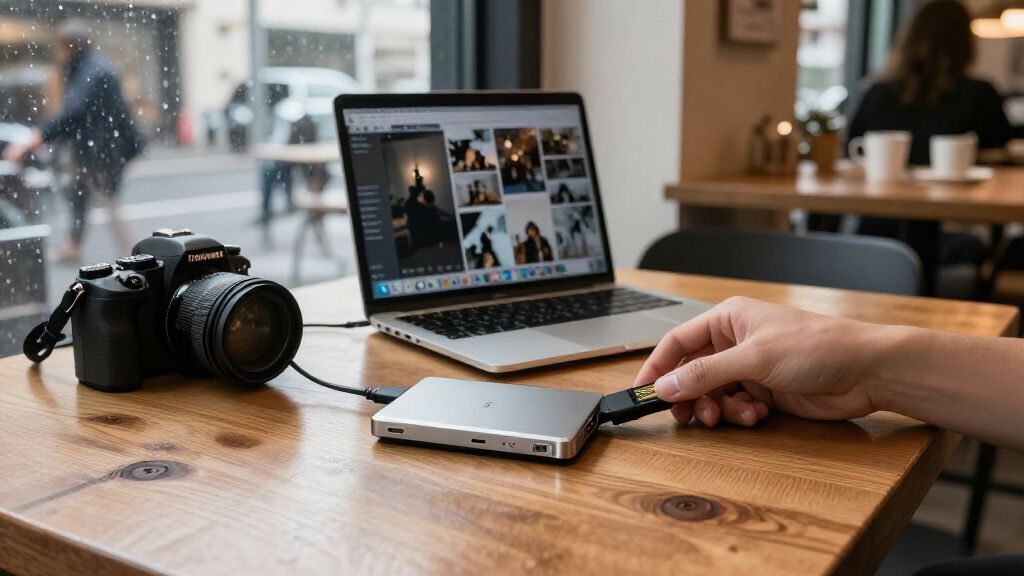
For shoppers comparing Black Friday portable SSD deals, I’d start with the Samsung T7 Shield as the best overall fit for everyday storage: its rugged design adds protection without pushing buyers toward a specialized interface. The Samsung T9 stands out for faster USB 3.2 Gen 2×2 transfers on compatible devices, while the OWC Envoy Ultra is the premium choice for Thunderbolt 5 systems. The main tradeoffs are speed versus device compatibility, and extra protection or features versus a simpler drive. Capacity, connector type, and whether a model is renewed also affect which option makes sense. Read on for how all 15 drives differ and which buyer each one suits.

Get everyday essentials delivered free with Prime
- Fast, free delivery on millions of items
- Prime Video, Amazon Music and more included
- Member-only deals all year
Key Takeaways
- The Samsung T7 Shield is my best overall pick because it pairs an everyday USB 3.2 Gen 2 connection with a more protective design; buyers who do not need that extra protection can look at the standard T7.
- The Samsung T9 and the 2,000MB/s-class drives are conditional speed picks: the host device must support the relevant interface to benefit, so advertised transfer rates alone do not settle the choice.
- The OWC Envoy Ultra is in a different performance tier with Thunderbolt 5 and 2TB capacity, but its appeal is limited to buyers whose computers support that connection and whose work can use the bandwidth.
- Magnetic and dual-connector models solve specific workflow problems: the Verbatim SnapBack and magnetic MOVE SPEED and ORICO options suit attachment-focused setups, while the Lexar D70E’s dual connectors target device-to-device convenience.
- The lineup includes meaningful capacity and product-type differences: several options are 512GB, while SanDisk’s 1TB Portable Drive is described as a drive rather than an SSD, and one SanDisk Extreme listing is renewed.
| Lexar D70E 1TB Dual-Connector Portable External SSD |  | Best for Device Flexibility | Capacity: 1 TB | Drive type: External solid-state drive | Connectors: USB-C and USB-A | VIEW LATEST PRICE | See Our Full Breakdown |
| Verbatim SnapBack 1TB Ultra-Slim Magnetic Portable SSD, USB 3.2 Gen 2×2 |  | Best for iPhone ProRes Recording | Capacity: 1 TB | Interface: USB 3.2 Gen 2×2 | Maximum speeds: Up to 2,050 MB/s read; up to 1,900 MB/s write | VIEW LATEST PRICE | See Our Full Breakdown |
| Samsung T7 Shield 1TB Portable SSD, USB 3.2 Gen 2 |  | Best for Rugged Travel | Capacity: 1 TB | Interface: USB 3.2 Gen 2 | Sequential speeds: Up to 1,050 MB/s read; up to 1,000 MB/s write | VIEW LATEST PRICE | See Our Full Breakdown |
| OWC Envoy Ultra 2TB Thunderbolt 5 Portable NVMe SSD |  | Best Premium High-Speed Pick | Capacity: 2 TB | Drive type: NVMe solid-state drive | Interface compatibility: Thunderbolt 5; compatible with Thunderbolt 3, Thunderbolt 4, and USB4 | VIEW LATEST PRICE | See Our Full Breakdown |
| MOVE SPEED 512GB Portable External SSD, USB 3.2 Gen 2×2, Up to 1000MB/s, Magnetic Aluminum Design with USB-C Cable |  | Best Compact Magnetic Pick | Capacity: 512 GB | Connectivity: USB 3.2 Gen 2×2 | Maximum speeds: Up to 1,000 MB/s read and write | VIEW LATEST PRICE | See Our Full Breakdown |
| ORICO K5PLUS 512GB Magnetic Portable SSD with Metal Body |  | Best for iPhone 16 Pro Video | Capacity: 512GB | Maximum transfer speed: Up to 460MB/s | Interface: USB 3.0 | VIEW LATEST PRICE | See Our Full Breakdown |
| Samsung T7 Portable SSD 1TB, Titan Gray, USB 3.2 Gen 2 | 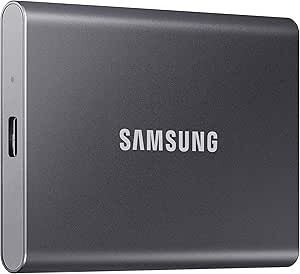 | Best Value for Everyday Transfers | Capacity: 1TB | Read speed: Up to 1,050MB/s | Write speed: Up to 1,000MB/s | VIEW LATEST PRICE | See Our Full Breakdown |
| OSCOO 1TB Touchscreen Encrypted Portable SSD, Up to 2,000MB/s |  | Best for Secure, Speed-Aware Workflows | Capacity: 1TB | Interface: USB 3.2 Gen 2×2 | Maximum read speed: Up to 2,000MB/s | VIEW LATEST PRICE | See Our Full Breakdown |
| OSCOO 2TB Magnetic External SSD, Up to 2000MB/s |  | Best High-Capacity Magnetic Pick | Capacity: 2TB | Maximum read speed: Up to 2,000MB/s | Hardware connectivity: USB 3.2 Gen 2×2 | VIEW LATEST PRICE | See Our Full Breakdown |
| SanDisk Extreme Portable SSD, 1TB, Up to 2000MB/s |  | Best for Rough-and-Ready Carry | Capacity: 1TB | Connector: USB Type-C | Maximum read speed: Up to 2,000MB/s | VIEW LATEST PRICE | See Our Full Breakdown |
| SanDisk Extreme Portable SSD 1TB, USB-C, USB 3.2 Gen 2, Renewed |  | Best for Rugged Carry | Capacity: 1 TB | Read speed: Up to 1,050 MB/s | Write speed: Up to 1,000 MB/s | VIEW LATEST PRICE | See Our Full Breakdown |
| SanDisk 1TB Portable Drive, USB-C, Black |  | Best for Everyday Backups | Capacity: 1 TB | Read speed: Up to 600 MB/s | Connectivity: USB Type-C | VIEW LATEST PRICE | See Our Full Breakdown |
| SanDisk 1TB Portable SSD, Up to 1000 MB/s Read Speed, Black |  | Best for Simple, Fast Setup | Capacity: 1 TB | Maximum read speed: Up to 1,000 MB/s | Interface: USB 3.0 | VIEW LATEST PRICE | See Our Full Breakdown |
| Samsung T9 Portable SSD 1TB, USB 3.2 Gen 2×2, Up to 2,000 MB/s | 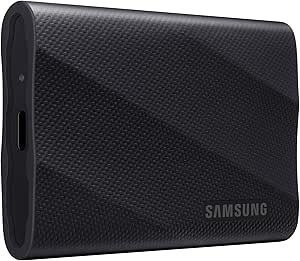 | Best Premium-Speed Pick | Capacity: 1 TB | Interface: USB 3.2 Gen 2×2 | Read speed: Up to 2,000 MB/s | VIEW LATEST PRICE | See Our Full Breakdown |
| MOVE SPEED SP20 512GB Portable External SSD |  | Best for Mixed USB-C and USB-A Setups | Capacity: 512GB | Approximate usable capacity: 465–476GB | Interfaces: USB 3.2 Gen 2×2, USB-C, and USB-A | VIEW LATEST PRICE | See Our Full Breakdown |
| Black Friday portable SSD deal | Capacity | Weight |
|---|---|---|
| Lexar D70E 1TB Dual-Connector | 1 TB | 55 g |
| Verbatim SnapBack 1TB Ultra-Sl | 1 TB | 1.44 oz |
| Samsung T7 Shield 1TB Portable | 1 TB | — |
| OWC Envoy Ultra 2TB Thunderbol | 2 TB | — |
| MOVE SPEED 512GB Portable Exte | 512 GB | 1.9 oz |
| ORICO K5PLUS 512GB Magnetic Po | 512GB | — |
| Samsung T7 Portable SSD 1TB | 1TB | — |
| OSCOO 1TB Touchscreen Encrypte | 1TB | 52g |
| OSCOO 2TB Magnetic External SS | 2TB | 50g |
| SanDisk Extreme Portable SSD | 1TB | 1.6 oz |
| SanDisk Extreme Portable SSD 1 | 1 TB | 1.76 ounces |
| SanDisk 1TB Portable Drive | 1 TB | 1.12 ounces |
| SanDisk 1TB Portable SSD | 1 TB | 1.12 ounces |
| Samsung T9 Portable SSD 1TB | 1 TB | — |
| MOVE SPEED SP20 512GB Portable | 512GB | — |
More Details on Our Top Picks
Lexar D70E 1TB Dual-Connector Portable External SSD
For a Black Friday portable SSD shortlist, the Lexar D70E stands out for its built-in USB-C and USB-A connectors, which make it easier to move files between newer phones or tablets and older computers without relying on an adapter. Its USB-C speeds reach up to 2,000 MB/s read and 1,800 MB/s write, while USB-A tops out at lower figures, so the faster performance depends on having a compatible USB-C host. Compared with the Samsung T7 Shield, the Lexar prioritizes connection flexibility and a light metal body over stated rugged water and drop protection. Automatic photo and video backups through the Lexar App add a useful phone-focused feature, but the app is not a reason to choose it if you only need a simple computer drive. I’d skip it if your main priority is rough-weather protection or consistently fast transfers through USB-A.
Pros:- USB-C and USB-A connectors support direct connections to compatible devices.
- USB-C read speeds reach up to 2,000 MB/s.
- Lightweight 55 g metal housing includes an integrated lanyard loop.
- Lexar App supports automatic photo and video backups.
Cons:- USB-A read and write speeds are lower than the stated USB-C speeds.
- Actual transfer rates depend on the host device and its supported USB standard.
Best for: Travelers and phone owners who regularly transfer files between USB-C devices and older USB-A computers.
Not ideal for: Buyers who need IP-rated weather protection or expect USB-A connections to match the drive’s fastest USB-C performance.
- Capacity:1 TB
- Drive type:External solid-state drive
- Connectors:USB-C and USB-A
- USB-C speeds:Up to 2,000 MB/s read; up to 1,800 MB/s write
- USB-A speeds:Up to 1,000 MB/s read; up to 900 MB/s write
- Weight:55 g
- Dimensions:3.13 × 1.19 × 0.31 in
- Housing and backup:Metal housing; automatic photo and video backup through the Lexar App
- Warranty:5-year limited warranty
Our verdict“Choose the Lexar D70E if switching between USB-C and USB-A devices matters more than rugged protection.”
Verbatim SnapBack 1TB Ultra-Slim Magnetic Portable SSD, USB 3.2 Gen 2×2
The Verbatim SnapBack is the most phone-specific pick here: its MagSafe-compatible magnetic attachment keeps the slim drive against a compatible iPhone, and supported devices can record Apple ProRes 4K video directly to it at up to 120fps. That makes it a more tailored filming accessory than the Lexar D70E, whose dual connectors and backup app suit everyday file transfers across devices. The SnapBack also lists higher peak read and write speeds, but those figures rely on a compatible USB 3.2 Gen 2×2 connection and should not be assumed on every phone or computer. Its 0.2-inch metal enclosure and two included USB-C cables add practical flexibility, while the magnetic fit is limited to compatible phones. I’d pass if you mainly want a general-purpose drive or need more than 1TB in this model.
Pros:- Magnetic design attaches to MagSafe-compatible smartphones.
- Supports direct Apple ProRes 4K recording up to 120fps on compatible devices.
- Lists read speeds up to 2,050 MB/s and write speeds up to 1,900 MB/s.
- Includes both a U-shaped USB-C cable and a standard USB-C cable.
Cons:- Magnetic attachment is intended for MagSafe-compatible smartphones.
- Peak transfer speeds and ProRes recording depend on compatible devices and interfaces.
- Limited to 1 TB of capacity.
Best for: iPhone videographers with a compatible MagSafe phone who want to record supported ProRes footage directly to external storage.
Not ideal for: Buyers who use phones without compatible magnetic attachment, need more than 1TB, or want a drive mainly for broad everyday backups.
- Capacity:1 TB
- Interface:USB 3.2 Gen 2×2
- Maximum speeds:Up to 2,050 MB/s read; up to 1,900 MB/s write
- Data transfer rate:Up to 20 Gbps
- Dimensions and thickness:2.75 × 2.24 × 0.2 in
- Weight:1.44 oz
- Enclosure:Metal; magnetic attachment for compatible smartphones
- Video support:Apple ProRes 4K up to 120fps on compatible devices
- Included cables and warranty:U-shaped and standard USB-C cables; 3-year limited warranty
Our verdict“Pick the SnapBack for compatible iPhone ProRes workflows; choose the Lexar D70E instead for more flexible USB-A and USB-C connections.”
Samsung T7 Shield 1TB Portable SSD, USB 3.2 Gen 2
The Samsung T7 Shield earns its place by putting weather and impact protection ahead of headline speed. Its IP65 rating covers water and dust resistance, and Samsung lists drop testing up to 9.8 feet under controlled conditions, giving travelers more reassurance than the slim, phone-focused Verbatim SnapBack. The tradeoff is speed: its maximum sequential read and write figures are 1,050 MB/s and 1,000 MB/s, below the faster claims of the Lexar D70E and SnapBack on compatible connections. For routine backups, game storage, or moving project files, that may be a sensible exchange for a drive built for travel. The rugged ratings do not promise protection in every real-world situation, and full speeds still depend on the host, cable, and UASP support.
Pros:- IP65-rated water and dust resistance.
- Drop resistance tested up to 9.8 feet under controlled conditions.
- Compatible with PCs, Macs, Android devices, gaming consoles, and supported iPhones.
- Includes hardware encryption and Dynamic Thermal Guard.
Cons:- Maximum read and write speeds are lower than those listed for the Lexar D70E and Verbatim SnapBack.
- Actual transfer speeds depend on the host device, cable, and UASP support.
- Protection ratings may not reflect every real-world exposure or impact.
Best for: Travelers, field workers, and console owners who want a 1TB drive with stated water, dust, and drop resistance.
Not ideal for: Video editors chasing the highest transfer rates or buyers who do not need extra protection and would rather prioritize speed or phone-specific features.
- Capacity:1 TB
- Interface:USB 3.2 Gen 2
- Sequential speeds:Up to 1,050 MB/s read; up to 1,000 MB/s write
- Water and dust resistance:IP65
- Drop resistance:Tested up to 9.8 ft (3 m) under controlled conditions
- Compatible devices:Gaming consoles, Mac, PC, tablets, Android devices, and iPhone 15/16
- Security and thermal features:Hardware encryption; Dynamic Thermal Guard
- Use cases:Personal, gaming, and business
Our verdict“Choose the T7 Shield if travel durability matters more than the faster peak speeds offered by the Lexar D70E and Verbatim SnapBack.”
OWC Envoy Ultra 2TB Thunderbolt 5 Portable NVMe SSD
The OWC Envoy Ultra is the specialist choice in this group: Thunderbolt 5 and up to 6,000 MB/s sequential reads target large creative workloads, not routine document backups. Its 2TB capacity also doubles that of the 1TB Verbatim SnapBack and Samsung T7 Shield, giving editors more room for active project files. The speed advantage is conditional, though: the connected device must support a suitable Thunderbolt or USB4 connection, and slower hosts will not deliver the headline rate. OWC’s bus-powered aluminum enclosure has fanless cooling, IP67 protection, and a built-in cable, so there is less loose gear to carry. That integrated cable cannot be detached, which limits replacement options if it is damaged. Compared with the T7 Shield, this is a larger-capacity performance investment, not the more practical pick for ordinary travel backups.
Pros:- Up to 6,000 MB/s sequential read speed for compatible systems.
- 2 TB capacity provides more working space than the 1TB drives in this batch.
- Compatible with Thunderbolt 3, Thunderbolt 4, Thunderbolt 5, and USB4 devices.
- Fanless aluminum enclosure is bus-powered and rated IP67 for weather protection.
Cons:- Maximum speed depends on the connected device and interface.
- Built-in Thunderbolt cable is not detachable.
- Its high-speed interface is unnecessary for many routine backup and storage tasks.
Best for: Video editors and other creative professionals with Thunderbolt or USB4 computers who move large files and need 2TB of portable workspace.
Not ideal for: Buyers using standard USB-only devices, seeking a small everyday backup drive, or preferring a detachable cable.
- Capacity:2 TB
- Drive type:NVMe solid-state drive
- Interface compatibility:Thunderbolt 5; compatible with Thunderbolt 3, Thunderbolt 4, and USB4
- Sequential read speed:Up to 6,000 MB/s
- Power:Bus-powered
- Cable:Built-in Thunderbolt cable
- Enclosure and cooling:Aluminum; fanless
- Protection:IP67 weatherproof; dust, water, and shock resistant
- Warranty:5-year OWC limited warranty
Our verdict“Choose the Envoy Ultra for large creative workloads on Thunderbolt or USB4 systems, not for basic backups or USB-only setups.”
MOVE SPEED 512GB Portable External SSD, USB 3.2 Gen 2×2, Up to 1000MB/s, Magnetic Aluminum Design with USB-C Cable
The MOVE SPEED is the smallest-capacity option in this batch, but its appeal is practical: 512GB, a magnetic aluminum body, and a cable that stores on the drive make it a compact companion for compatible phones, tablets, and computers. It lists speeds up to 1,000 MB/s read and write, so it sits below the Verbatim SnapBack’s higher peak claims and ProRes 4K recording up to 120fps. The MOVE SPEED still supports direct 4K ProRes HDR recording on compatible iPhones, making it a more accessible fit for lighter capture needs than a high-capacity Thunderbolt drive like the OWC Envoy Ultra. Its USB 3.2 Gen 2×2 specification does not guarantee those stated speeds on every host, and 512GB can fill quickly with high-resolution footage. Choose it for portability, not a large video archive.
Pros:- Compact 512GB design weighs 1.9 oz.
- Magnetic body can attach to compatible devices.
- USB-C cable stores on the back of the drive.
- Supports 4K ProRes HDR recording on compatible iPhones.
Cons:- 512GB provides less room than the 1TB and 2TB options in this batch.
- Maximum listed speeds are lower than the Verbatim SnapBack’s.
- Magnetic attachment and direct video recording depend on compatible devices.
Best for: Phone and tablet owners who want a compact magnetic drive for everyday transfers or occasional compatible-iPhone 4K ProRes HDR recording.
Not ideal for: Content creators who need 1TB or more, frequent large-file transfers, or the higher peak speeds and 120fps ProRes support listed for the Verbatim SnapBack.
- Capacity:512 GB
- Connectivity:USB 3.2 Gen 2×2
- Maximum speeds:Up to 1,000 MB/s read and write
- Thickness:0.36 in
- Weight:1.9 oz
- Enclosure:Magnetic aluminum alloy
- Included cable:USB-C cable that stores on the drive
- Compatibility:Desktop, laptop, smartphone, and tablet; Mac and PC
- Video recording:4K ProRes HDR on compatible iPhones
Our verdict“Pick the MOVE SPEED for a compact magnetic companion and modest storage needs; choose the SnapBack for higher listed speeds and 120fps ProRes support.”
ORICO K5PLUS 512GB Magnetic Portable SSD with Metal Body
For Black Friday shoppers choosing a drive around a specific phone workflow, the ORICO K5PLUS stands out for its magnetic attachment ring and support for 4K 120 fps ProRes HDR recording on iPhone 16 Pro and Pro Max. Its 512GB capacity and maximum 460MB/s transfer speed make it a more focused, slower option than the Samsung T7, which offers twice the storage and much higher stated speeds for general file transfers. The aluminum-alloy body is designed to dissipate heat, while the included USB-C and USB-A cable helps with connections beyond a phone. The tradeoff is clear: this pick suits recording directly to a compatible iPhone, not buyers chasing faster backups or roomy general-purpose storage. Older iPhones need ORICO’s specified LC10 Lightning adapter; other-brand adapters are not supported.
Pros:- Supports direct 4K 120 fps ProRes HDR recording on iPhone 16 Pro and Pro Max.
- Magnetic attachment ring helps keep the drive with a compatible device.
- Aluminum-alloy body is designed for heat dissipation.
- Included USB-C and USB-A cable supports connections to a range of devices.
Cons:- 512GB capacity is less than the 1TB and 2TB options in this group.
- Maximum transfer speed of 460MB/s is far below the Samsung T7’s stated speeds.
- Older iPhones require the specified ORICO LC10 adapter, and other-brand adapters are not supported.
Best for: iPhone 16 Pro and Pro Max owners who want a magnetic drive for recording 4K 120 fps ProRes HDR video.
Not ideal for: Buyers who need high-capacity, fast general-purpose storage, or iPhone 14-and-earlier owners unwilling to buy the specified ORICO adapter.
- Capacity:512GB
- Maximum transfer speed:Up to 460MB/s
- Interface:USB 3.0
- Connectivity:USB-C and USB-A
- Recording support:4K 120 fps ProRes HDR on iPhone 16 Pro and Pro Max
- Body material:Aluminum alloy
- Dimensions:2.36 × 3.15 × 0.47 inches
- Included accessory:Magnetic attraction ring
Our verdict“Choose the K5PLUS for magnetic 4K 120 fps ProRes HDR recording on an iPhone 16 Pro or Pro Max, not for fast, high-capacity backups.”
Samsung T7 Portable SSD 1TB, Titan Gray, USB 3.2 Gen 2
The Samsung T7 is the straightforward choice for shoppers who want a balanced portable SSD rather than a specialized phone attachment. It pairs 1TB of storage with read speeds up to 1,050MB/s and write speeds up to 1,000MB/s on a compatible USB 3.2 Gen 2 setup. That is quicker than the ORICO K5PLUS, while the OSCOO touchscreen models offer higher stated peak speeds but rely on a compatible Gen 2×2 host to reach them. Samsung also includes both USB-C-to-C and USB-C-to-A cables, making it easier to connect across newer and older devices. Its aluminum unibody is rated for drops up to six feet, and hardware encryption adds a security option. The main limit is that actual speed depends on the host, cable, and UASP support, while software compatibility can vary by device.
Pros:- Up to 1,050MB/s read and 1,000MB/s write speeds with compatible USB 3.2 Gen 2 hardware.
- Aluminum unibody offers drop protection up to six feet.
- Includes USB-C-to-C and USB-C-to-A cables.
- 256-bit AES hardware encryption.
Cons:- Reaching maximum speeds depends on the host device, cable, and UASP support.
- Device and software compatibility varies by operating system and hardware.
- Its stated peak speeds are below the 2,000MB/s figures listed for the OSCOO drives and SanDisk Extreme.
Best for: Laptop and console owners who want a versatile 1TB drive, included cables for different ports, and hardware encryption.
Not ideal for: Creators who need the highest stated transfer speeds or direct magnetic attachment for phone video recording.
- Capacity:1TB
- Read speed:Up to 1,050MB/s
- Write speed:Up to 1,000MB/s
- USB standard:USB 3.2 Gen 2
- Encryption:256-bit AES hardware encryption
- Construction:Aluminum unibody
- Drop protection:Up to 6 feet
- Included cables:USB Type-C-to-C and Type-C-to-A
Our verdict“Pick the Samsung T7 for dependable, broadly compatible 1TB storage when its speed and included cables matter more than magnetic phone features.”
OSCOO 1TB Touchscreen Encrypted Portable SSD, Up to 2,000MB/s
The OSCOO 1TB touchscreen SSD gives buyers something the Samsung T7 and SanDisk Extreme do not: on-drive readouts for transfer speed, temperature, and remaining capacity, alongside hardware encryption and password protection. Its stated read and write peaks of 2,000MB/s and 1,800MB/s make it a better fit for large creative files than the slower ORICO K5PLUS, but those figures depend on a host that supports USB 3.2 Gen 2×2. That limitation matters when a laptop or phone cannot use the full interface. The magnetic design and 52g zinc-alloy housing suit mobile setups, and compatible Apple devices can record ProRes at 4K 60 or 120 fps. Unlike the OSCOO 2TB model, this version gives up capacity for its touchscreen monitoring; choose it for visibility and security, not maximum storage.
Pros:- Touchscreen displays transfer speed, temperature, and available capacity.
- Hardware encryption and password protection add a security layer.
- High stated read and write speeds suit large creative files on compatible hardware.
- Magnetic design and lightweight zinc-alloy housing suit mobile setups.
Cons:- Maximum speeds depend on a compatible USB 3.2 Gen 2×2 host.
- ProRes recording requires a compatible Apple device.
- Its 1TB capacity is half that of the OSCOO 2TB magnetic SSD.
Best for: Mobile creators and professionals who want drive status at a glance, password-protected files, and a 1TB workspace.
Not ideal for: People whose computers lack USB 3.2 Gen 2×2 or buyers who prioritize 2TB capacity over touchscreen monitoring.
- Capacity:1TB
- Interface:USB 3.2 Gen 2×2
- Maximum read speed:Up to 2,000MB/s
- Maximum write speed:Up to 1,800MB/s
- Display:Touchscreen with speed, temperature, and capacity monitoring
- Security:Hardware encryption and password protection
- Housing:Zinc alloy
- Weight:52g
- ProRes recording:Compatible Apple devices at 4K 60 fps and 120 fps
Our verdict“Choose this OSCOO when touchscreen drive monitoring and security matter more than the extra capacity of its 2TB sibling.”
OSCOO 2TB Magnetic External SSD, Up to 2000MB/s
Among the phone-oriented drives here, the OSCOO 2TB Magnetic SSD makes the strongest case for carrying a larger video library or project archive: it doubles the capacity of the 1TB OSCOO touchscreen model while retaining a 2,000MB/s maximum read speed and direct ProRes 4K recording support for compatible iPhone Pro models. Its magnetic attachment, ring for non-MagSafe devices, and adjustable stand make it more adaptable for mobile filming than the Samsung T7, which is better suited to general transfers and lacks those mounting features. The aluminum-alloy body is described as helping with heat dissipation and resistance to water, dust, and shocks. The tradeoff is host dependence: maximum speed requires USB 3.2 Gen 2×2 or faster. Windows may also show the drive as about 1.86TB, a normal displayed-capacity difference noted in the product data.
Pros:- 2TB capacity provides more room than the 1TB OSCOO touchscreen model.
- Supports direct Apple ProRes 4K recording with compatible iPhone 15, 16, and 17 Pro models and later.
- Magnetic attachment, a ring for non-MagSafe devices, and an adjustable stand support mobile filming.
- Aluminum-alloy body is described as aiding heat dissipation and resistance to water, dust, and shocks.
Cons:- Maximum read speed requires a USB 3.2 Gen 2×2 port or faster.
- Windows may display the 2TB drive as approximately 1.86TB.
- The listed interface details are less clear than the stated USB 3.2 Gen 2×2 connectivity.
Best for: iPhone Pro videographers and mobile creators who need 2TB of magnetic storage plus a built-in stand.
Not ideal for: Buyers whose devices lack USB 3.2 Gen 2×2 or who need a clearly specified IP rating and quantified protection levels.
- Capacity:2TB
- Maximum read speed:Up to 2,000MB/s
- Hardware connectivity:USB 3.2 Gen 2×2
- ProRes recording:Apple ProRes 4K with compatible iPhone 15, 16, and 17 Pro models and later
- Mounting features:Magnetic attachment, ring for non-MagSafe devices, and adjustable stand
- Material:Aluminum alloy
- Weight:50g
- Windows capacity display:Approximately 1.86TB
Our verdict“Choose this OSCOO for high-capacity magnetic iPhone Pro recording, provided your host can support its top speed.”
SanDisk Extreme Portable SSD, 1TB, Up to 2000MB/s
For Black Friday buyers who expect a portable SSD to travel in a packed bag or work outdoors, the SanDisk Extreme Portable SSD prioritizes protection over phone-mounting extras. Its IP65 water and dust resistance and protection against drops up to three meters give it a more clearly defined rugged-use profile than the Samsung T7’s six-foot drop protection. The SanDisk also lists read speeds up to 2,000MB/s, well above the T7’s 1,050MB/s maximum, though actual performance depends on the host and usage conditions. At 1TB, it offers less room than the 2TB OSCOO magnetic drive and lacks that model’s stand and iPhone Pro recording features. Password protection with 256-bit AES encryption is included, but setup requires software, with support limited to Windows 10+ and macOS 12+. Its value is strongest for portable, protected storage, not a cable-free phone rig.
Pros:- IP65-rated water and dust resistance.
- Drop protection up to three meters.
- Up to 2,000MB/s read speed for compatible host setups.
- 256-bit AES password protection.
Cons:- Write speed is not specified and may be lower than the stated maximum read speed.
- Password protection requires software and is supported on Windows 10+ and macOS 12+.
- Offers less storage and fewer phone-mounting features than the OSCOO 2TB magnetic SSD.
Best for: Travelers, field workers, and console owners who want 1TB of storage with defined water, dust, and drop protection.
Not ideal for: iPhone videographers seeking magnetic mounting or buyers who want hardware-based password setup without installing software.
- Capacity:1TB
- Connector:USB Type-C
- Maximum read speed:Up to 2,000MB/s
- Water and dust resistance:IP65
- Drop protection:Up to 3m
- Encryption:256-bit AES password protection
- Dimensions:3.35 × 2 × 0.39 inches
- Weight:1.6 oz
- Supported platforms:Mac and PC
Our verdict“Pick the SanDisk Extreme for rugged 1TB carry and fast stated reads, but choose the OSCOO 2TB if phone mounting and capacity matter more.”
SanDisk Extreme Portable SSD 1TB, USB-C, USB 3.2 Gen 2, Renewed
For a buyer weighing Black Friday portable SSD deals, this renewed 1TB SanDisk Extreme combines quick transfers with a loop for attaching it to a bag and 256-bit AES hardware encryption. Its listed read and write speeds of up to 1,050MB/s and 1,000MB/s put it ahead of the standard SanDisk 1TB Portable Drive’s 600MB/s read ceiling, making it better suited to frequent large-file transfers. The tradeoff is the renewed condition, plus inconsistent durability claims: the title says IP65, while the description says IP55, and drop protection is listed as both 3 meters and 2 meters. I’d choose it over the Samsung T9 if a carry loop and stated water and dust resistance matter more than peak speed, but buyers should verify the protection details before relying on them.
Pros:- 1TB capacity with read speeds up to 1,050MB/s and write speeds up to 1,000MB/s
- USB-C connection with USB 3.2 Gen 2
- Carabiner loop supports attaching the drive to a bag or strap
- Password protection with 256-bit AES hardware encryption
Cons:- Renewed condition may not suit buyers who want a new drive
- Water and dust ratings conflict between the title and product description
- Drop-protection claims differ, and actual transfer speeds depend on the host device
Best for: Traveling photographers or field workers who want 1TB, hardware encryption, and a drive they can attach to a bag, and are comfortable buying a renewed unit.
Not ideal for: Buyers who need unambiguous water, dust, or drop-protection specifications, or who prefer a new drive with clearly stated condition.
- Capacity:1 TB
- Read speed:Up to 1,050 MB/s
- Write speed:Up to 1,000 MB/s
- Interface:USB 3.2 Gen 2
- Connector:USB-C
- Encryption:256-bit AES hardware encryption
- Weight:1.76 ounces
- Condition:Renewed
Our verdict“Pick this renewed SanDisk if you want a fast, attachable 1TB drive with encryption and can accept conflicting durability claims.”
SanDisk 1TB Portable Drive, USB-C, Black
This SanDisk suits buyers who want a straightforward 1TB USB-C drive for routine backups and file shuttling, rather than the highest transfer speeds in this lineup. Its read speed is listed at up to 600MB/s, below the 1,000MB/s listed for the SanDisk 1TB Portable SSD and well below the Samsung T9’s 2,000MB/s ceiling on compatible hardware. That gap matters most when moving large video folders; for documents, photos, and everyday device backups, the simpler speed tier may be enough. The drive has no moving parts and is rated for drops up to 2 meters, while its small, light body is easy to carry. The supplied data gives no write-speed figure, so I wouldn’t choose it for workloads that depend on consistently fast writes.
Pros:- 1TB capacity for everyday file storage and backups
- USB Type-C connectivity
- Pocket-sized body weighing 1.12 ounces
- No moving parts and drop protection rated up to 2 meters
Cons:- Read speed is listed at up to 600MB/s, below the faster SSD options in this roundup
- No write-speed figure is provided
- Actual performance varies with the host device and usage conditions
Best for: Laptop, tablet, and smartphone owners who need an uncomplicated 1TB drive for everyday backups and don’t require near-gigabyte-per-second transfers.
Not ideal for: Video editors or other buyers who regularly move large files and want the faster stated read and write speeds of the SanDisk Extreme or Samsung T9.
- Capacity:1 TB
- Read speed:Up to 600 MB/s
- Connectivity:USB Type-C
- Drop protection:Up to 2 meters
- Weight:1.12 ounces
- Dimensions:2.95 x 1.77 x 0.39 inches
- Color:Black
- Compatible platforms:Mac and PC
Our verdict“Choose this SanDisk for portable everyday backups if its 600MB/s read ceiling is sufficient for your files.”
SanDisk 1TB Portable SSD, Up to 1000 MB/s Read Speed, Black
This SanDisk is a straightforward step up from the 600MB/s SanDisk 1TB Portable Drive: its read speed is listed up to 1,000MB/s, while USB-C connection is described as ready to use without drivers or setup. That makes it a sensible middle choice for buyers who want faster file access without moving to the Samsung T9’s higher speed tier, which depends on USB 3.2 Gen 2×2-capable hardware. The compact 1TB SSD is rated for drops up to 2 meters and is listed as shock, dust, and water resistant, but the supplied data doesn’t specify ratings for dust or water. Write speeds are also not stated, so I wouldn’t treat the read-speed figure as a promise of equally fast file saving. I’d shortlist it for simple portable storage, not for buyers who need fully specified ruggedness or performance.
Pros:- Read speeds listed up to 1,000MB/s
- USB-C connection described as requiring no drivers or setup
- Compact 1TB design weighs 1.12 ounces
- Drop protection rated up to 2 meters
Cons:- Write speeds are not specified and may be lower than the maximum read speed
- Dust and water resistance are listed without a stated protection rating
- Actual performance depends on the host device and usage conditions
Best for: People who want a compact 1TB USB-C SSD for quick file transfers between computers, tablets, or phones, with no driver setup.
Not ideal for: Buyers who need a published write-speed figure, precise water and dust ratings, or the Samsung T9’s higher stated speeds on compatible hardware.
- Capacity:1 TB
- Maximum read speed:Up to 1,000 MB/s
- Interface:USB 3.0
- Connector:USB Type-C
- Weight:1.12 ounces
- Dimensions:1.77 x 3.35 x 0.39 inches
- Drop protection:Up to 2 meters
- Compatible platforms:Mac and PC
Our verdict“Choose this SanDisk for easy USB-C setup and faster stated reads than the basic SanDisk Portable Drive, but not for demanding write-heavy work.”
Samsung T9 Portable SSD 1TB, USB 3.2 Gen 2×2, Up to 2,000 MB/s
The Samsung T9 earns the premium-speed role with up to 2,000MB/s read and write speeds—twice the listed read speed of the SanDisk Extreme 1TB in this group, when the computer and cable support USB 3.2 Gen 2×2. That qualification is central to the buying decision: on hardware that lacks this interface, the T9’s headline speed may be out of reach, so the Samsung T9 is not automatically the quickest choice on every setup. Dynamic Thermal Guard helps manage heat during heavier transfers, and AES 256-bit hardware encryption adds a security option absent from the basic SanDisk 1TB Portable Drive’s supplied specs. It also lists drop durability up to 9.8 feet. I’d pick it for compatible workstations and large file jobs, but skip it if your devices cannot make use of its faster interface.
Pros:- Read and write speeds listed up to 2,000MB/s on compatible hardware
- Dynamic Thermal Guard helps manage heat during heavy use
- AES 256-bit hardware encryption
- Drop durability listed up to 9.8 feet
Cons:- Maximum speeds require compatible USB 3.2 Gen 2×2 hardware, cables, and UASP
- Compatibility can vary by host device
- Its speed advantage over the SanDisk Extreme depends on having the right connection
Best for: Creators and power users with USB 3.2 Gen 2×2 hardware who regularly transfer large files and want hardware encryption.
Not ideal for: Buyers whose computers, cables, or other host devices lack USB 3.2 Gen 2×2 support and would pay for speed they cannot access.
- Capacity:1 TB
- Interface:USB 3.2 Gen 2×2
- Read speed:Up to 2,000 MB/s
- Write speed:Up to 2,000 MB/s
- Encryption:AES 256-bit hardware encryption
- Drop durability:Up to 9.8 feet
- Compatible devices:Mac, PC, tablet, and iPhone 15/16
- Compatible game consoles:Xbox Series S, Xbox Series X, PlayStation 4, and PlayStation 5
Our verdict“Choose the T9 for demanding transfers if your host supports Gen 2×2; otherwise, a slower-interface drive may be a better fit.”
MOVE SPEED SP20 512GB Portable External SSD
The MOVE SPEED SP20 stands apart from the 1TB drives here with USB-C and USB-A interfaces and a smaller 512GB capacity. Its advertised USB-C read speed reaches 2,100MB/s, slightly above the Samsung T9’s stated 2,000MB/s ceiling, but that figure depends on a compatible high-speed interface; USB-A reads are listed at up to 1,000MB/s. That flexibility can help when moving between newer laptops and older equipment, although it doesn’t make the SP20 a better value for buyers who need more room. The zinc alloy enclosure is described as shock resistant, and TLC storage is listed. Usable capacity is approximately 465–476GB, so buyers should plan around that rather than the full 512GB label. I’d choose it for connector flexibility, not for maximum storage.
Pros:- USB-C and USB-A interfaces support connections across different device generations
- USB-C read speeds listed up to 2,100MB/s and write speeds up to 1,800MB/s
- USB-A read speeds listed up to 1,000MB/s
- Zinc alloy enclosure is described as shock resistant
Cons:- 512GB capacity is smaller than the 1TB options from SanDisk and Samsung
- Approximate usable capacity is 465–476GB
- Maximum speeds depend on a compatible high-speed interface and host device
Best for: People moving files between USB-C and USB-A computers or devices who want high advertised speeds and can work within roughly 465–476GB of usable space.
Not ideal for: Buyers who need a full 1TB of storage, or whose devices and cables cannot support the high-speed interface required for the advertised USB-C performance.
- Capacity:512GB
- Approximate usable capacity:465–476GB
- Interfaces:USB 3.2 Gen 2×2, USB-C, and USB-A
- Maximum read speed:Up to 2,100MB/s via USB-C; up to 1,000MB/s via USB-A
- Maximum write speed:Up to 1,800MB/s
- Storage technology:TLC
- Enclosure material:Zinc alloy
- Compatibility:Mac, PC, desktop, gaming console, laptop, smartphone, and television
Our verdict“Choose the SP20 if USB-C and USB-A flexibility matters more than 1TB capacity and you have compatible hardware for its faster speeds.”
How We Picked
I ranked these options by how well their listed features match common portable-storage needs: everyday backup, moving large files, travel, device compatibility, data protection, and high-bandwidth creative work. I weighed interface and advertised speed alongside the practical limits of host-device support, plus capacity, physical design, and whether a product adds a distinct feature such as magnetic attachment, dual connectors, or onboard encryption. I did not treat a high speed claim as a universal advantage: a fast interface matters only when the computer or device can use it.
The order favors broadly useful choices first, then models that make more sense for narrower workflows. The Samsung T7 Shield leads for its balance of familiar connectivity and a protective build; the standard T7 and SanDisk’s mainstream SSD options are simpler alternatives. Specialized Thunderbolt, magnetic, touchscreen-encrypted, compact-capacity, and renewed choices rank according to how clearly their added feature benefits a particular buyer and what tradeoff it brings. I distinguish the SanDisk Portable Drive from the SSD listings rather than treating every product labeled portable storage as equivalent.
Factors to Consider When Choosing Black Friday Portable SSD Deals
Before choosing among these Black Friday portable SSD deals, I’d match the drive to the device and workload first, then compare capacity and design. A faster specification or extra feature can be wasted if your computer lacks the matching port or you do not need that workflow.
Check the connection your device can actually use
USB-C describes the connector shape, not the transfer speed, so it does not guarantee that two drives will perform alike. USB 3.2 Gen 2, Gen 2×2, and Thunderbolt connections have different capabilities, and the slowest link in the chain sets the practical ceiling. Check the computer’s port specifications and, for phones or tablets, confirm that the device supports external storage and the drive’s connection method. A speed-class upgrade can make sense for repeated large transfers, but for occasional documents and backups, compatibility and convenience may matter more. Avoid choosing from the largest advertised number alone; it describes a best-case capability, not every real-world transfer.
Choose capacity around your next few months of files
Capacity needs grow quickly when a drive holds video footage, game libraries, or a second copy of a working project. The 512GB options in this lineup may suit document storage and smaller transfers, but leave less room for large media collections than the 1TB and 2TB choices. Think about what must stay on the drive at the same time, not just the size of your current folder. Leaving free space also makes it easier to add new files without frequent cleanup. If the drive is for a single project, a smaller model may be practical; for a long-term travel library, the larger capacity can reduce file shuffling.
Pay for protection when the drive will travel
A portable drive that lives in a desk drawer has different demands from one carried between locations every day. Protective construction can help when a drive faces bumps, dust, or rough handling, but it does not replace backups or careful storage. Magnetic attachment can keep a drive close to a compatible device or tidy a mobile setup, yet it is a workflow feature rather than a substitute for rugged protection. Consider where the drive will sit while connected and whether its cable or attachment could snag. For mostly stationary use, a simpler enclosure may be the more sensible choice.
Decide whether security features fit your routine
Encryption can be useful when a drive carries work files, personal records, or material that would be costly to expose. A touchscreen model adds a separate access method, but buyers should learn how its authentication and recovery process work before relying on it as the only copy. Security measures can add setup steps, so they are less attractive for a drive shared among several devices or users. Keep a separate backup of important data and store recovery information somewhere other than the encrypted drive. If the contents are ordinary media files, a simpler drive may be easier to manage.
Treat renewed listings and product names carefully
Read the exact listing details before buying: a renewed product is not the same purchasing proposition as a new one, and its condition or included accessories may differ. Also check whether a product is actually described as an SSD; the SanDisk 1TB Portable Drive listing is distinct from the portable SSD models in this roundup. Confirm the capacity, interface, cable, and any warranty or return terms shown for the specific listing. Similar names can refer to different generations or speeds, so match the model name and specifications rather than relying on brand alone. These checks matter especially during a deal event, when several near-identical listings may appear side by side.
Spend more only when your workflow can use the upgrade
A premium interface earns its place when you regularly move large files and your computer supports that interface. The Thunderbolt 5 OWC model targets a narrower group than USB drives, while USB 3.2 Gen 2×2 models also depend on compatible hosts for their higher performance. For ordinary backups, a broadly compatible drive can be more useful than a faster model that runs at a lower rate on your devices. Magnetic attachment, onboard access controls, or dual connectors may justify a different kind of premium if they simplify a real routine. I’d pay for a feature that removes a recurring bottleneck, not one that only looks impressive on a spec sheet.
Frequently Asked Questions
Will a USB 3.2 Gen 2×2 portable SSD reach its advertised speed on any USB-C laptop?
No. USB-C only identifies the connector, while the laptop’s port must also support the drive’s data interface for the faster transfer mode to be available. If the port supports a slower USB standard, the drive can still work but will operate within that connection’s limits. Check the laptop specifications and any included cable details before choosing a Gen 2×2 model such as the Samsung T9. If your computer lacks support, a more broadly matched drive may be the better use of your storage budget.
Is the 2TB Thunderbolt 5 OWC drive a sensible choice for a regular USB-C computer?
It is most compelling when the computer has Thunderbolt 5 and the workload can take advantage of the connection. A regular USB-C port does not automatically provide Thunderbolt performance, even if the cable fits. Buyers who mainly store documents, photos, or occasional backups may get more practical value from a simpler USB SSD with enough capacity. Before choosing the OWC, confirm the exact port support on the computer and consider whether the extra bandwidth will reduce time spent on recurring large transfers. Its 2TB capacity may still appeal, but capacity alone does not require Thunderbolt.
Should I choose a 512GB magnetic SSD or a 1TB standard portable SSD?
Choose based on the job the magnetic feature performs and how much space your files need. A 512GB magnetic option can suit a compact phone or laptop workflow if attachment and portability are priorities and the files fit comfortably. A 1TB standard model gives more room for media and ongoing backups, with less need to move files off the drive. Magnetic attachment does not replace a protective case or a backup copy. If you are unsure, estimate the size of the files you expect to keep together and leave room for future additions.
Does the touchscreen-encrypted OSCOO make sense for everyday personal backups?
It can make sense if access control is a real requirement for the data you carry, but it adds a feature you may not need for ordinary media storage. Before relying on it, check the setup, unlock, and recovery process so you know how you would regain access if something goes wrong. Keep another copy of important files, since encryption does not protect against loss or drive failure. For a shared drive or frequent plug-and-play backups, a simpler model may involve fewer steps. The choice is about balancing privacy needs with convenience, not speed alone.
What should I verify before buying the renewed SanDisk Extreme or the SanDisk Portable Drive?
Start by confirming the exact product type: the renewed SanDisk Extreme is an SSD listing with a renewed condition, while the SanDisk 1TB Portable Drive is not identified as an SSD in its product name. Review the specific listing for condition details, included cable, warranty, and return terms rather than assuming they match a new model. Then compare the interface and stated performance with your intended device and workload. If you want an SSD, choose a listing that explicitly identifies it as one. These checks help prevent a deal from being the wrong product or condition for your needs.
Conclusion
For the broadest mix of everyday portability and protection, I’d choose the Samsung T7 Shield as best overall. The best value depends on the specific listing and capacity you need; among the straightforward mainstream choices, the standard Samsung T7 is a sensible pick for buyers who do not need the Shield’s extra protection. For a best premium option, the OWC Envoy Ultra suits Thunderbolt 5 owners moving large files, while the Samsung T9 is a more approachable speed-focused alternative for compatible USB 3.2 Gen 2×2 systems. Beginners should start with a simple 1TB model such as the Samsung T7 or SanDisk portable SSD and confirm their device’s ports before buying. For specific needs, consider the Lexar D70E for its dual-connector approach, a magnetic model for attachment-focused setups, or the OSCOO touchscreen drive when access control matters. Match the drive to your actual devices and files first; the right Black Friday choice is the one whose features you can use.