
TL;DR
Ergonomic laptop stands support better posture and reduce strain, especially with adjustable features. Recent models incorporate smart tech and eco-friendly materials, making them essential for healthy, comfortable workspaces.
If you spend hours hunched over your laptop, you’re probably feeling the toll. Neck tension, shoulder pain, eye strain—sound familiar? The good news: a simple upgrade like an ergonomic laptop stand can change all that. These stands aren’t just about style—they’re about health, comfort, and boosting your productivity.
In this article, you’ll learn what makes a stand truly ergonomic, what recent innovations are shaping the market, and how to pick the right one for your needs. Get ready to transform your workspace into a healthier, more comfortable zone.
Choose a stand with adjustable height and tilt for personalized ergonomic support.
Prioritize durable, eco-friendly materials like aluminum or bamboo for longevity.
Smart features like sensors or wireless charging add value but aren’t essential.
Proper setup involves aligning your screen with your eyes and keeping wrists neutral.
Investing in a good stand can reduce neck and back pain by up to 30%, according to recent studies.
What Makes an Ergonomic Laptop Stand Truly Supportive?
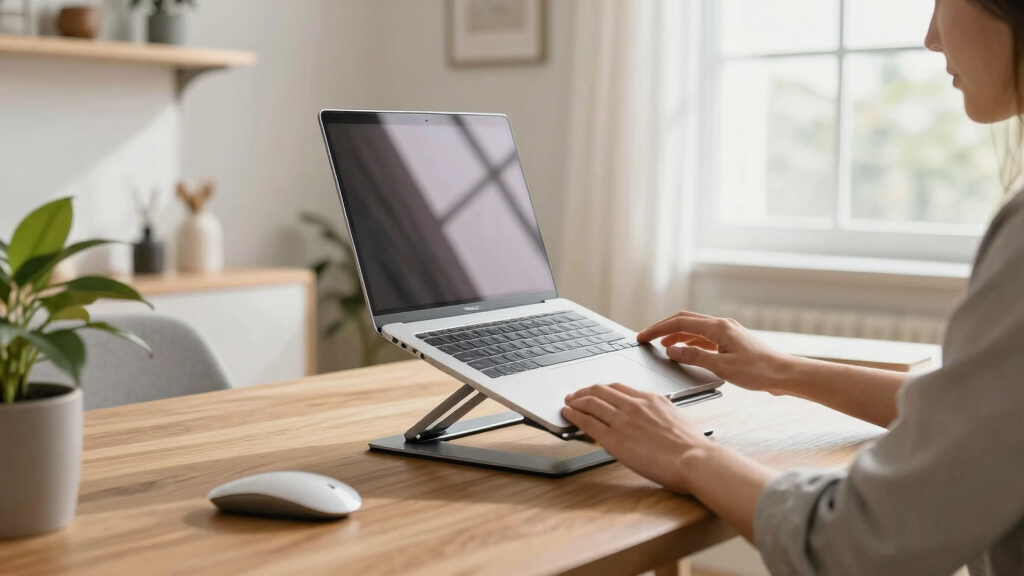
An ergonomic laptop stand is more than a raised surface. It’s designed to align your screen with your eyes and keep your neck in a neutral position. Think of it as a tool for better posture, reducing strain on your neck, shoulders, and eyes. For example, a stand that raises your laptop to eye level can prevent the constant downward gaze that causes neck pain.
Look for these key features:
- Adjustability: Can you modify height, tilt, and angle easily? This flexibility allows you to customize your workspace, which is crucial because individual body proportions and preferences vary. An adjustable stand helps prevent awkward postures that could lead to discomfort or injury over time.
- Material & Build: Durable, lightweight materials like aluminum or bamboo matter. They ensure stability and longevity, but also influence heat dissipation and aesthetic appeal. A sturdy build prevents wobbling, which can cause frustration and potential device accidents.
- Compatibility: Fits your laptop size and supports additional devices. Proper compatibility ensures your setup is stable and ergonomic, reducing the need to hunch or stretch awkwardly.
- Portability: Foldable or compact for on-the-go use. Portability is essential if you work in multiple locations, but often involves tradeoffs—more lightweight stands might compromise durability or stability.
Imagine a stand that folds flat into your backpack but can be adjusted with a quick twist—perfect for coffee shop working sessions or travel. Choosing the right combination of features can significantly impact your comfort and health during long work hours.

Gogoonike Adjustable Laptop Stand for Desk, Metal Foldable Laptop Riser Holder, Portable Desktop Book Stands, Ventilated Cooling Computer Notebook Stand Compatible with 10-15.6” Laptops
【Adjustable & Ergonomic】:This laptop stand can be adjusted to a comfortable height and angle according to your actual…
As an affiliate, we earn on qualifying purchases.
As an affiliate, we earn on qualifying purchases.
How Recent Tech Innovations Are Changing the Stand Game
Technology is making ergonomic stands smarter and more eco-friendly. Today’s models offer multi-angle adjustments with smooth gas springs or locking joints, making it effortless to find your perfect height. These innovations mean you can switch between sitting and standing effortlessly, reducing fatigue and improving circulation during long work sessions.
Some stands now incorporate sustainable materials like recycled aluminum or bamboo, which not only reduce environmental impact but also appeal to eco-conscious consumers. These materials often provide a sturdy, heat-dissipating surface that maintains device safety and longevity.
Plus, some stands now include integrated wireless charging pads or built-in monitors, transforming your workspace into a tech hub. This integration reduces clutter, simplifies your setup, and promotes a cleaner, more organized workspace. Imagine a stand that elevates your laptop, charges your phone wirelessly, and acts as a secondary monitor—streamlining your workflow and reducing the need for multiple devices cluttering your desk.
Smart sensors are emerging too, monitoring your posture and sending reminders to adjust. This tech-driven evolution helps prevent prolonged poor posture, which is a common cause of musculoskeletal issues. These features make ergonomic stands more adaptable to modern work habits and help promote healthier, more productive routines.

Tonmom Laptop Stand for Desk, Adjustable Laptop Riser ABS+Silicone Foldable Portable Notebook Holder, Ventilated Cooling Notebook Mount Computer Stand for 10-15.6” Laptops,Tablets-Black
【Adjustable & Ergonomic】:The laptop holder elevates your notebook from 2.78” to 6.5” height (7 level height) for a…
As an affiliate, we earn on qualifying purchases.
As an affiliate, we earn on qualifying purchases.
Comparison Table: Top Features of Popular Ergonomic Laptop Stands
| Feature | Basic Model | Mid-Range | Premium |
|---|---|---|---|
| Adjustability | Fixed height | Multiple adjustable angles & heights | Smart adjustment with sensors |
| Materials | Plastic | Aluminum or bamboo | Recycled aluminum + eco-friendly finishes |
| Portability | Low | Foldable, lightweight | Compact, portable with carrying case |
| Extra Features | None | USB hub, cooling pad | Wireless charger, monitor support |

DEPGI Laptop Cooling Pad, Laptop Cooler Stand with 5.5" Movable Fan Easy to Clean, 10 RGB Light Modes, Auto Temp Sensor & 3-Speed Manual Control, Ultra Quiet ≤40dB for 14–17.3 Inch Laptops
5.5" MOVABLE FAN: This laptop cooler features a large 5.5inch fan that slides freely to align with your…
As an affiliate, we earn on qualifying purchases.
As an affiliate, we earn on qualifying purchases.
3 Easy Steps to Pick the Perfect Laptop Stand for You
- Assess Your Workspace: Do you work mostly at a desk or on the go? Need portability or a fixed setup? Understanding your environment helps you prioritize features like portability or stability, ensuring your investment aligns with your routine.
- Identify Your Needs: Do you require height adjustability, cooling features, or wireless charging? Clarifying these needs prevents buyer’s remorse and ensures your stand supports your ergonomic goals effectively, enhancing comfort and reducing strain.
- Set a Budget & Research: Price varies from $20 to $150+. Read reviews, test adjustability, and choose a model that fits your ergonomic goals. Balancing cost and features ensures you get the best value while meeting your specific needs.
For example, if you’re a remote worker who travels often, prioritize foldability and lightweight design. If you mostly work at a desk, invest in a sturdy, adjustable stand with extra features. The right choice depends on your unique workflow and comfort priorities.
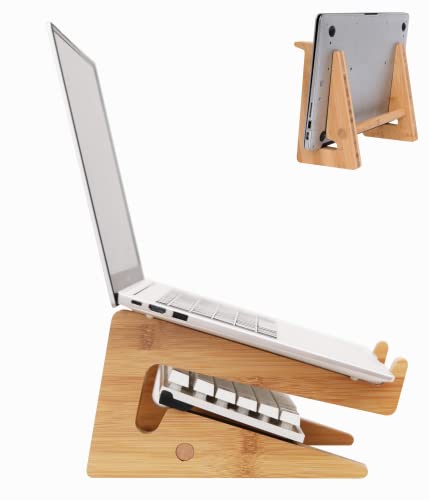
Nuvograin Laptop Stand, Wooden Vertical Laptop Stand for Desk, Bamboo Laptop Stand Compatible with MacBook Air Pro/Dell XPS/Surface pro/HP/Pixelbook/Lenovo, More Laptops 13-17.7inch
【High-quality Material】 Made of good quality solid wood, it has a good load bearing capacity(load-bearing up to 44pound)…
As an affiliate, we earn on qualifying purchases.
As an affiliate, we earn on qualifying purchases.
Why You Should Never Overlook Material & Build Quality
The material of your stand impacts durability, stability, and even aesthetics. Aluminum stands feel sleek, support heavy laptops, and dissipate heat better, which is essential for preventing overheating during long working sessions. Bamboo offers a natural look, is eco-friendly, and sturdy enough for daily use, but may require more careful handling to avoid damage.
A poorly made plastic stand might wobble or break after a few months, which can compromise your device’s safety and your ergonomic posture. Imagine your laptop slipping off during an important Zoom call—embarrassing and avoidable. Additionally, cheap plastics may emit fumes or degrade over time, impacting your workspace environment.
Choosing a stand with high-quality materials is crucial because it directly influences safety, stability, and how long your investment lasts. A stable, durable stand ensures your laptop remains secure, preventing accidents that could cause injury or damage. Furthermore, quality materials often support better heat dissipation, which is vital for maintaining device performance and longevity. Skimping on material quality might seem like a saving initially, but it can lead to frequent replacements and increased costs down the line. Ultimately, investing in well-made, durable materials is a proactive step towards a safer, more reliable ergonomic workspace.
How to Set Up Your Workspace with a Laptop Stand for Maximum Comfort
Start by placing your stand on a sturdy, level surface. Adjust it so your screen is at eye level—about 2 inches above your keyboard line—to prevent neck strain. Proper height alignment ensures your head remains in a neutral position, reducing the risk of tension headaches and neck pain.
Position your external keyboard and mouse at a comfortable height to keep your wrists neutral and your shoulders relaxed. This minimizes repetitive strain injuries and promotes good circulation in your arms and hands.
For example, a standing desk setup with a laptop on a stand combined with an external keyboard can help you switch between sitting and standing during the day, reducing fatigue and improving focus. Remember, the goal is to create a workspace where your body can maintain natural, healthy postures throughout the day.
Regularly reassess your setup, adjusting the height and position as needed to maintain comfort and prevent strain. Small tweaks can make a significant difference in your overall ergonomic health.
Frequently Asked Questions
How do I know if a laptop stand is truly ergonomic?
Look for features like adjustable height and tilt, support for your laptop size, and stability. An ergonomic stand should help align your screen with your eyes and keep your neck in a neutral position, reducing strain.Can I use an ergonomic stand with my external keyboard and mouse?
Absolutely. Many stands are designed to work seamlessly with external peripherals. Position your keyboard and mouse so your wrists stay straight and your arms relax, which enhances comfort.What materials last the longest and support heavy laptops?
Aluminum and high-quality recycled plastics are durable options. Aluminum supports heavier laptops effectively and dissipates heat, which helps prevent overheating. Bamboo is sturdy and eco-friendly, but always check weight support specifications to ensure it can handle your device.Are there affordable ergonomic stands that still support good posture?
Yes. Many budget-friendly options under $50 offer adjustable height and tilt, supporting healthier postures without breaking the bank. Just ensure they are stable, support your laptop size, and have good reviews for durability.How do I clean and maintain my ergonomic laptop stand?
Use a soft, damp cloth to wipe down the surface regularly. Avoid harsh chemicals that could damage eco-friendly finishes or degrade materials over time. Proper cleaning prevents dust buildup, maintains appearance, and ensures your stand remains stable and safe to use.Conclusion
Investing in an ergonomic laptop stand isn’t just about comfort—it’s about protecting your body during long work hours. A well-chosen stand transforms your workspace into a health-friendly zone, making every hour more productive and pain-free.
Think of your stand as the foundation of a healthier work habit. The right choice can turn a tired, strained neck into a confident, upright posture. Your body will thank you—and your work will, too.